3.3 Seal One with Linux
'HSHQGLQJRQWKH/LQX[GLVWULEXWLRQDQGFRQÛJXUDWLRQWKH
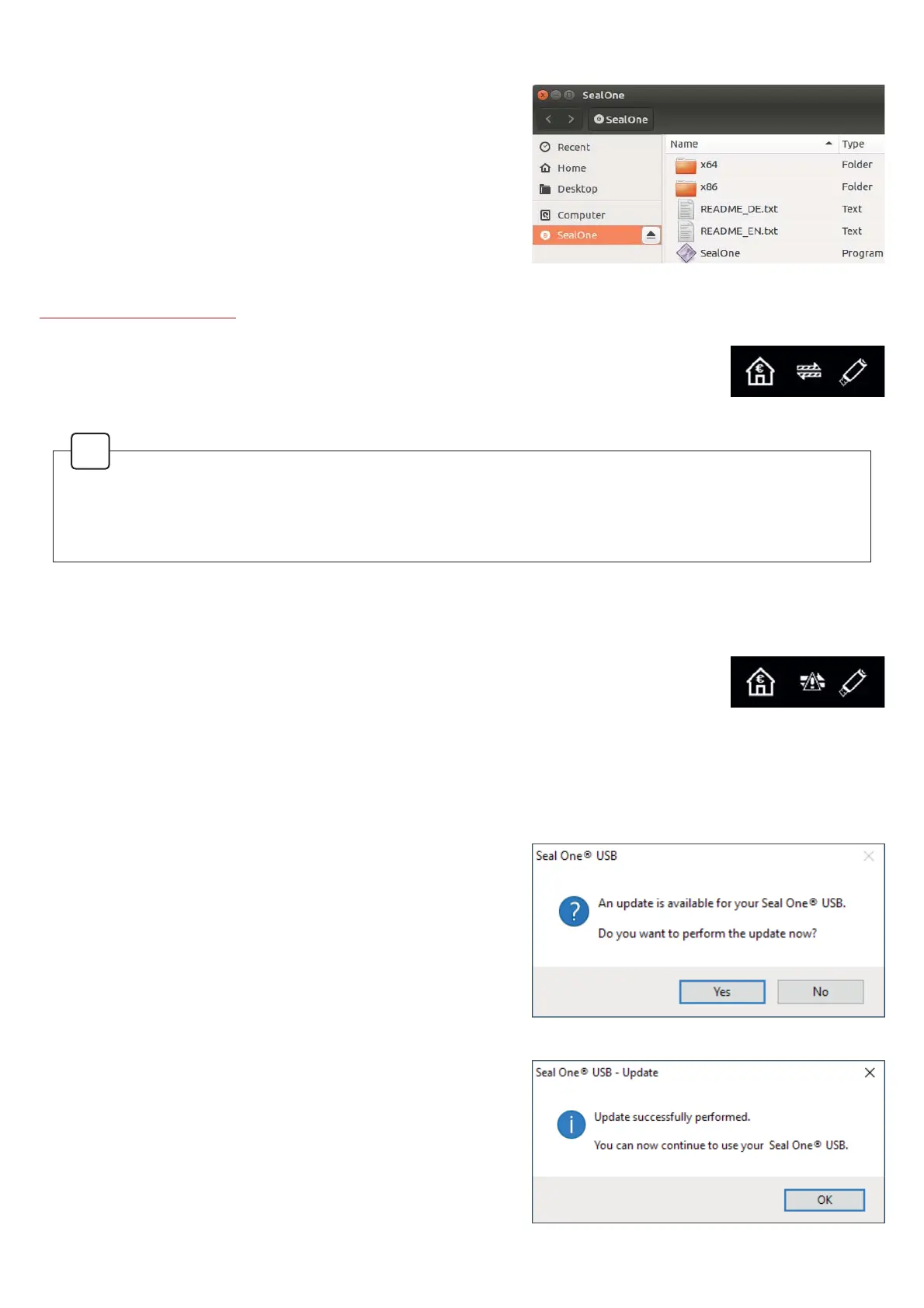
virtual Seal One CD drive will automatically mount itself.
When that’s not the case, you must do this step manually.
2QFHGRQH\RXFDQÛQGWKHYLUWXDO&'GULYHIURP\RXU
File Manager and start the Seal One application by double
clicking on it.
$OWHUQDWLYHO\\RXFDQGRZQORDGWKHODWHVWYHUVLRQRIWKH6HDO2QHDSSOLFDWLRQIURPDQGVWDUWLW
www.seal-one.com/start
$IWHUWKHDSSOLFDWLRQKDVEHHQVWDUWHGVXFFHVVIXOO\7KHIROORZLQJPHVVDJHZLOO
appear on the display of your Seal One device. Your Seal One is ready for use.
N.B. The animation of the arrows is moving.
4 Firewall
,I\RXVHHWKHIROORZLQJLFRQRQWKHVFUHHQÛUHZDOOVHWWLQJVPLJKWKDYHWREHDGMXV
WHG0D\EHWKHLQWHUQHWFRQQHFWLRQLVEORFNHGE\DÛUHZDOO$OORZDOOLQFRPLQJDQG
outgoing Seal One connections.
N.B.: The warning symbol is blinking.
ØØØ TSNL@SHBØ4OC@SDR
To keep your Seal One device up-to-date, you will be
QRWLÛHGRIDQ\DYDLODEOHÛUPZDUHXSGDWHV:HUHFRPPHQG
that you always update to the latest version when promp-
ted. When an update is available, you will be presented
with the following dialog asking if you would like to update
now.
If you would prefer to defer the update to a later date, click
“No” when the dialog appears. The update prompt will be
displayed again in regular intervals.
During the update process, you will see a progress bar
displayed in the update window and on the device’s dis-
SOD\$IWHUDVXFFHVVIXOXSGDWH\RXU6HDO2QHZLOODXWRPD
tically restart, reconnect, and be ready for use.
Please take special care not to disconnect your Seal One
device from USB during the update process.
In order to have a full featured experience on Linux, you will need a Linux Distribution which con-
WDLQVWKH*7.JUDSKLFVOLEUDU\<RXFDQDOVRXVHWKHDSSOLFDWLRQZLWKRXWD*UDSKLFDO8VHU,QWHUIDFH
in which case you would need to manage the necessary settings for your Seal One device via the
FRPPDQGOLQH)RUPRUHGHWDLOVVHHWKH5($'0(W[WRQWKHYLUWXDO&'520GULYH
!


 To Next Page
 Loading...