4.4.3. Tosettherunningtimeturntheunito.
4.4.4. To set the standby time turn the unit on.
4.5. FAN SPEED
4.5.1. The fan speed can only be adjusted in the automatic mode. Press this key to switch between high and low wind speed.
4.5.2. The corresponding fan speed indicator lights up ( 3 blades or 4 blades).
4.6. LOCK
4.6.1. Press this button to engage the child lock function. The child lock indicator light is on when set. All other keys are locked and cannot
be operated. Press this button again, the indicator light will go out, and the button will be restored.
5. DRAINAGE
5.1. WATER TANK
Whenthewatertankisfullthewarninglightonthecontrolpanelwillash,theunitwillstopworkingandabuzzerwillsound.
Toremovethewatertankrstremovelowerrearcoverbygentlypullingitfrombothsidesusinggriprecessestopullit.
Carefully slide the water tank forward making sure no spillage occurs.
Beforereplacingwatertankdryitothoroughlyandalsoremoveanymildewdeposits.
5.2. CONTINUOUS DRAINAGE
Connect a water pipe (not supplied) to the drain on the rear of the unit. The water pipe requires an inner diameter of 9mm and should
not be longer than 1.5 metres. Ensure the connection does not leak.
WARNING! The water pipe must ALWAYS be lower along all of it’s length than the unit outlet drain height.
6. MAINTENANCE
WARNING! Switch the machine off and unplug from the mains before carrying out any maintenance or cleaning.
6.1. FILTER CLEANING
6.1.1. It is recommended that the air filter is cleaned every two weeks maximum.
6.1.2. To remove the filter, remove water tank and gently pull down exposed tab of filter.
6.1.3. The filter may only be washed with water. DO NOT use hot water. Leave to dry naturally. DO NOT use solvent cleaners nor use heat to
dry the filter.
6.1.4. Once dry, replace the filter by snapping it back into place, making sure that the lower edge fits behind the casing locations and that all the
lugs are sprung gently into place thus holding the filter up inside casing.
6.2. CLEANING THE CASING
6.2.1. The casing may be cleaned by rubbing over with a damp cloth. DO NOT use detergents, abrasive or solvent cleaners as these will
damage the surface finish.
8 DO NOT allow the control panel to become wet.
7. TROUBLESHOOTING
Original Language Version
© Jack Sealey Limited
SDH102.V2 Issue 1 21/07/22
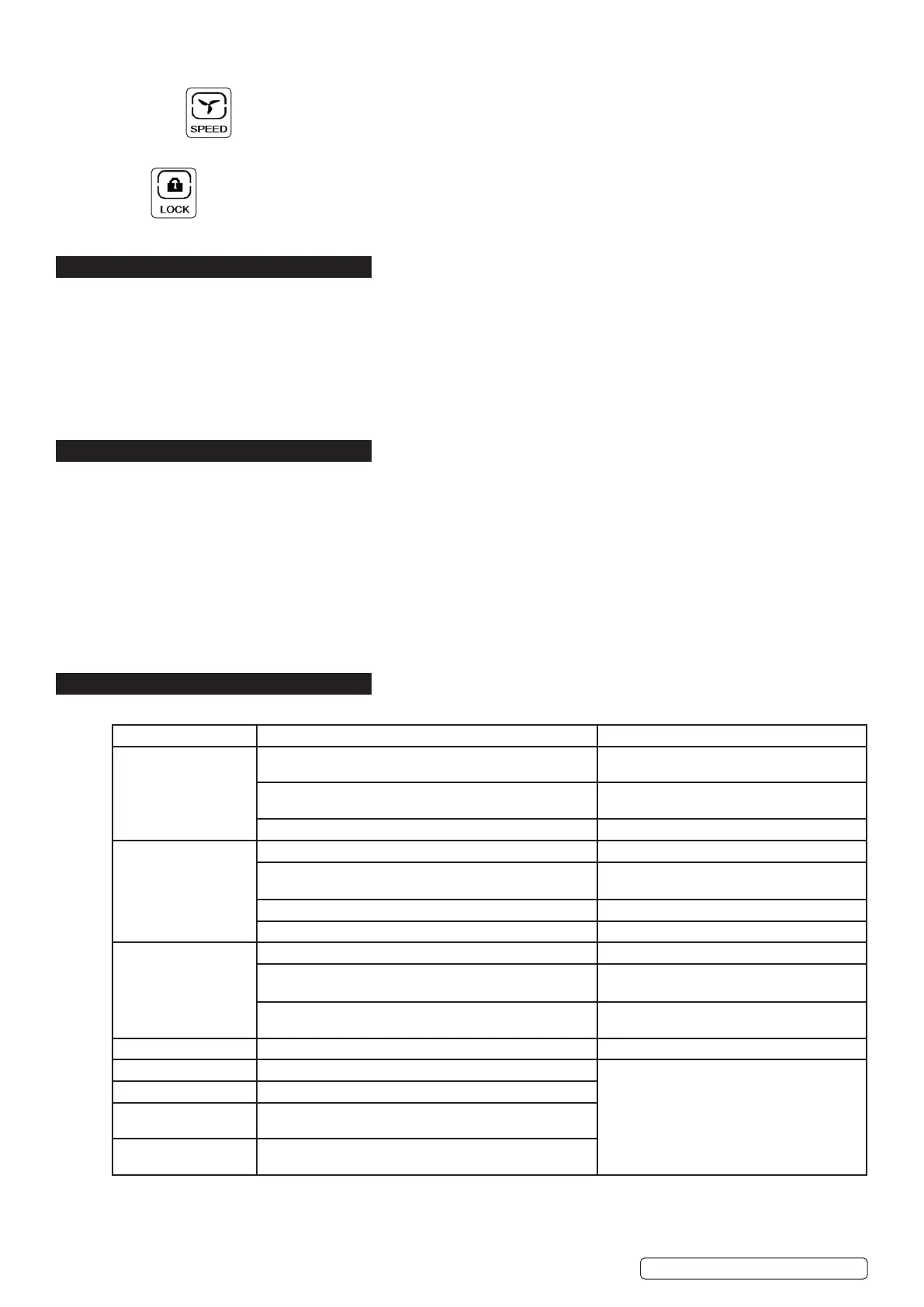
Symptom Potential cause Possible remedy
Unit does not operate Is power supply connected? Insert the plug into an electrical outlet fully and
securely - check fuse in plug is OK.
Check to see if the water tank is full of water i.e. is water
level warning light on.
Remove front cover
Empty water out of the tank.
Check to see if the water tank is fitted properly in position. Remove front cover and reposition tank.
Dehumidiedvolume
is small
Islterdirty/clogged? Cleanltersection
Check for any obstructions to front and back air inlets /
outlets of unit.
See section
Low ambient temp. Unit does not work below approx 5
o
C.
Low ambient humidity. Unit has reached required level set.
Humidity remains too
high.
Room size may be too large. Room size may exceed 12m
3
.
Doors and windows may be opened and closed frequently. Keep doors and windows shut during
operation.
The dehumidifier is used together with a kerosene heater
which emits water vapour.
Turnheatero.
E2 Humidity sensor problem Change a sensor
LO Environmental humidity is below 20% Unit shuts down.
HI Environmental humidity is above 90%
CL Low temperature protection, the environmental
temperature<5
0
C
CH High temperature protection, the environmental
temperature>38
0
C


 To Next Page
 Loading...