VS8700 - 1 - 110108
17
This function is performed with key on engine off (KOEO). Do
not start the engine.
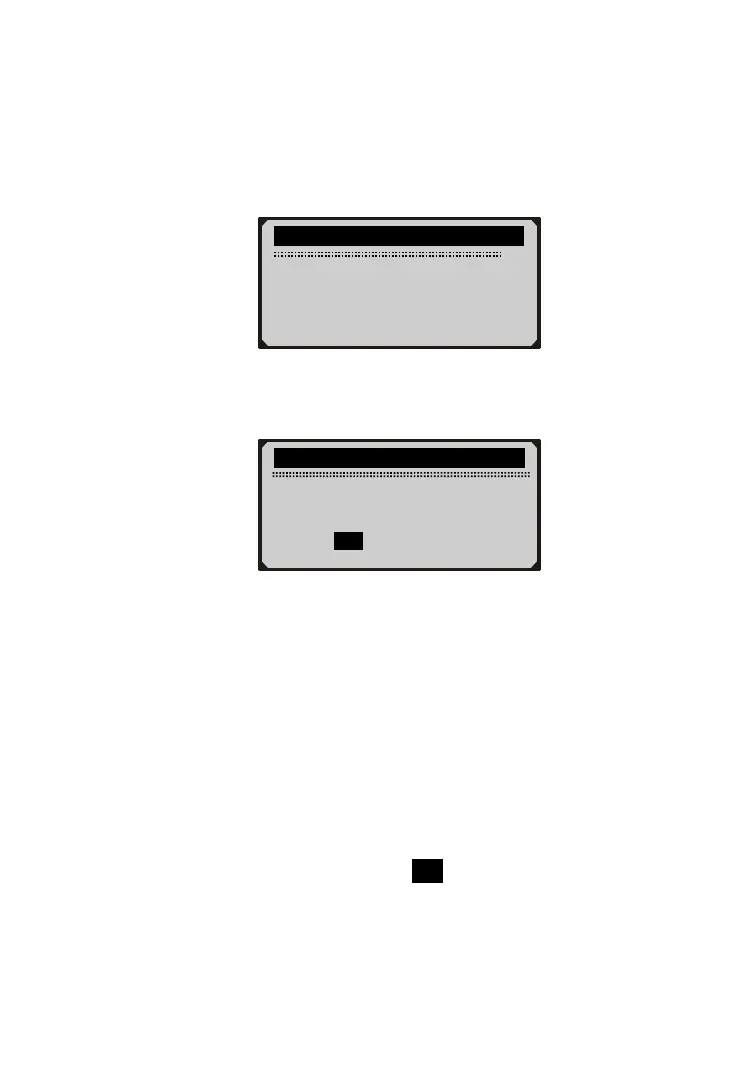
1) If you decide to erase the DTC’s, use SCROLL button to select
Erase Codes from Diagnostics Menu and press ENTER/EXIT
button.
2) A warning message comes up asking for your confirmation.
3) If you want to proceed with erasing the codes, press
ENTER/EXIT button to erase.
If the codes are cleared successfully, an “Erase Done!”
message shows up.
If the codes are not cleared, then an “Erase Failure. Turn
Key on with Engine off!” message displays.
4) Wait a few seconds or press any key to return to Diagnostic
Menu.
If you do wish to proceed to erase the codes, then press
SCROLL button to select NO and press ENTER/EXIT. A
“Command Canceled” message shows up. Press any key
or wait a few seconds to return to Diagnostic Menu.
...........Diagnostic Menu............
2/6
1) Read Codes
►2) Erase Codes
3) Freeze Frame
4) I/M Readiness
.............Erase Codes................
Erase trouble codes!
Are you sure?
YES NO


 To Next Page