TESTFORSOLUTION SPRAY
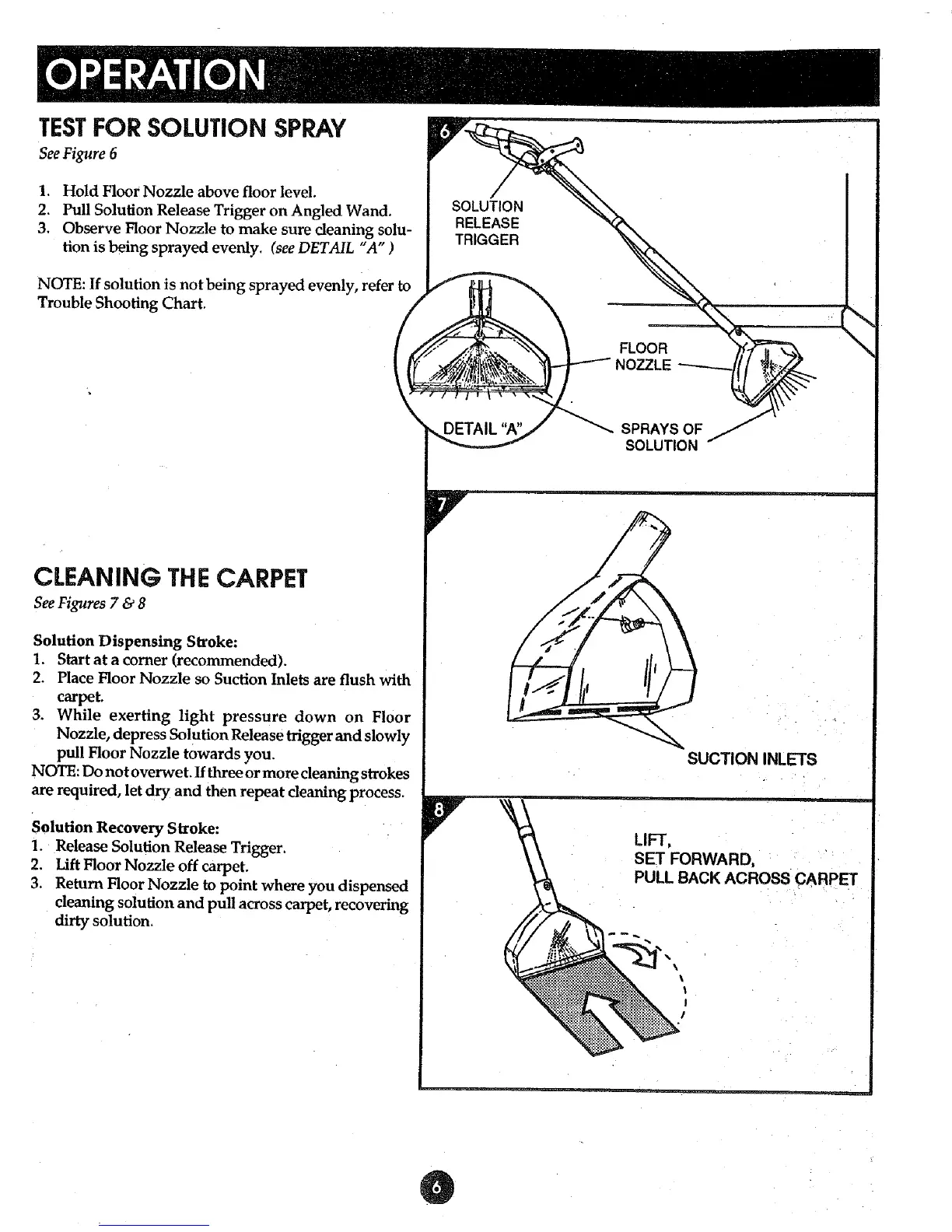
See Figure 6
1. Hold Floor Nozzle above floor level.
2. Pull Solution Release Trigger on Angled Wand.
3. Observe Floor Nozzle to make sure cleaning solu-
tion is being sprayed evenly. (see DETAIL "A" )
NOTE: If solution is not being sprayed evenly, refer to
Trouble Shooting Chart.
CLEANING THE CARPET
See Figures 7 & 8
Solution Dispensing Stroke:
1. Start at a corner (recommended).
2. Place Floor Nozzle so Suction Inlets are flush with
carpet.
3. While exerting light pressure down on Floor
Nozzle, depress Solution Release trigger and slowly
pull Floor Nozzle towards you.
NOTE: Do not overwet. If three or more cleaning strokes
are required, let dry and then repeat cleaning process.
Solution Recovery Stroke:
1. Release Solution Release Trigger.
2. Lift Floor Nozzle off carpet.
3. Return Floor Nozzle to point where you dispensed
cleaning solution and pull across carpet, recovering
dirty solution,
SUCTION INLETS
LIFT,
SET FORWARD,
PULL BACK ACROSS CARPET
, \
_ . _ . =



 To Next Page