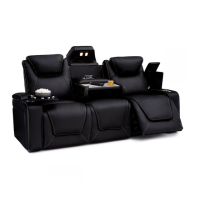
The Seatcraft Anthem Sofa with Drop-Down Table is a versatile and comfortable seating solution designed for residential use, offering a blend of relaxation and functional features. This manual provides comprehensive instructions for assembly, general use, and troubleshooting, ensuring users can maximize their experience with the product.
Function Description:
The Seatcraft Anthem is a sofa unit that incorporates multiple powered reclining seats and a central drop-down table, making it suitable for various entertainment and relaxation needs. Each end seat features powered recline and headrest adjustments, allowing individual users to find their preferred comfort position. The middle seat is equipped with a fold-down table that includes integrated power and USB outlets, as well as reading lights, transforming the sofa into a convenient workstation or snack area. The sofa is designed for indoor residential use and is not intended for commercial or institutional settings.
Usage Features:
Assembly:
The assembly process is straightforward and involves several key steps:
- Connecting Power Headrest Cables: Each powered headrest has male and female cables that need to be connected. Users should ensure each female cable is securely connected to its corresponding male cable.
- Attaching Backrests to the Seat Base: The backrests slide onto male brackets located on the seat base. Users should push the backrests down until they hear a "click" on both sides, indicating that each backrest is securely fastened.
- Connecting Power Cables: This step involves connecting various power cables to ensure all powered features function correctly. For the end seats, the power adapter cable connects to the power adapter, which then connects to the seat base. For the middle seat, the headrest light power cable plugs into the seat base. All four cables (for a three-seat configuration) then plug into a power source.
- Attaching Tray Tables: The sofa includes tray tables that are stored in the in-arm compartments. Users can open these compartments and place each tray table into an accessory mount for use.
- Opening the Drop-Down Table: To access the fold-down table, users first lift the headrest of the middle seat, then pull down on the backrest. The table will fold down, revealing the USB/110V panel. To access the outlets, a button on the panel needs to be pushed. When finished, the USB/110V panel should be pushed shut before returning the fold-down table to its upright position.
Power Control Panel:
Each end seat is equipped with a power control panel that offers several functions:
- Ambient Light Control: A button to turn the ambient base lighting and lighted cupholders on or off.
- USB Charging Port: A port to plug in and charge any USB-powered device.
- Powered Recline: A button to adjust the seat to the user's preferred reclining position.
- Home Button: Holding this button returns the seat, headrest, and lumbar support to their upright positions.
- Powered Headrest: A button to adjust the powered headrest to the desired position.
Reading Light:
The fold-down table features two reading lights, controlled by individual switches:
- Left Light Power Switch: Turns the left reading light on or off.
- Right Light Power Switch: Turns the right reading light on or off.
USB/Power Panel (on Drop-Down Table):
The fold-down table includes a panel with:
- 110V Outlets: Two standard electrical outlets to power devices.
- USB Charging Outlets: Two USB ports to charge USB-powered devices.
Troubleshooting Guide:
The manual provides solutions for common issues:
- Chairs not reclining: This is often due to loose or disconnected power adapters. Users should unplug and re-plug the power adapter into a wall outlet, ensuring the green light on the adapter is illuminated. They should also unplug and re-plug the power adapter into the powered recline cable.
- Power headrest not functioning: Similar to recline issues, this can be caused by loose or disconnected powered headrest cables. Users should unplug and re-plug the powered headrest cables to each other, and also check the power adapter connections as described above.
- Reading light not turning on: This issue typically stems from a loose or disconnected reading light power cable. Users should unplug and re-plug the power adapter into a wall outlet and also check the connection of the reading light power cable.
- USB/110V Panel not powering devices: This indicates a loose or disconnected USB/110V panel power cable. Users should unplug and re-plug this cable into a wall outlet.
- Cupholder lights not lighting up: This is addressed by checking the power adapter connections, similar to the recline issues.
- Removing the backrest from the seat base: To remove a backrest, users need to pull up on the locking tab located on the backrest female bracket and then firmly pull the backrest upward.
Maintenance Features:
The manual emphasizes several important safety instructions to ensure safe operation and prevent injury:
- Electrical Safety: Always disconnect the electrical plug from the wall outlet before cleaning, moving, servicing, or when the unit is not in use for an extended period. Do not use the product if it is wet or near water/liquids. Regularly check the power transformer, electrical cord, plug, and connectors for damage and keep them away from heat sources.
- Operation Safety: Do not operate the unit until the backrest is installed and locked. Supervise children and disabled persons. Be aware of moving parts and keep hands, fingers, and body parts away from the mechanism. Sit down slowly and avoid throwing weight against the backrest to prevent tip-over. Move the unit slowly when reclining to ensure no children or pets are in close proximity. Only the occupant should operate the unit; never attempt to open the leg rest by pulling on it. Do not stand, sit, or place extra weight on the arms, back, or open leg rest.
- Exiting the Unit: To safely exit and prevent tripping hazards, bring the backrest upright and close the leg rest.
- Clearance: Ensure a clear path for the chair's operation, backrest, and leg rest. Place tables and rugs at a distance to allow full extension without rubbing.
- Moving the Product: Use care when moving the product. Secure the mechanism to prevent unexpected opening. Do not move the product by the mechanism, leg rest, handle, reclining back, or swivel base. Disconnect modular units and grip non-moving parts only.
- Damage and Attachments: Do not use the product if it is damaged or with unauthorized attachments/substitute parts.
- Medical Devices: This product is not intended as a healthcare device. Users with medical devices or poor circulation, immobility, or inability to sense heat should consult their healthcare provider before use.
- Flammability: Always keep open flames and lit cigarettes away from upholstered furniture, as it can burn rapidly with toxic gas and thick smoke.
Seatcraft provides a one-year limited warranty covering materials, foam, frame parts, and mechanisms (including motorized parts) against manufacturing defects. Normal fabric fading, shrinking, or stretching, and natural markings/stretching/shrinking of leather are not covered. Improper cleaning, abuse, or abnormal use will void the warranty. Foam compression is natural and not covered. After the warranty period, the customer is responsible for inspection, labor, and transportation costs. The warranty covers repair, substitution, and replacement, but not returns or refunds. Proof of purchase is required for warranty service. Seatcraft is not liable for incidental or consequential damages outside the warranty terms.
For missing or damaged parts or installation assistance, customers can call 1-855-244-0170. Customer service hours are Mon-Fri: 6 AM - 7 PM PST, Sat: 9 AM - 5 PM PST, and Sun: 10 AM - 5 PM PST.

 Need help?
 General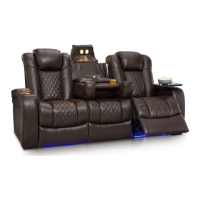

 To Next Page