SecuRam Systems Inc. USA Page 4
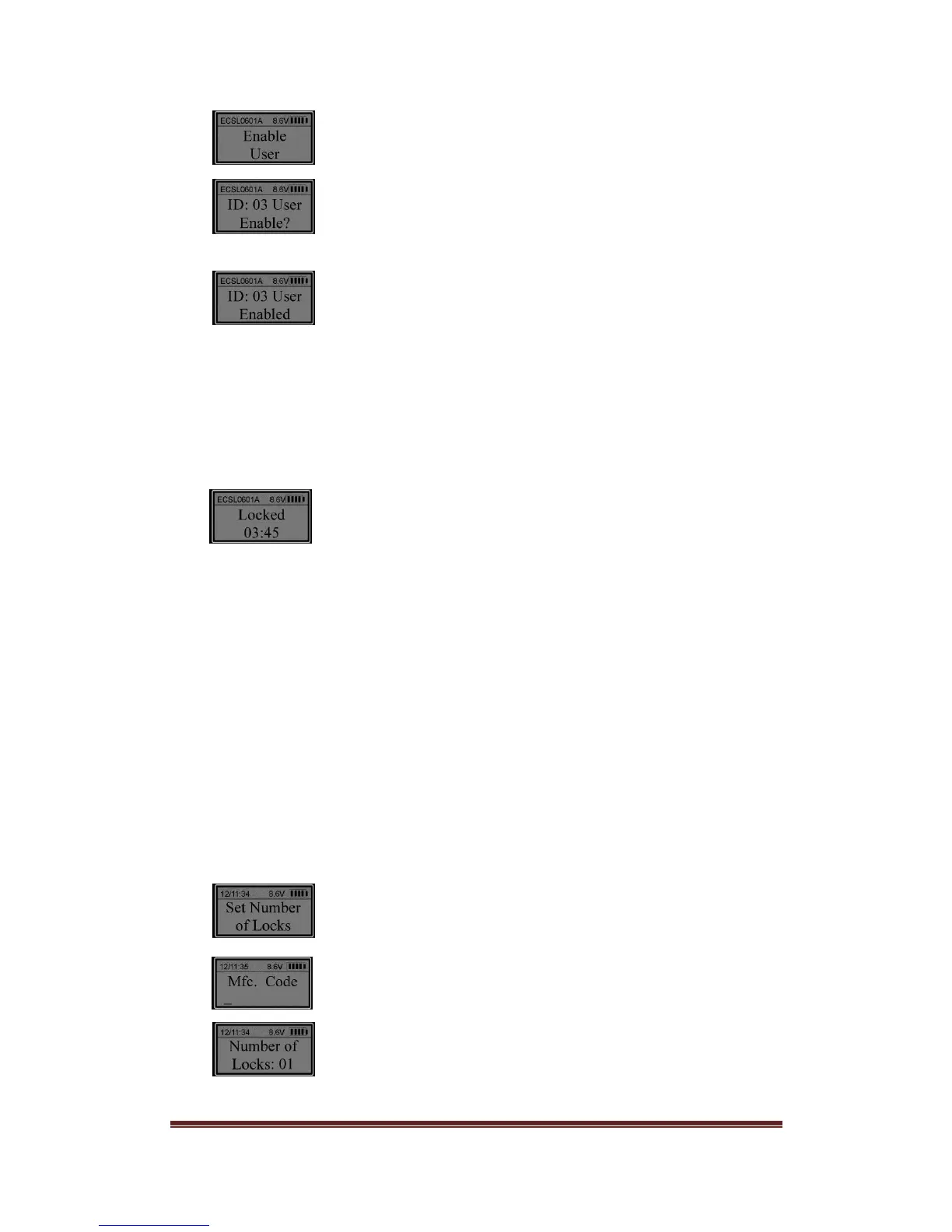
Press “Menu/OK”.
Press “Menu/OK”. Press “▲” or “▼” to select the ID No. to be
enabled (e.g. ID 03).
Now the user (ID No. 03) is enabled.
7. Wrong entry penalty
Four (4) consecutive wrong code entries initiates a 4-minute Penalty Time. During
Penalty Time, the entry pad is not functional and no operations are permitted.
The entry pad will start counting down with the LCD flashing the remaining time every 15
seconds. For example:
After the countdown has finished, the entry pad is ready to use again.
Note: After the first Penalty time period (without a correct code entry), two more
consecutive invalid code entries will restart an additional 4 minutes delay period. An
attempt to unlock using a valid code will not terminate the delay period.
Pushing buttons on the EntryPad during Penalty time does not restart penalty time.
8. Set number of locks
The ProLogic L02 is capable of controlling up to 4 locks using a junction module
called a CB11-1T4.
Each lock must be identified or named within the system (Lock1, Lock2,etc.)
Unlock using a Manager Code. When the LCD screen shows “Select Menu”. Press “▲” or
“▼” to select “Set number of locks”.
Press “Menu/OK”.
Enter Mfc. Code: 975246.
Press “▲” or “▼” to set number of locks. For example, to set the number of locks to 2,


 To Next Page