SecuRam Systems Inc. USA Page 8
The LCD screen flashes with remaining time every 15 seconds.
During the 5 minutes Time Window, user can enter an enrolled code again to unlock the
entry pad.
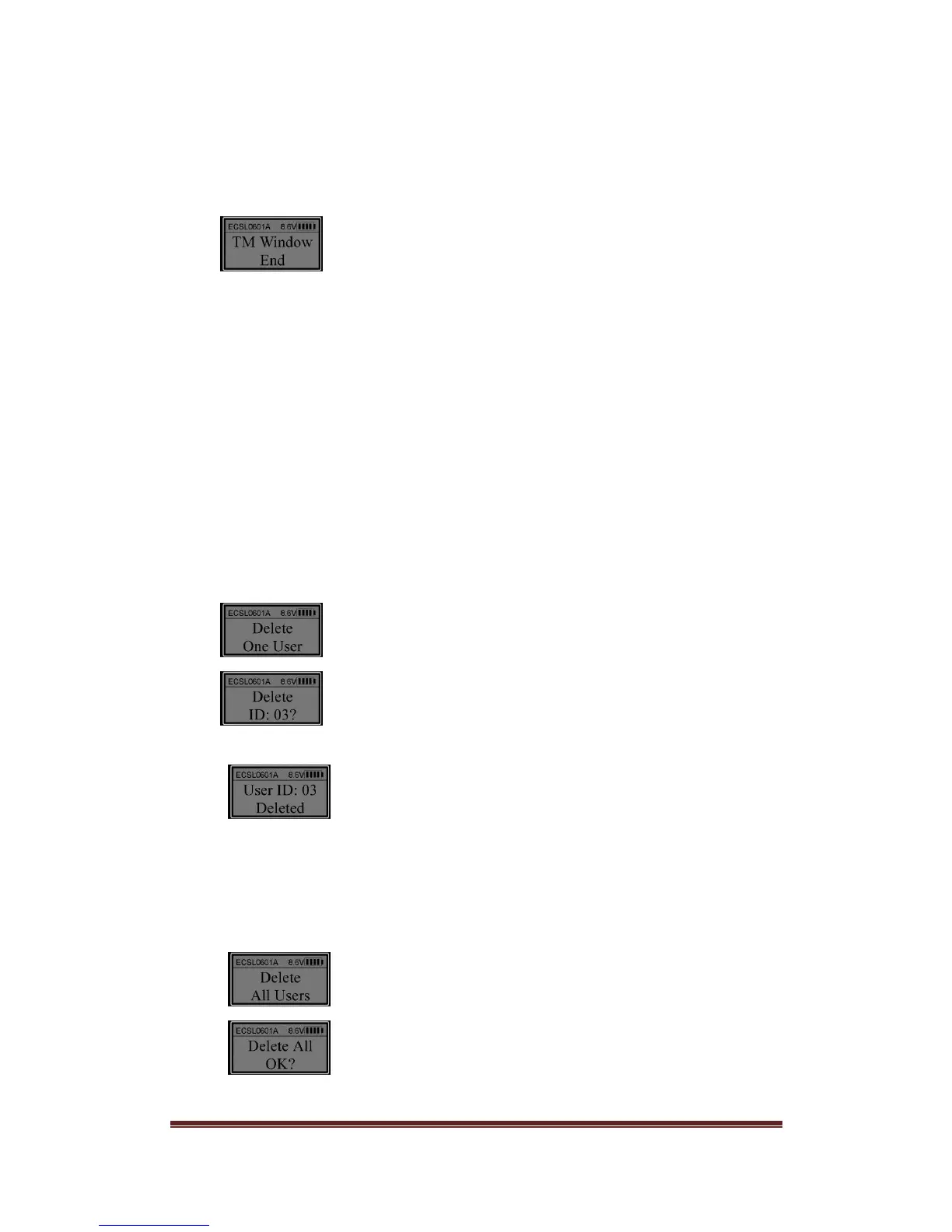
When the Time Window has expired the LCD will show:
If a code is not entered during the Time Window, the process to open the lock will start at
the beginning with a valid code entry beginning Time Delay count again.
Note:
The users with TDO (Time Delay Override) can unlock the lock body without
delay.
IMPORTANT: If the Time Window is set to 0 minutes, there is no need to enter a
code after Time Delay has expired. When Time Delay ends, the lock body will be
unlocked automatically.
12. Delete One User
Unlock using a Manager code. When the LCD shows “Select Menu”, press “▲” or “▼” to
select “Delete One User”.
Press “Menu/OK.
Press “▲” or “▼” to select the ID No. to delete (e.g. ID No. 03).
Press “Menu/OK”.
Now the user with ID No. 03 has been deleted.
13. Delete All Users
Unlock using a Manager code (ID No. 01 or 02). When the LCD shows “Select Menu”,
press “▲” or “▼” to select “Delete All Users”.
Press “Menu/OK”.
Press “Menu/OK” again.


 To Next Page