EasyManua.ls Logo

SecurityMan SM-302 - User Manual

SecurityMan SM-302
15 pages
Print Icon
To Next Page IconTo Next Page
Loading...
1
SM-302
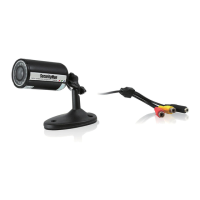
Weatherproof Color Camera with Audio & 100 Feet Cable
User’s Manual

Questions and Answers

  • R
    rjacksonAug 6, 2025
    What to do if the SecurityMan SM-302 Security Camera image is not visible on the screen?
    • K
      katherinephillipsAug 6, 2025
      If the image from your SecurityMan Security Camera isn't showing on the screen, try these steps: First, adjust the contrast or brightness settings on your monitor or TV. Then, verify that the DC adapter is properly connected to both the camera and a working electrical outlet. Also, ensure that the YELLOW cable is securely connected between the camera and the video input of your monitor or TV, and that the RED cable connects the camera to the audio input.

Summary

Copyright and Legal Information

Warranty

Outlines the product's one-year limited warranty against defects in materials and workmanship.

Operating Instructions and Conditions

Product Features

Installation Setup

Power and Cable Connection

Step-by-step instructions for connecting the power adapter and A/V cables.

Camera Installation

Night Vision Functionality

Night Vision Operation

Explanation of the camera's built-in IR lights providing 7m night vision in Black & White.

Specifications

Technical Specifications

Detailed technical specifications of the SM-302 camera, including sensor, resolution, and dimensions.

Troubleshooting and Environmental Protection

Troubleshooting Common Issues

Provides solutions for common problems like poor picture quality, no power, no picture, and no sound.

SecurityMan SM-302 Specifications

General IconGeneral
BrandSecurityMan
ModelSM-302
CategorySecurity Camera
LanguageEnglish

Related product manuals