6
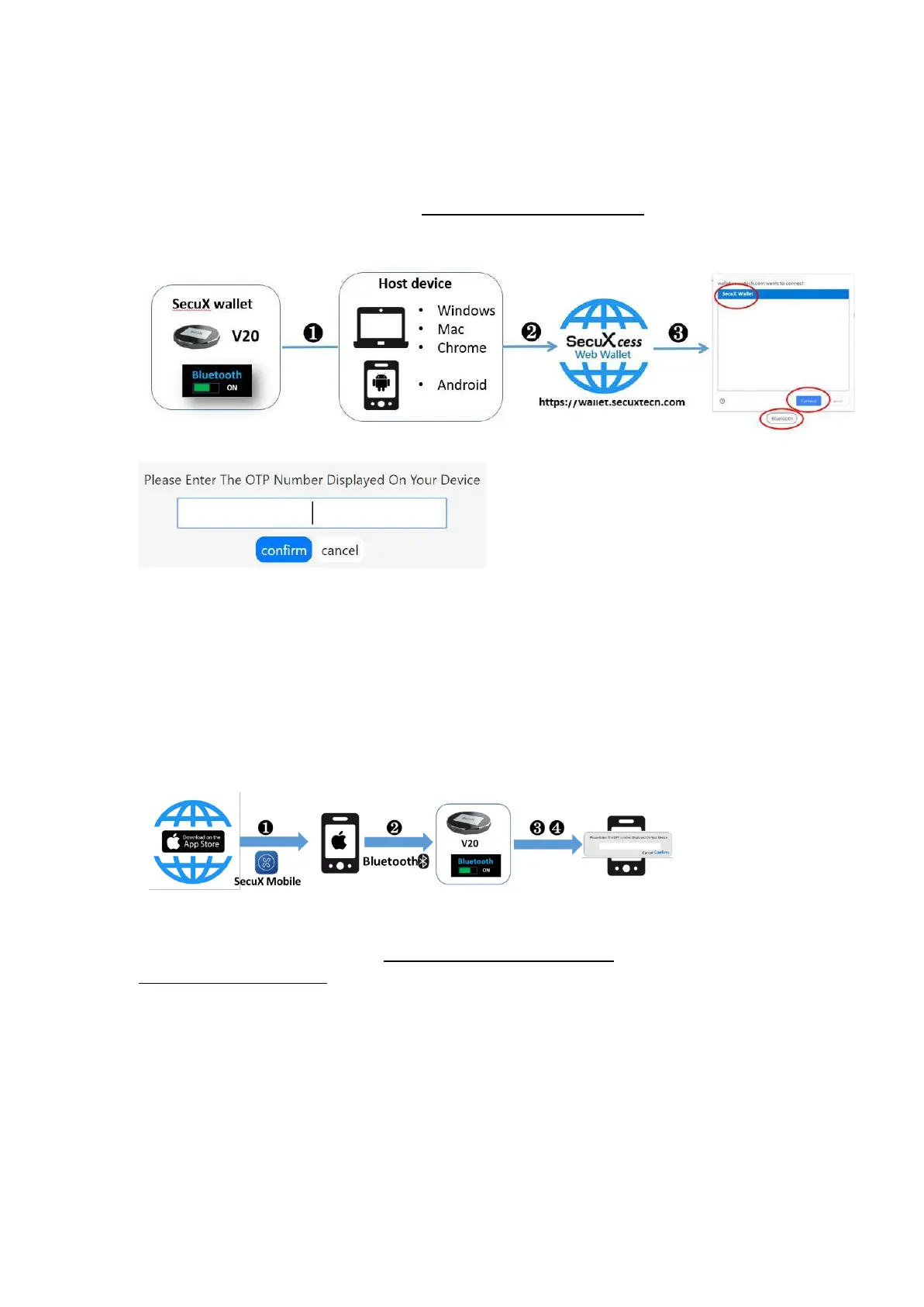
● Connect to a host device using Bluetooth (except iOS devices)
❶ Enable Bluetooth on SecuX wallet and the host
❷ Access the SecuXcess Web Wallet (https://wallet.secuxtech.com) on the host
❸ On SecuXcess interface page, select Bluetooth icon and your SecuX wallet, then click Pair.
❹ Enter the one-time password shown on the device display and click Confirm
● Connect to iOS devices using Bluetooth
❶ Download the SecuX Mobile App from the App Store.
❷ Enable Bluetooth for both SecuX wallet and iOS device
❸ Activate the SecuXcess app and select your SecuX wallet from the Bluetooth search list to
link.
❹ Enter One Time Password shown on the device display.
Now you are ready to use SecuX wallet to manage your crypto assets. If you have any
further questions, please visit www.secuxtech.com/support/ or send us an email at
support@secuxtech.com).


 To Next Page