LCQ / LCS / LCQI / LPQI / BMQ / CPQ / TBQ / TBS / TBQI / TBSI OWNER’S MANUAL
|
3
MAGIQCOOL CONTROLLER
OPERATION cont
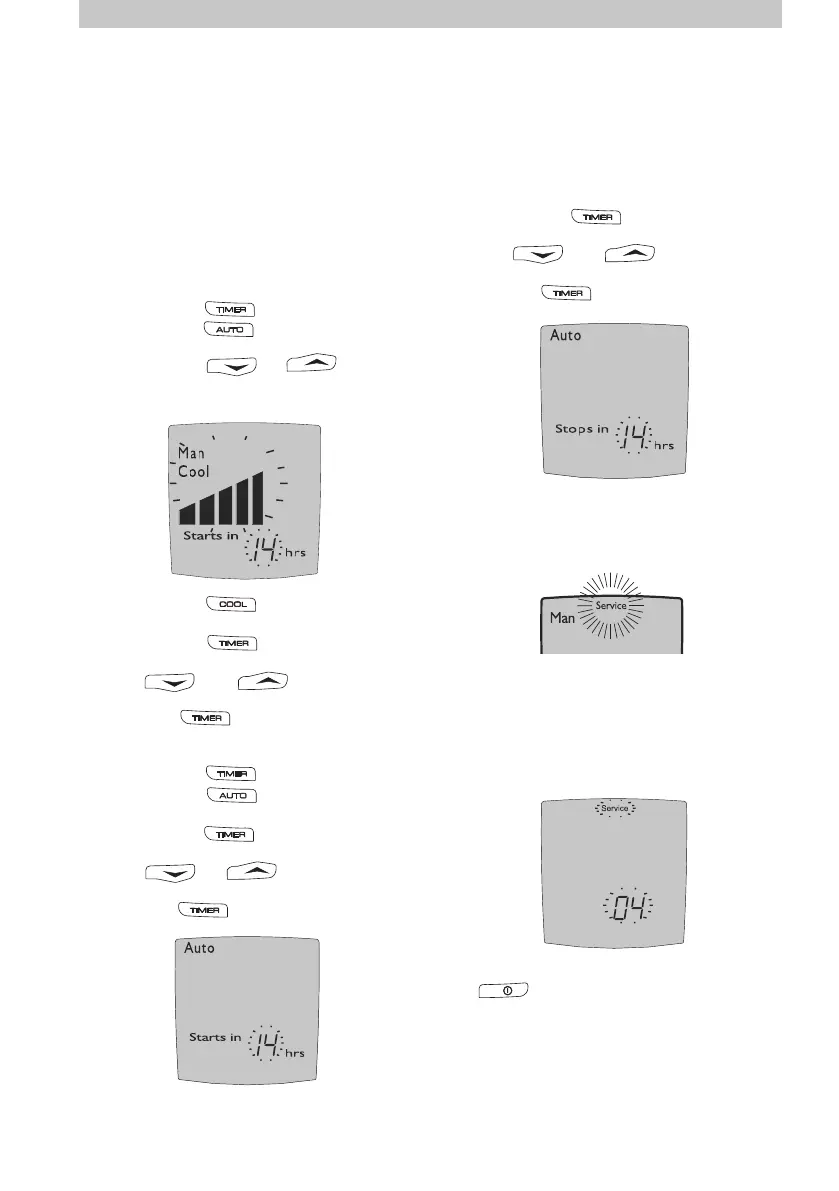
Delayed Start or Stop
The cooler can be programmed to start at a
specic time or stop at a specic time.
The delayed start time can only be
programmed when the cooler is OFF. To
program the cooler to start in a certain amount
of hours use the following sequence:
Programming In Manual Mode
(1)...... Press the button.
(2)...... Press the button until MAN is
displayed on the screen.
(3)...... Press the or button
until the desired fan speed is displayed by the
bars in the middle of the screen.
(4)...... Press the button to set either
COOL or VENT.
(5)...... Press the button and the ‘starts
in’ time will start ashing.
Use the and buttons to select
the desired time.
(6)...... Press again.
ILL1118-A
Programming In Auto Mode
(1)...... Press the button.
(2)...... Press the button until AUTO is
displayed.
(3)...... Press the button and the ‘starts
in’ time will start ashing.
Use the or button to select
the hour.
(4)...... Press again.
This is ideal if you are going to bed but don’t
want to turn the cooler o straight away. To
program the delayed time in which you want
the cooler to stop use the following sequence:
(1)......Select the button and the ‘stops
in’ time will start ashing.
Use the and buttons to select
the desired o time.
(2)......Press again.
ILL1117-B
ILL1119-B
Service Mode
When a fault has been recognised by the wall
control the word “Service” ashes on the
screen.
ILL1120-B
When “Service” is displayed it may be
necessary for you to phone the service number
located near the back of this manual. However,
before doing so, turn the wall control OFF. You
will notice a number ashing at the bottom of
the screen. This number indicates the reason
for requiring service.
Please write this number down, then push
the button to turn the cooler back on.
If after a short time “Service” is again shown
on the display, turn the wall control OFF and
check if the ashing number is the same. If it
is the same check for the following possible
problems.
However, we do recommend that any checks
be carried out by an authorised dealer or
service agent.
ILL1121-B
The delayed stop time can only be
programmed once the cooler is ON.


 To Next Page