12
REMOTE CONTROLREMOTE CONTROL
HOLD
TTX
REVEAL
CANCEL
FAV
AUDIO
/RECORD
1
2
3
4
5
6
8
10
12
14
17
18
19
20
16
15
13
11
21
22
23
24
25
26
27
28
29
9
7
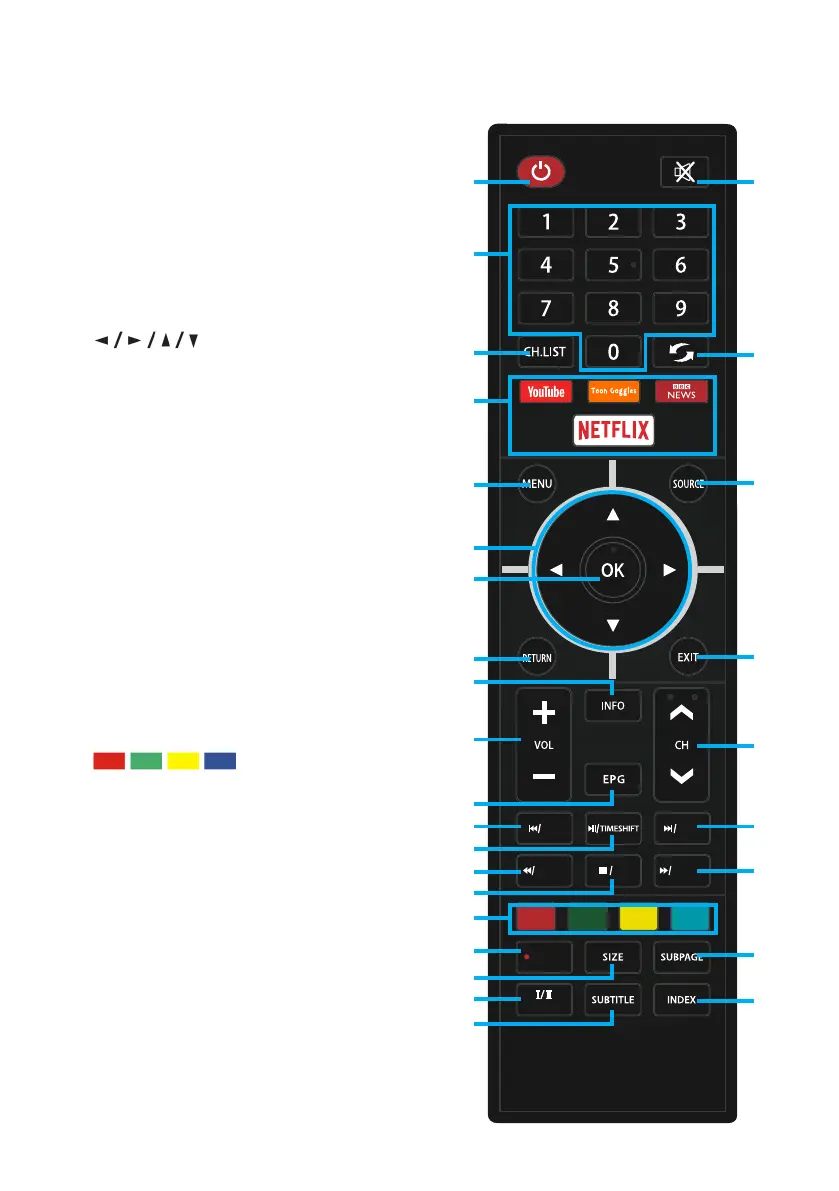
1. POWER: ON/OFF
2. NUMBER BUTTONS (0-9):
Select a TV channel
3. CH.LIST: List of channels.
4. APPS: Direct access to apps.
5. MENU: Display Menu
6. : RIGHT/LEFT UP/DOWN
buttons to navigate the on-screen
menus
7. OK: Select current option thats
highlighted.
8. RETURN: Return back to previous menu.
9. INFO: Display Channel Information
10. VOL +/-: Turn the volume up/down
11. EPG: Launch the Electronic
Program Guide
12. Previous / TTX: Go back a song or title.
13. Play/Pause / TIMESHIFT: Pause, rewind
and play live TV. (USB is needed for this
function to work).
14. Rewind / Cancel
15. Stop / FAV
16. : Corresponds to
various colour functions in the menu
or teletext.
17. Record: USB storage device must
be inserted to record DTV channel/
program. (not included)
18. SIZE: Change the size of display in
Teletext mode.
19. AUDIO: To change audio soundtrack.
20. SUBTITLE: Enable/disable subtitles.


 To Next Page