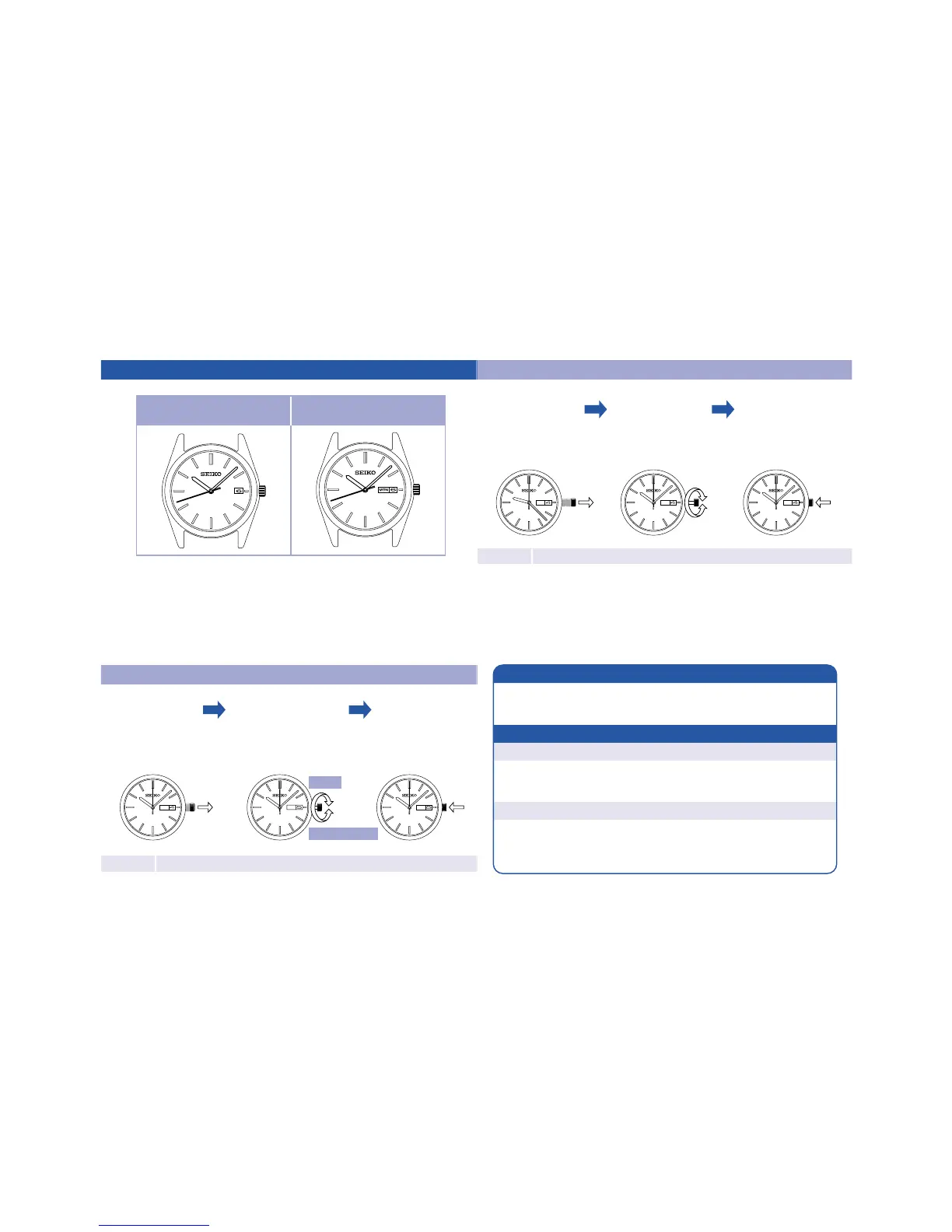
Instructionsforuse(modelswithdate/modelswithdateanddayoftheweek)
Modelswithdate
Modelswithdate
anddayoftheweek
○
Thetelephonetimesignalservice(Tel.117)isconvenientforsettingthetime.
Note
Formodelswithascrewlocktypecrown,alwaysscrewthecrownupagainaftersettingthetime
Timesetting
SUN SUNSUN
Pulloutthecrown
tothesecondclick
whenthesecond
handisatthe
12o'clockposition.
Turnthecrown
tosetthetime.
Inordertosetthetime
accurately,turntheminute
hand4to5minutesahead
andthenreturnittothe
correcttime.
Pushthecrown
backintoits
normalposition
simultaneously
withatimesignal.
Date(Dayoftheweek)setting(Donotsetdate/dayoftheweekbetween9:00PMand4:00AM)
Pulloutthe
crowntothe
firstclick.
Pushthecrown
backintoits
normalposition.
Note
Formodelswithascrewlocktypecrown,alwaysscrewthecrownupagainaftersettingthetime
※Somemodelsdisplaythedateanddayoftheweekinthereverseorder.
Date
※
Dayoftheweek
※
SUN MON MON
Turnthecrownto
setthedate(day
oftheweek).
Dayoftheweekcan
bedisplayedeitherin
JapaneseorEnglishby
yourchoice.
Thedatemakesoneroundina31-dayperiod.
Itisnecessarytoadjustthedateattheendofthe
monthfollowingamonththathaslessthan31days.
Note
Whendate(dayoftheweek)changesduringdaytime
IthappenswhenAM/PMiswronglyset.
Advancethehourhandbytwelvehours.
(Referto"TimeSetting".)
Timeperiodthatisnotgoodforsettingthedate(dayoftheweek)
Between9:00PMand4:00AM
(Thedate(dayoftheweek)maynotchange.)
Whendateadjustmentisrequired



 To Next Page