EasyManua.ls Logo

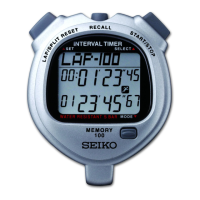
Seiko S149 - User Manual

Seiko S149
14 pages
Print Icon
To Next Page IconTo Next Page
Loading...
S149
セイコーシ
プウッチ
取扱説明書
INSTRUCTION

Other manuals for Seiko S149

Questions and Answers

  • P
    Patricia HaleyJul 25, 2025
    What to do if Seiko S149 motor does not run?
    • D
      Deborah MillerJul 25, 2025
      If your Seiko Watch's motor isn't running even when the power switch is turned on, the issue might be due to weak batteries. Try replacing them with new ones. Also, check if the batteries are installed correctly and ensure the paper isn't stuck inside. Remove the paper if it is.
  • M
    mary17Jul 30, 2025
    Why are digits not printing correctly on my Seiko Watch?
    • L
      lpowersJul 30, 2025
      If your Seiko Watch prints digits or letters that are defective, or if no data is printed at all when you press the start button, it could be due to a few reasons. First, ensure the cord is correctly connected. Second, check the cord plug for any water or foreign matter and wipe it off. Finally, make sure the paper is inserted properly.
  • E
    Elizabeth MarshallAug 4, 2025
    How to fix Seiko S149 Watch if paper is not advancing?
    • L
      Lawrence FitzgeraldAug 4, 2025
      If the paper is not advanced by pressing the paper advancing switch on your Seiko Watch, this could be due to several reasons. First, try replacing the batteries with new ones, as weak batteries can cause this issue. Second, check for any stuck paper and remove it. Finally, ensure that the roll paper is properly shaped and not out of round.
  • M
    Mrs. Megan Lindsey DDSAug 9, 2025
    What to do if Seiko S149 Watch paper advances irregularly?
    • B
      bcallahanAug 9, 2025
      If, when you press the start button on your Seiko Watch, data prints but the paper advances irregularly, the issue might be due to the paper being stuck. Remove the paper to resolve this. Alternatively, weak batteries could be the cause, so try replacing them with new ones.
  • R
    Rebecca CarsonAug 14, 2025
    Why Seiko S149 is not printing anything?
    • C
      Carla GonzalezAug 14, 2025
      If no data prints and the paper doesn't advance at all when you press the start button on your Seiko Watch, there are a few potential causes. First, weak batteries could be the problem, so try replacing them with new ones. Second, ensure the batteries are installed correctly. Finally, check that the power switch is turned "ON" before pressing the start button.
  • J
    Jeffrey MerrittAug 19, 2025
    Why is auto start time not transferred on my Seiko S149 Watch?
    • M
      Matthew NguyenAug 19, 2025
      If the auto-start time is not being transferred on your Seiko Watch, it could be due to the cord not being connected properly. Make sure the cord is correctly connected. Another possible cause is water or foreign matter sticking to the cord plug. Ensure you wipe off any water or foreign matter.

Summary

SEIKO Stopwatch S149 Features

Display and Button;Switch Operation

Stopwatch Core Buttons

Buttons for split/lap timing, start/stop, and memory recall.

How to Use the Stopwatch

Stopwatch Mode Activation

Activating stopwatch measurement mode.

Starting Stopwatch Measurement

Instructions for starting measurement.

Standard Measurement Procedure

Basic start, stop, and reset procedure.

Accumulated Elapsed Time Measurement

Lap and Split Time Measurement

Memory Function Usage

Memory Recall Function

Recalling and displaying stored measurement data.

Clearing Stored Data

Memory Clearing Procedure

Steps for completely erasing stored data from memory.

Printing Out Data

Setting the Printer Paper

Instructions for loading thermal paper.

Auto Start Function Usage

Auto Start Function Purpose

Enables automatic measurement start at a preset time.

Setting Auto Start Time

Step-by-step guide to configure the auto start time.

Transferring Auto Start Time

Purpose of Time Transfer

Synchronizing start times across multiple stopwatches.

Transfer Procedure

Steps to transfer auto start time using a cord.

Printer Battery Installation

Time and Calendar Setting

Initiating Time;Calendar Mode

Accessing the time and calendar setting interface.

Watch Placement and Environmental Care

Environmental Hazards

Warnings about extreme temperatures, magnetism, dust, and chemicals.

Battery Information and Maintenance

Battery Safety Warnings

Critical safety precautions related to battery handling.

Troubleshooting Guide

Printer Troubleshooting

Solutions for common printer operational problems.

Print Quality Troubleshooting

Remedies for defective print or missing data.

Auto Start Transfer Troubleshooting

Steps to resolve issues with auto start time synchronization.

Technical Specifications

Stopwatch Specifications

Technical details of the stopwatch functions.

Seiko S149 Specifications

General IconGeneral
ModelS149
CategoryWatch
MovementQuartz
Case MaterialStainless Steel
Dial ColorBlack
DisplayAnalog

Related product manuals