TECHNICAL GUIDE
Cal. 6N76A
13/18
●
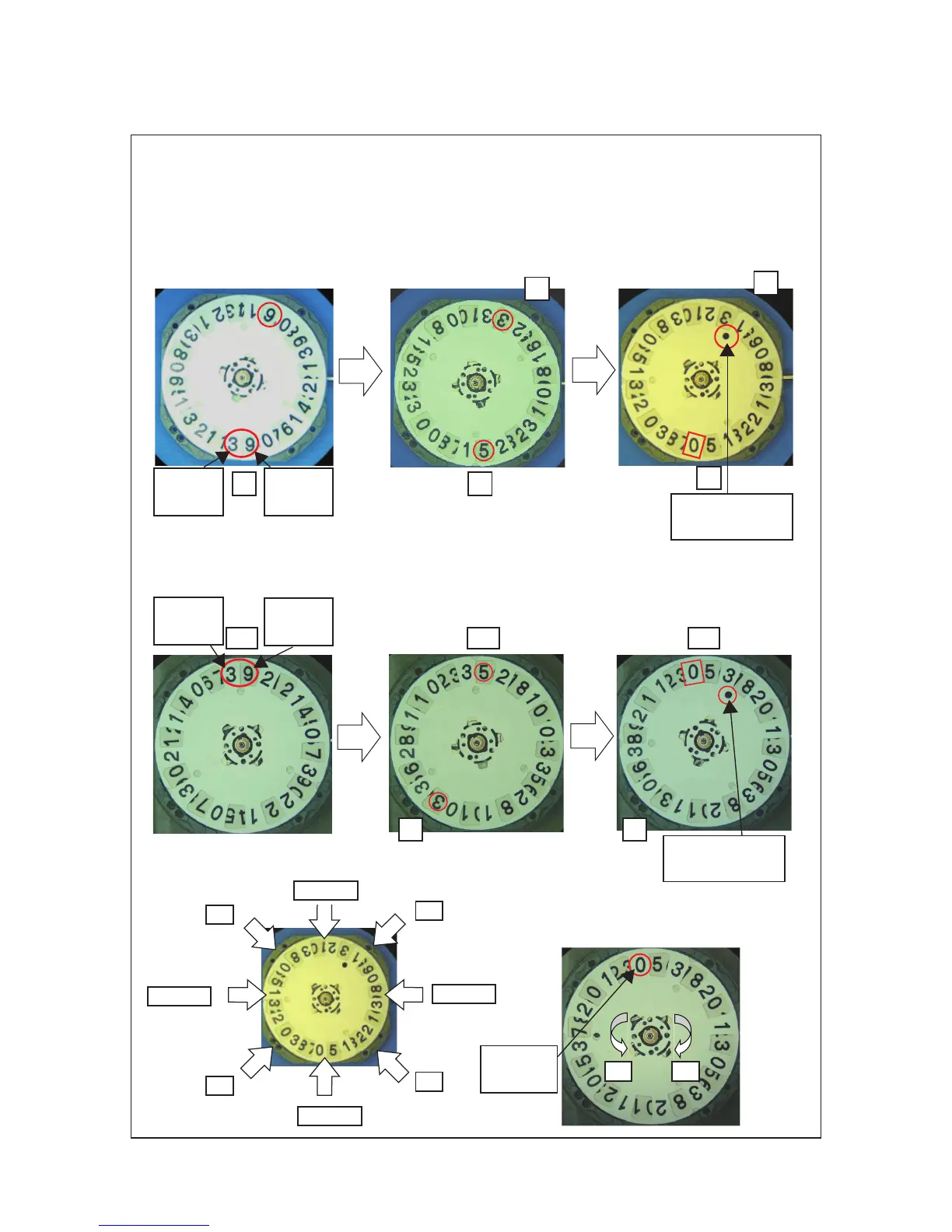
How to set the FIRST DATE INDICATOR and the SECOND DATE INDICATOR
①
First position at random
②
Fir st date indica tor posi tion
setting: Pull out the crown to
first click and turn the crown to
set day 3 to 1h position and day
③
Second date indicator position
set ting: Rota te i t in the
clockwise direction by touching
on its surface with finger until
the two holes overlap.
INDICATOR
1h
①
First position at random
②
Fir st date indica tor posi tion
setting: Pull out the crown to
first click and turn the crown to
set day 3 to 7h position and day
5 to 12h position.
③
Second date indicator position
set ting: Rota te i t in the
clockwise direction by touching
on its surface with finger until
the two holes overlap.
12h
7h
12h12h
7h
holes overlap
holes overlap
②
Second date indicator may only be
rotated in the clockwise direction.
If rotated counterclockwise, it may
cause malfuntion.
Notes:
①
Positions to take hold of the movement
NG (12h)
NG (3h)
NG (9h)
OK
OK
OK
OK
INDICATOR
1h
OKNG
INDICATOR
FIRST
INDICATOR
FIRST
INDICATOR



 To Next Page