The watch moves depending on the quartz movement (loss/gain: ±15 seconds per month). After
the manual time setting, if the watch successfully receives a time signal, the watch displays the
time based on the time information it receives.
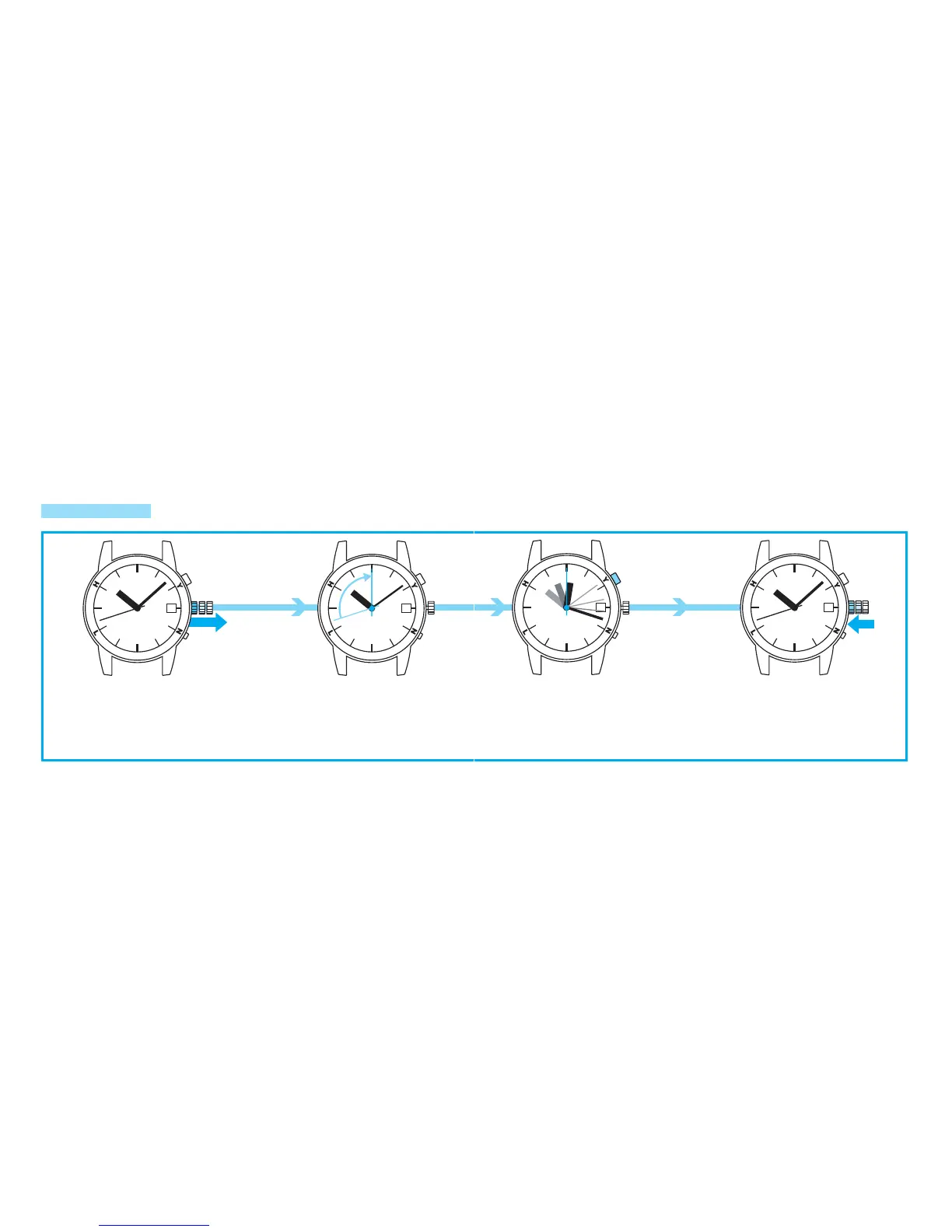
Pull out the crown to the
second click.
The second hand rotates
u nti l it p o i nts t o t h e 0
s e c o n d p o s i t i o n ( 1 2
o ’ c l o c k po s i t i o n ) and
stops to enter the manual
time setting mode.
*The watch hands do not move if the crown is turned.
Pressing Button A advances the hands clockwise only.
*Refer to “THE SCREW LOCK
TYPE CROWN” on page 9.
HOW TO MANUALLY SET THE TIME AND DATE
MANUAL TIME SETTING
Press Button A to set the time.
Each pressing of Button A advances the hour and
minute hands by one minute. If Button A is kept
pressed for one to two seconds, the hands advance
rapidly. The hands keep advancing if Button A is
released. Press Button A again to stop.
Push the crown back in.
The wa t ch res ume s i t s
normal movement.
○
A



 To Next Page