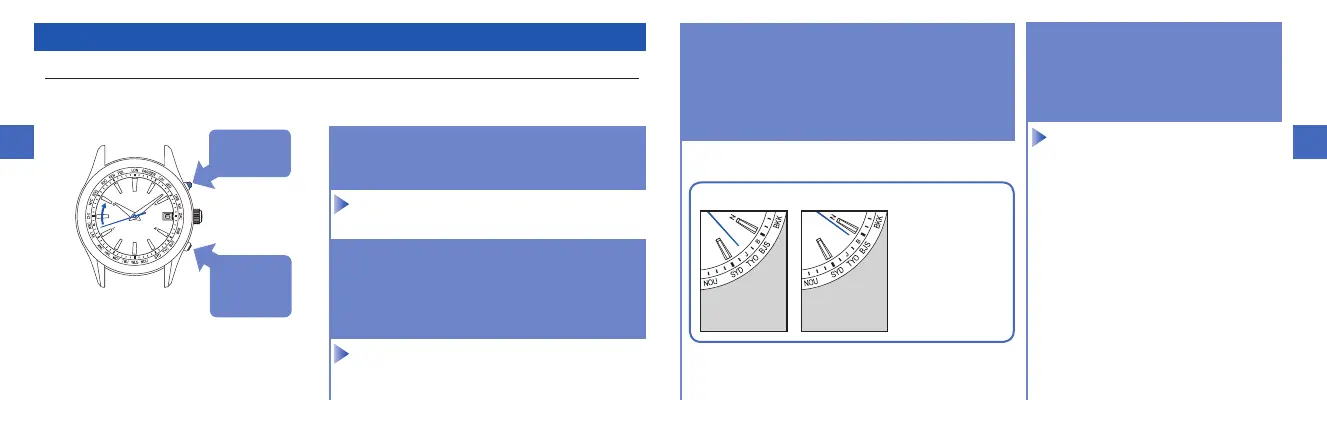
How to select the time zone (How to display the local time around the world)
Within 10 seconds after procedure
1.
is completed, start the operation of procedure
2.
.
1.
3.
Wait for ten seconds after
the movement of the hour
and minute hands stop.
(The time zone adjustment
mode is nished.)
The radio signal transmitting station
can be changed by selecting the time
zone. When selecting a time zone for
regions other than the radio signal
reception ranges, the radio signal
reception function will not work.
1.
Keep pressing down Button B (for
3 seconds) until the second hand
stops.
2.
Within 10 seconds after carrying
out procedure
1.
, press Button
A or B to set the second hand
to point at the target time zone
index.
2.
forclockwise
turn
ButtonB
1.
for3seconds
2.
forcounter-
clockwiseturn



 To Next Page