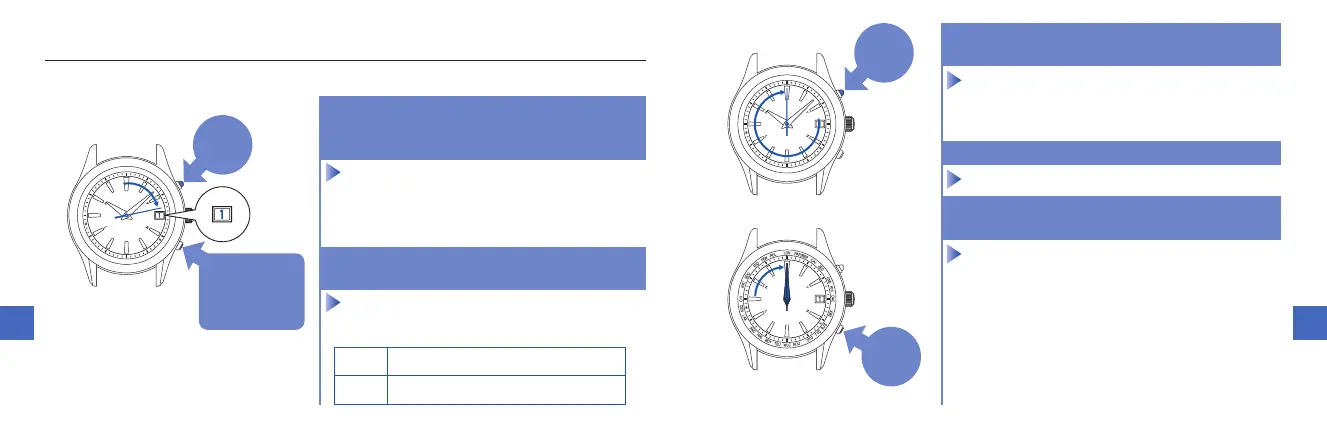
■ Setting the preliminary position of the date, hour and minute hands (continued)
Within 10 seconds after procedure
1.
is completed and the date stops, start the operation of procedure
2.
1.
3.
Keep pressing down Button A (for 2 seconds) until the
second hand stops pointing to the 0-second position.
5.
4.
Press Button B once and release it.
5.
After completing the operation, leave
the watch untouched for 10 seconds.
1.
Keep pressing down Button A and B (for 3
seconds) at the same time until the second
hand stops pointing to the 13-second position.
2.
Within 10 seconds after the date stops,
press Button B to set the date to “1.”
3.
ButtonA
1.
Pressfor
3seconds
ButtonB
1.
Pressfor3seconds
2.
Presswithin10
secondsafterthe
datestops
ButtonA
3.
Pressfor
2seconds
ButtonB
4.
Press
once



 To Next Page