EasyManua.ls Logo

Seiko 7F22 - Time Setting

Seiko 7F22
13 pages
Print Icon
To Next Page IconTo Next Page
To Previous Page IconTo Previous Page
Loading...
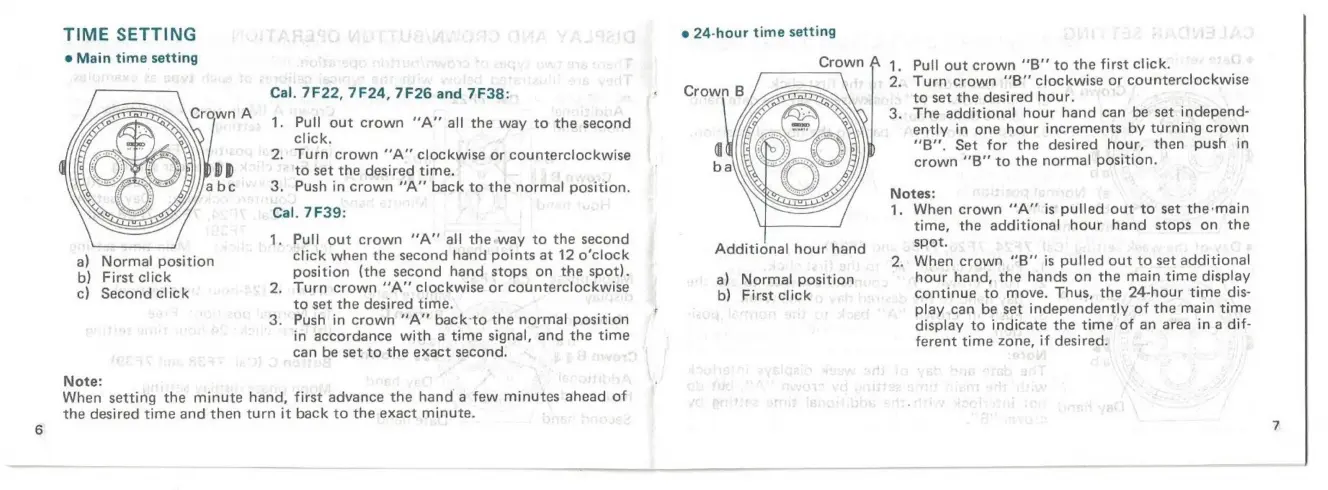
TIME
SETTING
e
Main
time
setting
a)
Normal
position
b)
First
click
c)
Second
click
Note:
Cal.
7F22,
7F24,
7F26
and
7F38:
Pull
out
crown
“A”
all
the
way
to
the
second
click.
2.
Turn
crown
“‘A”
clockwise
or
counterclockwise
to
set
the
desired
time.
3.
Push
in
crown
“A”
back
to
the
normal
position.
Cal.
7F39:
1.
Pull
out
crown
“A”
all
the
way
to
the
second
click
when
the
second
hand
points
at
12
o’clock
position
(the
second
hand
stops
on
the
spot).
2.
Turn
crown
“A”
clockwise
or
counterclockwise
to
set
the
desired
time.
3.
Push
in
crown
“A”
back-to
the
normal
position
in
accordance
with
a
time
signal,
and
the
time
can
be
set
to
the
exact
second.
When
setting
the
minute
hand,
first
advance
the
hand
a
few
minutes
ahead
of
the
desired
time
and
then
turn
it
back
to
the
exact
minute.
e
24-hour
time
setting
Additional
hour
hand
a)
Normal
position
b)
First
click
Pull
out
crown
“‘B”
to
the
first
click.
Turn
crown
“B”
clockwise
or
counterclockwise
to
set
the
desired
hour.
The
additional
hour
hand
can
be
set
independ-
ently
in
one
hour
increments
by
turning
crown
“B’'
Set
for
the
desired
hour,
then
push
in
crown
“‘B”
to
the
normal
position.
Notes:
1.
When
crown
“A”
is
pulled
out
to
set
the:main
time,
the
additional
hour
hand
stops
on
the
spot.
2.
When
crown
“B”
jis
pulled
out
to
set
additional
hour
hand,
the
hands
on
the
main
time
display
continue
to
move.
Thus,
the
24-hour
time
dis-
play.can
be
set
independently
of
the
main
time
display
to
indicate
the
time
of
an
area
ina
dif-
ferent
time
zone,
if
desired.

Related product manuals