EasyManua.ls Logo

Seiko 7F22 - Calendar Setting

Seiko 7F22
13 pages
Print Icon
To Next Page IconTo Next Page
To Previous Page IconTo Previous Page
Loading...
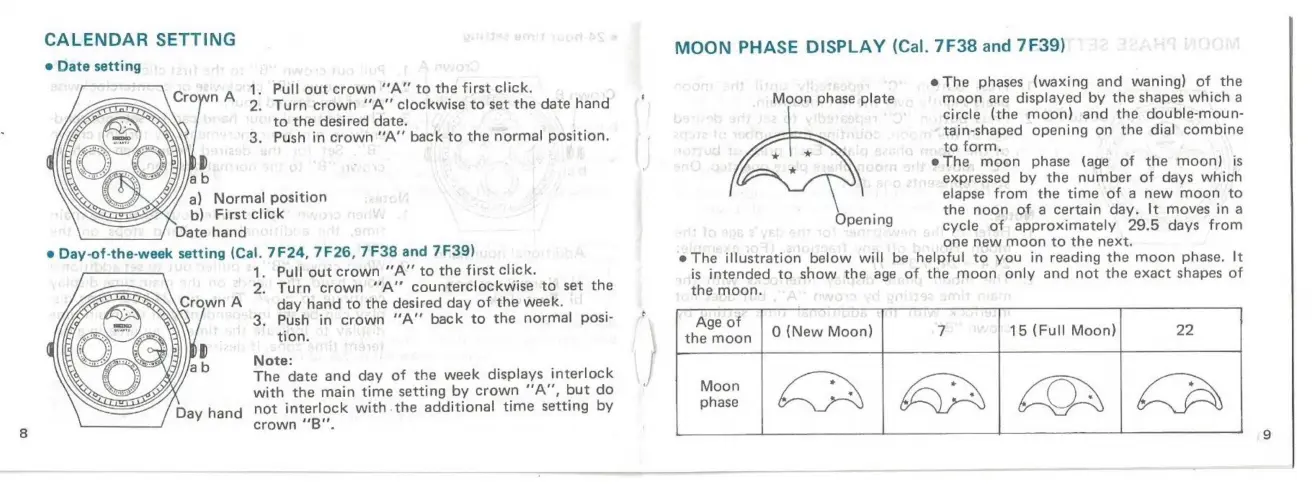
CALENDAR
SETTING
e
Date
setting
.
Pull
out
crown
“‘A”
to
the
first
click.
2.
Turn
crown
“A”
clockwise
to
set
the
date
hand
to
the
desired
date.
3.
Push
in
crown
“A”
back
to
the
normal
position.
a)
Normal
position
b)
First
click
Date
hand
e
Day-of-the-week
setting
(Cal.
7F24,
7F26,
7F38
and
7F39)
1.
Pull
out
crown
“‘A”’
to
the
first
click.
2.
Turn
crown
“A”
counterclockwise
to
set
the
Crown
A
day
hand
to
the
desired
day
of
the
week.
3.
Push
in
crown
“A”
back
to
the
normal
posi-
|
tion.
p
Note:
The
date
and
day
of
the
week
displays
interlock
with
the
main
time
setting
by
crown
“‘A”,
but
do
Day
hand
"ot
interlock
with.the
additional
time
setting
by
crown
“‘B".
1
MOON
PHASE
DISPLAY
(Cal.
7F38
and
7F39)
@
The
phases
(waxing
and
waning)
of
the
moon
are
displayed
by
the
shapes
which
a
circle
(the
moon)
and
the
double-moun-
tain-shaped
opening
on
the
dial
combine
to
form.
@
The.
moon
phase
(age
of
the
moon)
is
expressed
by
the
number
of
days
which
elapse
from
the
time
of
a
new
moon
to
the
noon
of
a
certain
day.
It
moves
in
a
cycle
of
approximately
29.5
days
from
one
new
moon
to
the
next.
e
The
illustration
below
will
be
helpful
to
you
in
reading
the
moon
phase.
It
is
intended
to
show
the
age
of
the
moon
only
and
not
the
exact
shapes
of
the
moon.
Age
of
|
=
[<3
|Aa|
onea
Moon
phase
plate
AX
Opening

Related product manuals