EasyManua.ls Logo

Seiko 7F22 - Page 7

Seiko 7F22
13 pages
Print Icon
To Next Page IconTo Next Page
To Previous Page IconTo Previous Page
Loading...
MOON
PHASE
SETTING
iP
a
10
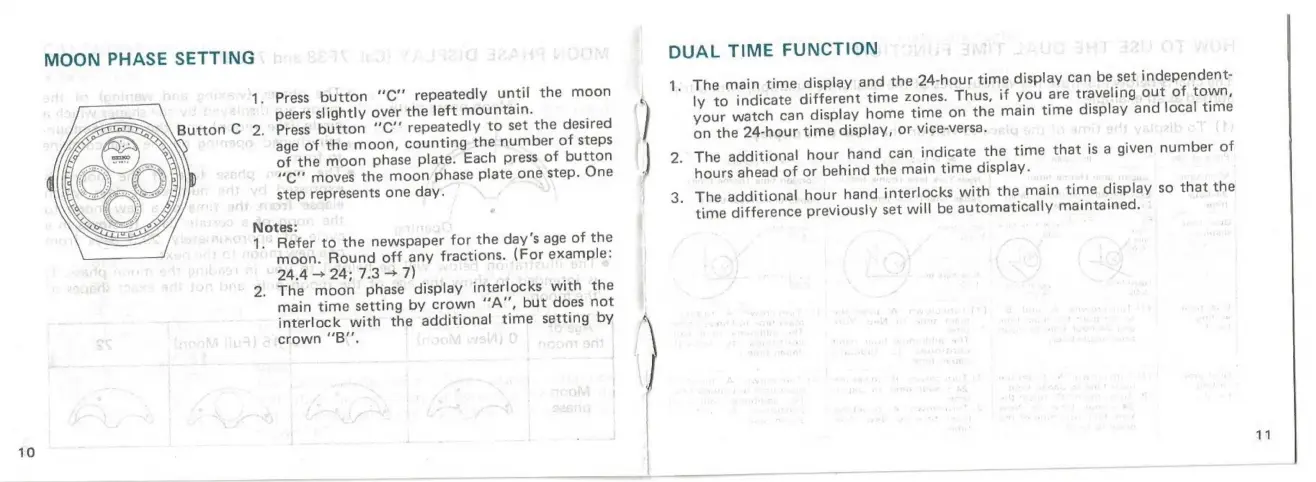
Press
button
“C’’
repeatedly
until
the
moon
peers
slightly
over
the
left
mountain.
Press
button
“C’’
repeatedly
to
set
the
desired
age
of
the
moon,
counting
the
number
of
steps
of
the
moon
phase
plate.
Each
press
of
button
“C"'
moves
the
moon
phase
plate
one
step.
One
step
represents
one
day.
Notes:
Refer
to
the
newspaper
for
the
day’s
age
of
the
moon.
Round
off
any
fractions.
(For
example:
24.4
>
24:
7.3
+7)
The
moon
phase
display
interlocks
with
the
main
time
setting
by
crown
“A”,
but
does
not
interlock
with
the
additional
time
setting
by
crown
“B”,
DUAL
TIME
FUNCTION
1;
The
main
time
display
and
the
24-hour
time
display
can
be
set
independent-
ly
to
indicate
different
time
zones.
Thus,
if
you
are
traveling
out
of
town,
your
watch
can
display
home
time
on
the
main
time
display
and
local
time
on
the
24-hour
time
display,
or
vice-versa.
The
additional
hour
hand
can
indicate
the
time
that
is
a
given
number
of
hours
ahead
of
or
behind
the
main
time
display.
The
additional
hour
hand
interlocks
with
the
main
time
display
so
that
the
time
difference
previously
set
will
be
automatically
maintained.

Related product manuals