11
10
English
English
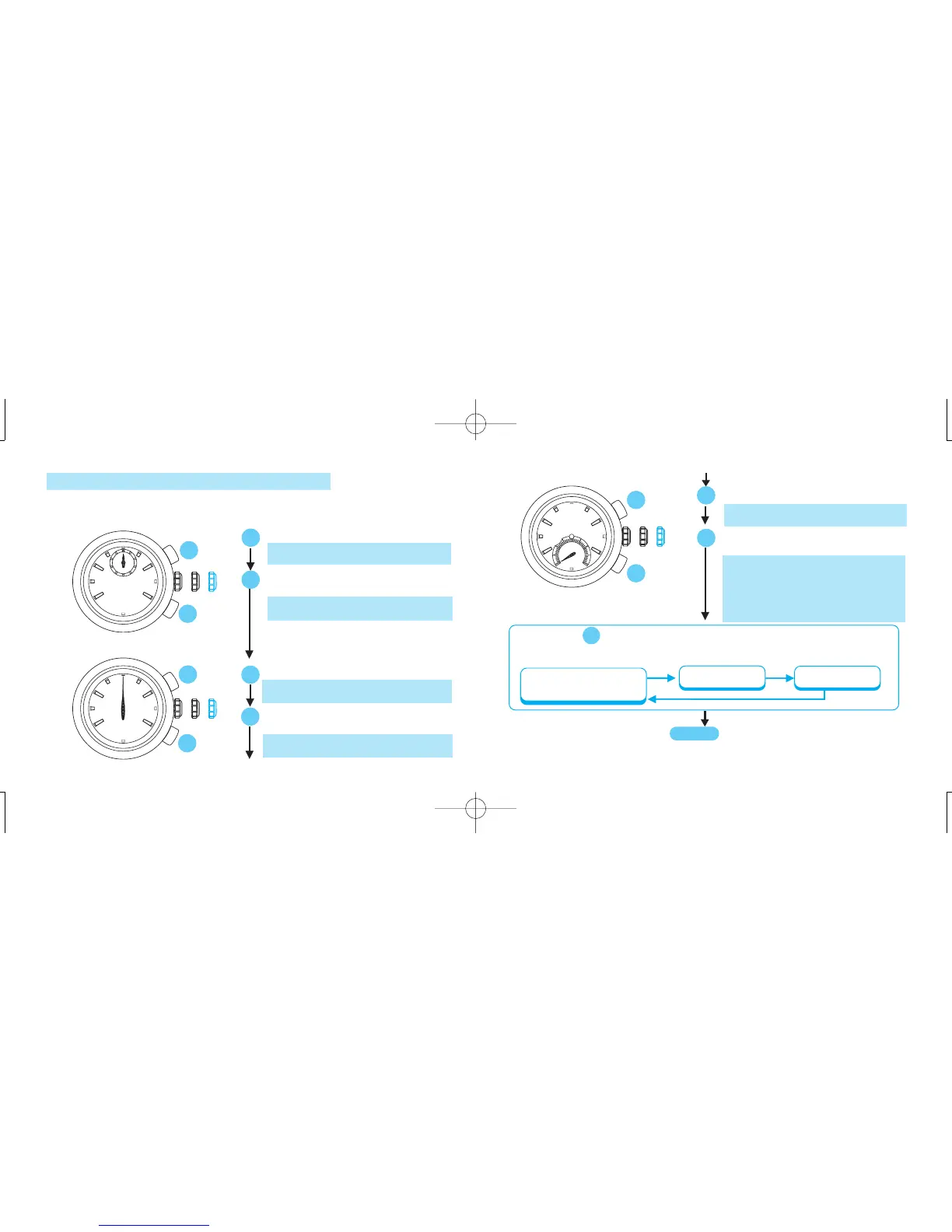
● If Button is pressed again for 2 seconds, you can go back to the
adjustment of 1/10- and 1/100-second hands and so on in the following
order.
A
Press for 2 seconds.
* STOPWATCH minute hand turns a full
circle.
Press repeatedly to set it to the “0”
position.
* The hand moves quickly if Button B is
kept pressed.
* STOPWATCH minute hand turns a full
circle passing the 40-minute marker
only during the STOPWATCH hand
position adjustment.
0
10
After all the adjustments are completed,
push back in to the normal position in
accordance with a time signal.
CROWN
B
A
B
A
STOPWATCH
second hand
STOPWATCH
minute hand
STOPWATCH
1/10- and 1/100-second
hands
2) STOPWATCH HAND POSITION ADJUSTMENT
✩ If the STOPWATCH hands are not in the “0” position, follow the procedure below to set them
to the “0” position.
B
A
Press for 2 seconds.
* STOPWATCH 1/10-second and 1/100-
second hands turn a full circle.
Press repeatedly to set the STOPWATCH
hands to the “0” position.
* The hands move quickly if Button B is
kept pressed.
B
Press repeatedly to set it to the “0”
position.
* The hand moves quickly if Button B is
kept pressed.
* STOPWATCH second hand turns a full
circle.
Press for 2 seconds.
A
B
A
A
B


 To Next Page