9
English
C
D
➡
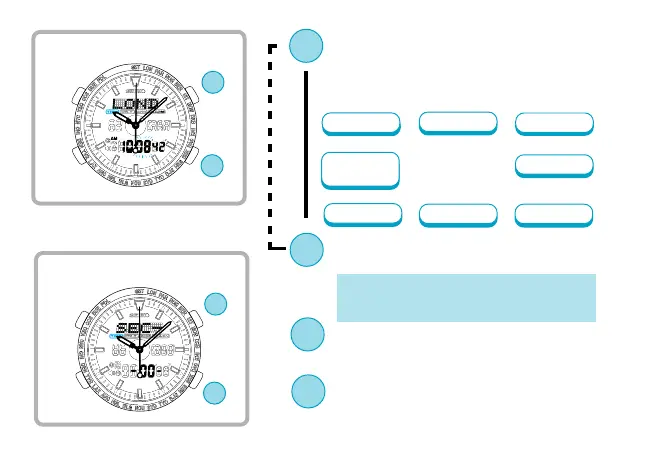
Press to select an item(flashing) to be
adjusted.With each press of the but-
ton, a flashing item changes over in
the following order
(See *1 on page 22)
City
Minute
▲
Second
12-/24-hour
display
Year
Date
Month
Hour
▲
▲
▲
▲
▲
▲
Digital time/calendar setting
Analogue time setting
C
D
C
D
D
C
Press to show “SEC–SET–00”.
Press to adjust the selected item.
(See *2 on page 22)
* Seconds setting
By pressing the button,the seconds are reset
to "00" and start counting immediately.
▲
▲
▲
▲
▲
Press to reset Second hand to point to
the 12 o’clock position.


 To Next Page