- 2 –
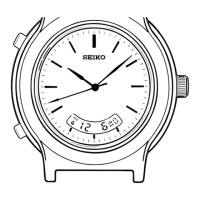
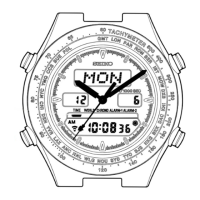
HOW TO SET THE ANALOGUE TIME:
1. Pull the crown out. If the crown is turned clockwise one click, the
minute hand will advance half a minute. If the crown is turned
counterclockwise one click, the minute hand will go back half a
minute. This action can be repeated to set the minute hand to the
exact time.
2. If the crown is turned clockwise two clicks within ½ second, the hands
will advance one hour. If the crown is turned counterclockwise two
clicks within ½ a second, the hands will automatically go back one
hour.
In order to stop the hands before they complete their one hour cycle
turn the crown one click clockwise or counterclockwise.
NOTE: The hands must travel for at least one minute before they can be
stopped.
3. The alarm will ring with a single "peep" each time the crown is turned
one click.
HOW TO SET THE DIGITAL TIME, CALENDAR AND MILITARY (24 HOUR) TIME:
1. From the time display (the digital display with seconds and alarm
function) depress button "B" for 4 seconds. The home time/calendar
setting function will be activated, signalled by a chime and the
second digits will be flashing.
2. Depress button "A" and the seconds will reset to zero and start
immediately.
NOTE: When the seconds count any number from "30" to "59" and button
"A" is depressed, one minute is added and the seconds are immediately
reset to "00".
3. To set the first minute digit, depress button "B" again and it will
start flashing. One minute digit can then be advanced with each of
button "A". Depress button "B" and the 10 minute digit will start
flashing. Again this can be advanced by each depression of button "A".
4. To set the hour digits depress button "B" once more and they will
start flashing. One hour digit can be advanced by each depression of
button "A"
NOTE: If in the 12 hour display, ensure that the desired A for A.M. or
P for P.M. is set.
5. To select the 12 or 24 hour display depress button "B" again and the
A/P mark will start to flash. Depress button "A" once to select the 24
hour display (or military) represented by AP, and once more to return
to the 12 hour display P.
/Continued.....
Original Document Provided by Seiko.
OCR & Formatting by Deomandinka.


 To Next Page