14
Automatic and manual gear shifting
Depending on the assist bicycle used, you may be able to switch between automatic and manual gear shifting.
•
Automatic gear shifting: Automatically shifts gears based on the riding conditions.
•
Manual gear shifting: This refers to standard electronic gear shifting. Gears are shifted by operating the shifting switch.
1.
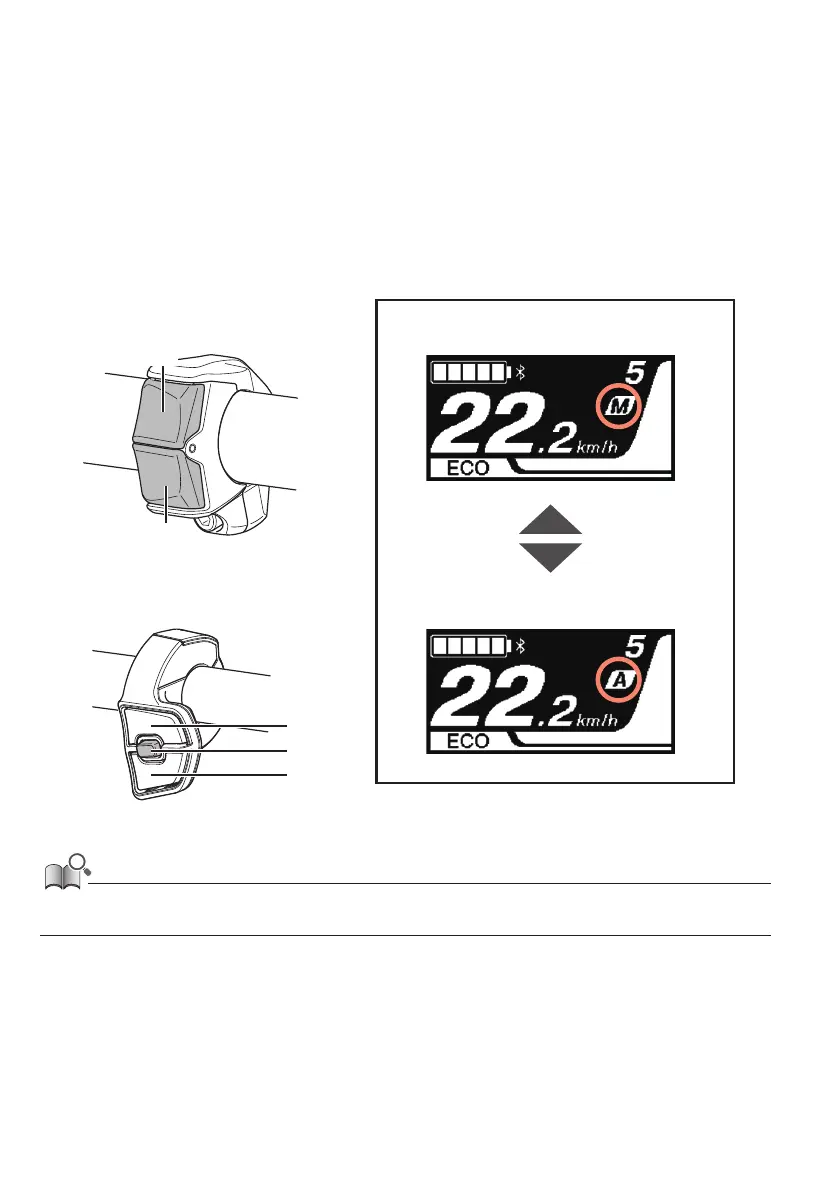
Switch between automatic and manual gear shifting.
The shifting switch (right side of the handle) is operated as follows, depending on the type.
Shifting changes from automatic to manual gear shifting and back again with each operation.
•
2-switch type shifting switch: Press the X and Y buttons together
•
3-switch type shifting switch: Press the A button
X
Y
Example of manual gear
shifting mode display
Example of automatic gear
shifting mode display
X
A
Y
2-switch type
shifting switch example
3-switch type
shifting switch example
• Depending on the cycle computer, [Auto] is displayed when in automatic gear shifting mode, and [Manual] is displayed when in manual
gear shifting mode.



 To Next Page