9
Date Code 20010214 SEL-2505 Remote I/O Module
SEL-2505 Operating Time Performance Diagram
ALARM contact should open and the ALARM LED
should extinguish.
Step 6. Apply rated voltage to IN1 on one device. The IN1 LED
should illuminate on this device. On the other SEL-2505,
the OUT1 contact should close and OUT1 LED should
illuminate.
Step 7. Repeat Step 6 for the remaining contacts.
Step 8. To test the loop-back feature, connect a single fiber
between the TX to RX on the same device. The LOOP
LED should illuminate and the ROK LED should
extinguish. Energize each input. No output contact should
assert.
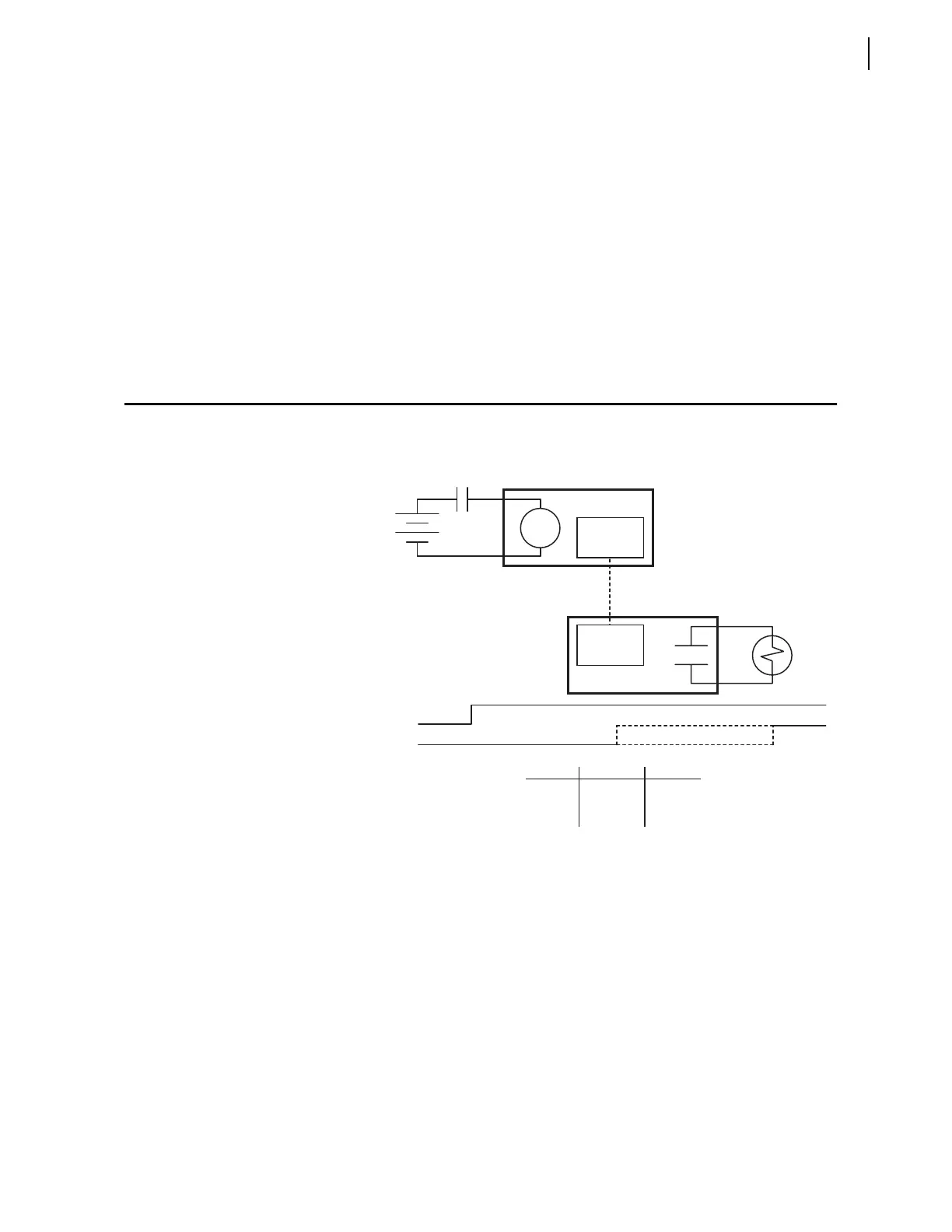
SEL-2505 Operating Time Performance Diagram
Figure 9 shows the time to close an output contact of a remote
SEL-2505 given a contact closure on the local SEL-2505.
Figure 9 SEL-2505 to SEL-2505
End-to-End Operating Time Diagram.
Input
SEL-2505
Input
Contact
Power
Fiber-Optic
Transmitter
0 ms
Operate Window
Max. ms
SEL-2505
Output
Min. ms
Output
Fiber-Optic
Receiver
Baud Min. ms Max. ms
38400 5 10
19200 8 13
9600 14 19


 To Next Page