TEC Series v 3.2X
Page 17
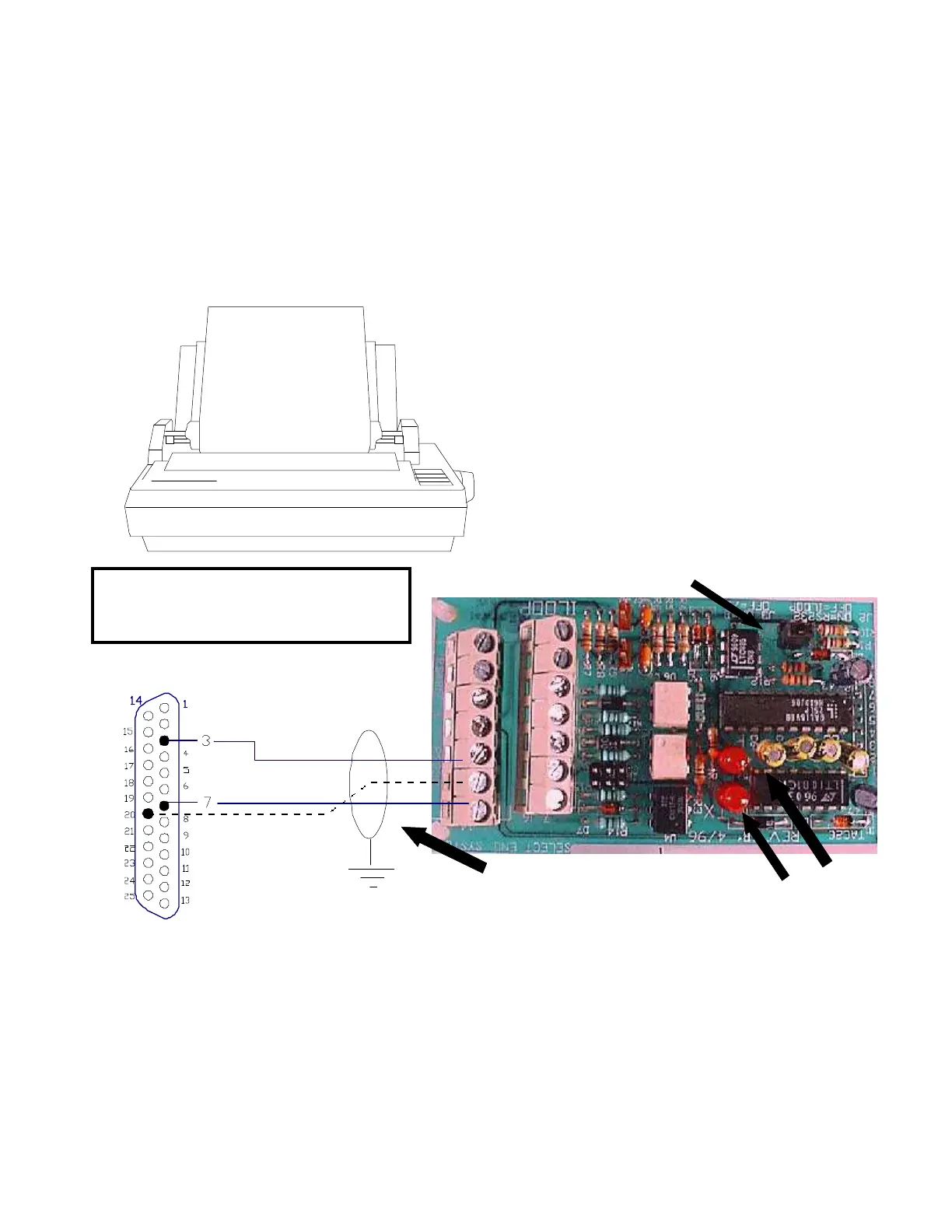
The optional RS-232 serial port adapter (OPTKPRT) may be used to send information
from the TEC to a serial printer. Information may be transmitted to the printer at rates
from 300 baud to 19200 baud. Baud rate may be selected from the communications setup menu.
Because TEC printer messages are relatively short, a busy signal control is usually not required. The
busy signal is only active for systems that have a transaction buffer (See Pg. 20. If the BSY signal is
used it can be inverted from high going to low going as required by some printers by removing jumper
J-3. The only connections usually required for a printer are RX (Received Data, pin 3) and GROUND
(pin 7). Connect the TX terminal on the serial port adapter to the input of the printer. It may be called
RX, RCV, Data In, or some other label. Connect the serial port adapter ground to printer ground (may
also be called common).
J2 MUST BE JUMPERED
RX
GND
PRINTER
CONNECTOR
(DB-25 MALE)
RCV LED
XMIT LED
SHIELD
TIES TO TBS1
SEE SECT 3.1
IN MANUAL
TX
COM
BSY
BSY ACTIVE ONLY
FOR SYSTEMS
WITH TRANSACTION
BUFFER
NOTE:
SERIAL PORT ADAPTER
PRINTER
THE PRINTER SHOULD BE SET TO 8 BITS, NO
PARITY BIT, AND 1 STOP BIT (8,N,1).
Consult the manual for your printer to set
your printer to these parameters. SES has an
optional printer that is set correctly at the factory.
Because of the wide variation in printers on the
market, SES cannot make specific
recommendations for printers that are not purchased
from SES.
NOTE: SHIELDED CABLE MUST BE
USED AND THE SHIELD MAY NOT
BE USED AS A SIGNAL PATH.
PRINTER REPORTS AND MESSAGES
If a printer is attached to the TEC, this start up message will print when the TEC is first powered
on.
S.E.S. TEC 2R
VER 3.XX (where X.XX is a version and revision number)
00:00/00/00 (where 00:00 is the time, and 00/00/00 is the date.
The time and date may not be correct until the time and date are set. See Pg. 39, SETTING
TIME DATE to set the clock.
ACCESSORY INSTALLATION
New Style Serial cards are on Pages 19 & 20
(OPTIONAL)



 To Next Page
 Loading...