TEC Series v 3.2X
Page 61
START MIN 00: You will be prompted to key in the minute. This is a 1 or 2 digit number
between 00 and 59. If you make a mistake, press <BkSpc> to backspace one character.
After the minute is entered, press the "Enter" key.
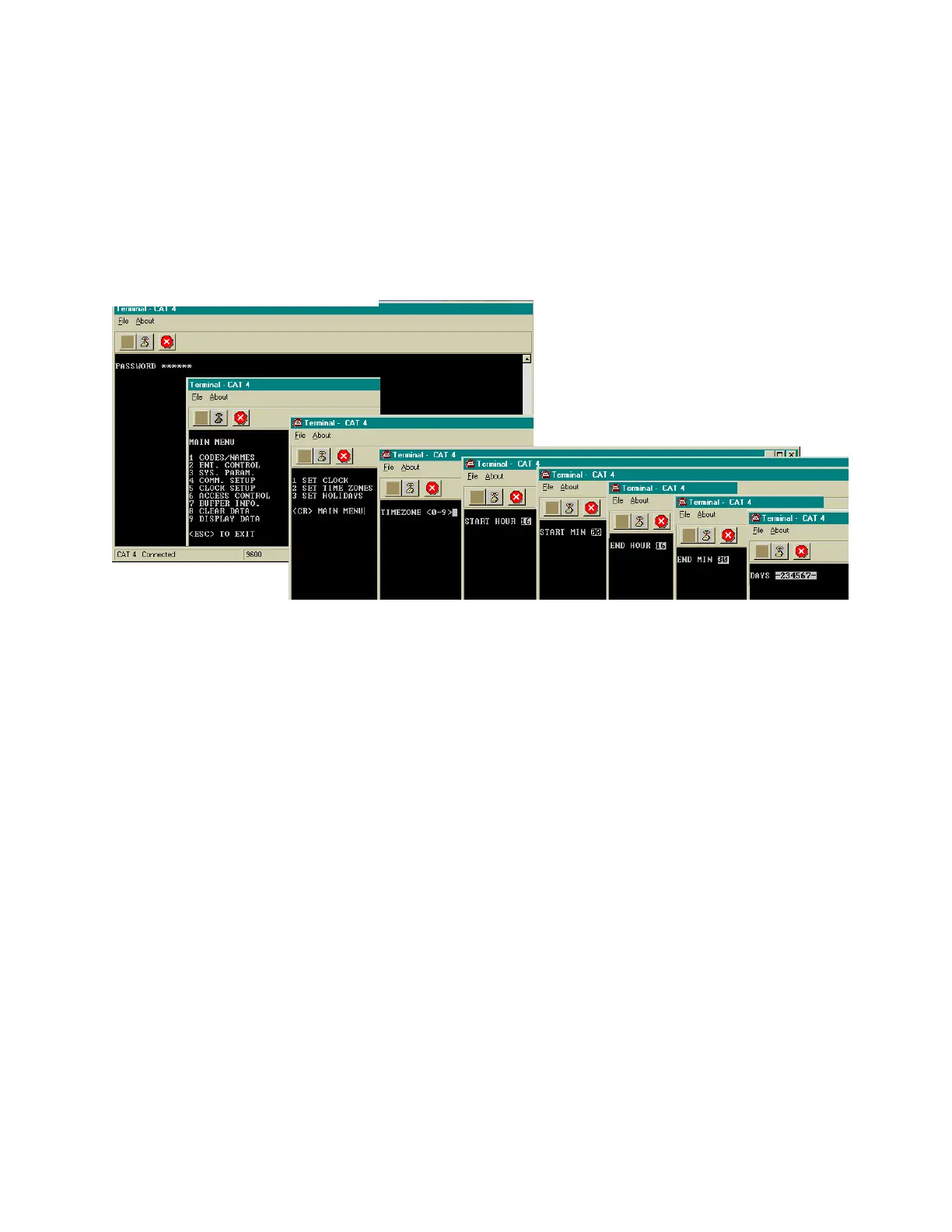
TIMEZONE <0-7>: You will be prompted to select a time zone between 0 and 7. If you make a
mistake, press BkSpc to backspace one character. Once programming of a time zone is begun, all
choices must be keyed in or you will be returned to the beginning of the time zone menu.
A time zone is a period of time that limits when the TEC is valid. Use this to control access to a
facility, when a given condition is valid, based on:
1) The time of day.
2) The day of the week.
3) Whether or not the day of the week is a Holiday.
A time zone is valid only within a 24 hour period that begins at midnight. A time zone has a start time
and an ending time. This can be as short as two minutes, or as long as 24 hours. This time period is
valid in combinations from 1 to 7 days and Holidays. There are 8 times zones numbered 0 - 7
available for use on a TEC. Holidays may be set up at any time. A time zone can have valid
Holidays, or invalid Holidays. A time zone can be set that is only valid on Holidays, for applications
that require different hours of access on Holidays.
From the main menu, select "5" for clock setup, then "2" for time zone.
SETTING TIME / DATE continued
DATE: Enter a 1 or 2 digit number to set the day of the month. If a mistake is made, <BkSpc> to
backspace one character. After the day is entered, press the "Enter" key.
YEAR: Enter a 2 digit number to set the year. If you make a mistake,<BkSpc> to backspace one
character. After the year is entered, press the "Enter" key.. You will be returned to the Clock Setup
menu.
START HOUR 00: After the time zone is selected, press the "Enter" key. You will be prompted to key
in the hour. This is a 1 or 2 digit number. The hour is expressed in 24 hour format (e.g., 2:25 P.M. is
keyed in as 14:25), from 00:00 to 23:59.
If you make a mistake, press <BkSpc> to backspace one character. After the hour is entered, press
the "Enter" key.
SETTING TIME ZONES
MONTH: Enter a 1 or 2 digit number to set the month. If you make a mistake, <BkSpc> to
backspace one character. After the month is entered, press the "Enter" key.
(CAT Shown. TEC is similar.)


 To Next Page
 Loading...