Selmo Electronic
Via Pacinotti, 24 - 35030 Rubano www.selmo.it(PD) Italy- Tel 049.8976761, Fax 049.8976085 -
Selmo Electronic
Via Pacinotti, 24 - 35030 Rubano www.selmo.it
EN
Rev.01 - Aug. 2018Pg. 6
Selmo
Comfort technology division
Chrono Mode
This operating mode allows the definition of a weekly program configurable for each day of the
week.To enter into this mode, press the key until the display shows the "Chrono" icon.[Mode]
Configuring the hours sequence:
Press the key to start the programming procedure.[Chrono]
a) Set the time and day of the week.
- The blinking number shows the day of the week: press and keys to set the correct day,[+] [-]
then press to confirm.[Mode]
- Press the and keys to set the hour then press to confirm and proceed with the[+] [-] [Mode]
configuration of the minutes.
- For configuring the minutes, repeat the same procedure and confirm with the key at the[Mode]
end.
a) Configuring the weekly program.
The procedure starts automatically from day 1, and requires specifying the desired temperature
(either “Comfort” or “Off”) for each hour of the day. This is done by pressing for the current hour either
the key (for setting the “Comfort” temperature) or the key (for disabling the heating element).[+] [-]
Once one of the two keys is pressed, the configuration process moves to the following hour (for a total
of 24 steps).
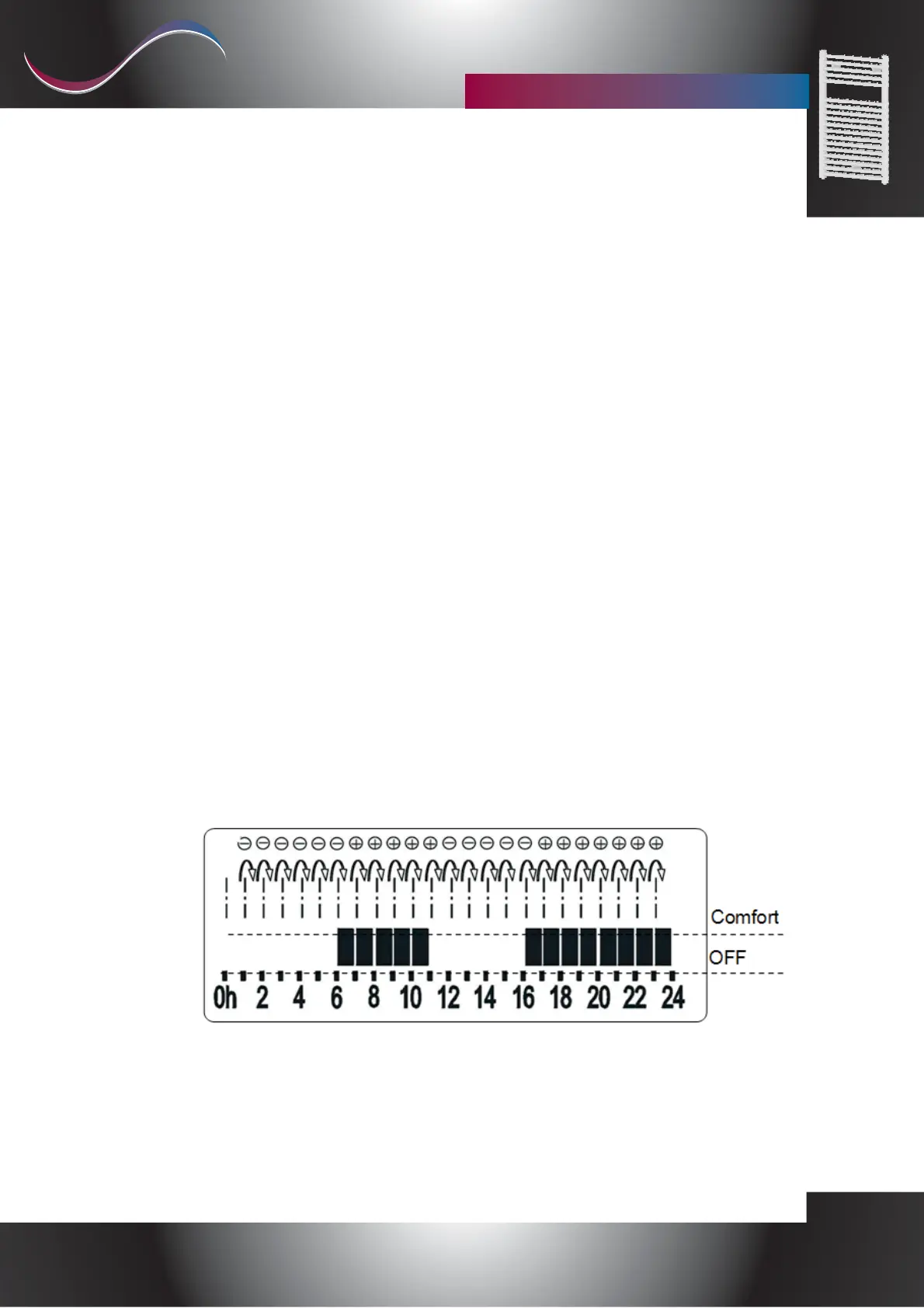
The "Comfort" temperature is represented with a filled rectangle while the “ ”Antifreeze (OFF)
temperature is represented with an empty space.
Example
Press to confirm and proceed repeating the procedure for the following day.[Mode]
Once the configuration of the seventh day has been completed, the program returns to the previous
operating mode
“Galaxy Pro”
Remote control for chronotermostat


 To Next Page
 Loading...