EasyManua.ls Logo

Sena 10C PRO - User Manual

Sena 10C PRO
20 pages
Print Icon
To Next Page IconTo Next Page
Loading...
10 C P R O
MOTORCYCLE BLUETOOTH
®
CAMERA
AND COMMUNICATION SYSTEM
2.0.0
SENA
QUICK START GUIDE
ENGLISH
QUICK REFERENCE10 C P R O
QUICK START GUIDE QUICK START GUIDE QUICK START GUIDE QUICK START GUIDE QUICK START GUIDE QUICK REFERENCE QUICK REFERENCEQUICK START GUIDE
TYPE OPERATION BUTTON COMMANDS
Intercom
Intercom pairing
5s
HOLD
Start/End intercom
1x
TAP
End all intercoms
3s
HOLD
Start Group Intercom
3s
HOLD
End Group Intercom
3s
HOLD
QUICK REFERENCE
Sena Device Manager
The Sena Device Manager allows you to upgrade the firmware and
configure its settings directly from your PC or Apple computer.
Download the Sena Device Manager, please visit sena.com.
Sena Smartphone App
The Sena Smartphone App allows you to configure the headset
settings. Download the Sena Smartphone App for Android and
Apple operating systems from sena.com.
TYPE OPERATION BUTTON COMMANDS
Music
Play/Pause music
1s
HOLD
Track forward
ROTATE
R
Track backward
ROTATE
L
Camera
Camera On
1x
TAP
Camera Off
1x
TAP
Start/Stop recording
1s
HOLD
Taking Photos
1x
TAP
FM Radio
FM radio on/off
1s
HOLD
Seek forward
ROTATE
R
Seek backward
ROTATE
L
TYPE OPERATION BUTTON COMMANDS
Basic
Operations
Power on / Power off
1s
HOLD
1x
TAP
Volume up / Volume down
ROTATE
R
or
ROTATE
L
Mobile
Phone
Answer phone call
or
1x
TAP
End phone call
1x
TAP
or
2s
HOLD
Reject phone call
2s
HOLD
Call transfer while on the phone
2s
HOLD
Voice dial
1x
TAP
Speed dial
2x
TAP
Sena Camera App
The Sena Camera App allows you to see a live preview from the
camera, manage recorded videos as well as configure the video
settings using the built-in WiFi feature on camera system. When the
camera and the Sena Camera App are connected, the camera is
synchronized with the smartphone’s date and time. Download the
Sena Camera App for Android and Apple operating systems from
sena.com.
Headset Configuration Menu Camera Configuration MenuGroup Intercom
Accessing the Headset
Configuration Menu
=
10s
HOLD
CONFIG.
MENU
“Configuration menu”
Execute Menu Options
=
1x
TAP
EXECUTE
Navigating Between
Menu Options
=
ROTATE
R
NAVIGATE
FORWARD
“[Menu prompt]”
=
ROTATE
L
NAVIGATE
BACKWARD
“[Menu prompt]”
Accessing the Camera
Configuration Menu
=
5s
HOLD
CAMERA
CONFIG.
MENU
“Camera Setup”
Enable / Disable or
Execute Menu Options
ENABLE/
DISABLE
=
1x
TAP
EXECUTE
Navigating Between
Menu Options
=
ROTATE
R
NAVIGATE
FORWARD
“[Menu prompt]”
=
ROTATE
L
NAVIGATE
BACKWARD
“[Menu prompt]”
Start Group Intercom
=
3s
HOLD
START GROUP
INTERCOM
“Group intercom”
=
Green LED Flashing
LED
STATUS
End Group Intercom
=
3s
HOLD
END GROUP
INTERCOM
“Group intercom
terminated”
Radio
FM Radio On
=
1s
HOLD
“FM on”
Seek Forward
=
ROTATE
R
SEEK
FORWARD
FM Radio Off
=
1s
HOLD
“FM off”
Seek Backward
=
ROTATE
L
SEEK
BACKWARD
Troubleshooting
Factory Reset
=
10s
HOLD
“Factory reset”
=
Solid red
LED
STATUS
=
1x
TAP
within
5s
EXECUTE
Fault Reset
=
1x
TAP
Note: Fault Reset will
not restore the headset to
factory default settings.
MP0501719_2.0.0_EN_October2018
Question and Answer IconNeed help?

Do you have a question about the Sena 10C PRO and is the answer not in the manual?

Summary

Quick Start Guide

Getting Started

Introduction to the quick start guide and initial setup procedures.

Product Details

Identifies and labels the main components and ports of the device.

Installation

Visual step-by-step instructions for mounting and connecting the device.

Basic Operations

Covers essential functions like powering the device on/off and adjusting volume.

Checking the Battery Level

Explains methods for determining the current battery status of the headset.

Bluetooth Pairing

Detailed steps for establishing Bluetooth connections with other devices.

Mobile Phone Operations

Instructions for managing phone calls and using voice dialing features.

Music Controls

Guide to playing, pausing, and navigating audio tracks on the device.

Camera Controls

How to operate the built-in camera for recording and photography.

Intercom Functions

Procedures for pairing and communicating via Bluetooth intercom.

Group Intercom

Steps for initiating and terminating group intercom conversations.

Radio Operation

Instructions for using the integrated FM radio, including seeking stations.

Headset Configuration

Navigating the headset's menu for settings and customization.

Camera Configuration

Accessing and adjusting settings specific to the device's camera.

Software and Apps

Information on using Sena Device Manager and smartphone applications.

Troubleshooting

Guidance on resolving issues and performing factory or fault resets.

Quick Reference

Basic Operations Reference

Summary of button commands for power and volume adjustments.

Mobile Phone Reference

Quick reference for handling calls and voice dialing commands.

Music Controls Reference

Summary of button commands for music playback and track navigation.

Camera Controls Reference

Overview of button commands for camera functions like recording and photos.

FM Radio Reference

Quick guide to FM radio operations and station seeking commands.

Intercom Reference

Summary of button commands for pairing and managing intercom connections.

Overview

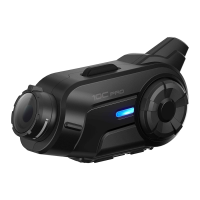
The Sena 10C Pro is a motorcycle Bluetooth® camera and communication system designed to enhance the riding experience by keeping users connected and allowing them to capture their journeys. This integrated device combines a Quad HD camera with a comprehensive communication system, offering a blend of entertainment, safety, and convenience for motorcyclists.

Function Description

The primary function of the Sena 10C Pro is to provide a seamless communication and recording solution for motorcycle riders. It integrates Bluetooth® capabilities, allowing riders to connect with their mobile phones, MP3 players, and GPS devices. The built-in Quad HD camera enables recording of rides, capturing high-quality video footage. The device also facilitates intercom conversations with other riders, enhancing group riding experiences. Advanced Noise Control™ technology ensures clear audio quality by minimizing wind and road noise during calls and intercom conversations.

Usage Features

The Sena 10C Pro offers a wide array of usage features, making it a versatile companion for any motorcycle journey:

  • Communication:

    • Bluetooth® Integrated: Allows for wireless connection to various devices, including smartphones for calls, music streaming, and GPS navigation.
    • Intercom System: Supports up to four-way intercom conversations, enabling riders to communicate with up to three other people over a range of up to 1.6 km (1.0 mile).
    • Mobile Phone Integration: Users can answer, reject, and end calls, as well as make calls using voice dialer. Call transfer while on the phone is also supported.
    • Audio Multitasking™: This feature allows for seamless blending of audio sources, such as intercom conversations and music, ensuring that users can hear both simultaneously without interruption.
    • Audio Source Priority: Users can set priorities for different audio sources, ensuring that important audio, like GPS directions or intercom calls, takes precedence.
  • Camera Functionality:

    • Quad HD Camera Integrated: Records video in high definition, capturing clear and detailed footage of rides.
    • Video Recording: Users can start and stop video recording with simple button presses.
    • Photo Capture: The device can also take still photos.
    • MicroSD Card Slot: Required for video recording, supporting cards up to 64GB and Class 10 or higher.
  • Audio and Entertainment:

    • Music Controls: Play, pause, track forward, and track backward music from connected devices.
    • FM Radio: Built-in FM radio allows riders to listen to their favorite stations, with options to turn the radio on/off and seek forward/backward.
    • Smart Audio Mix™: This feature allows users to mix audio from the intercom and music from their smartphone into the video recording, creating dynamic and engaging ride videos.
  • User Interface and Controls:

    • Unibody Design: The device features a streamlined unibody design for durability and ease of use.
    • Jog Dial and Buttons: Intuitive controls include a Jog Dial for volume adjustment and navigation, along with dedicated Camera and Phone buttons for specific functions.
    • Audible Prompts: The device provides audible prompts for various actions and status updates, such as "Battery level high/medium/low," "Camera on," "Recording," and "Intercom pairing."
    • Status LEDs: Visual LED indicators provide feedback on device status, such as battery level, pairing status, and recording status.
  • Configuration and Customization:

    • Headset Configuration Menu: Allows users to access and adjust various headset settings.
    • Camera Configuration Menu: Provides options to configure camera settings.
    • Sena Smartphone App: A dedicated smartphone app (available for Android and iOS) allows users to configure headset settings, manage recorded videos, see a live camera preview, and synchronize the camera's date and time with the smartphone.
    • Sena Device Manager: A desktop application (for PC and Apple computers) enables firmware upgrades and direct configuration of device settings.

Maintenance Features

While the manual primarily focuses on operational features, it touches upon aspects that contribute to the device's maintenance and longevity:

  • Firmware Upgrades: The Sena Device Manager allows users to update the product's firmware for free. This ensures that the device benefits from the latest advanced features and performance improvements, which is crucial for long-term functionality and compatibility.
  • MicroSD Card Management: The manual highlights the necessity of formatting the microSD card before using the camera and specifies compatible card types (up to 64GB, Class 10 or higher). Proper card management is essential for reliable video recording and data integrity.
  • Charging: The device includes a DC Power Charging & Firmware Upgrade Port, indicating that it is rechargeable. Regular charging is a fundamental maintenance aspect for any portable electronic device.
  • Troubleshooting: The manual provides basic troubleshooting steps, including Factory Reset and Fault Reset options. These features help users resolve common issues and restore the device to a functional state, although a Fault Reset will not restore factory default settings.
  • Customer Support: Sena encourages users to visit sena.com for support and to follow their social media channels for updates and helpful tips, indicating a commitment to ongoing product support.

The Sena 10C Pro is designed to be a robust and user-friendly system, integrating essential communication and recording capabilities into a single, motorcycle-specific device. Its comprehensive features aim to make every ride more connected, enjoyable, and memorable.

Sena 10C PRO Specifications

General IconGeneral
Field of View135 degrees
Aperturef/2.0
BluetoothBluetooth 4.1
Talk Time17 hours
Charging Time3.5 hours
Wi-FiYes
CategoryAction Camera
Video Resolution1440p: 30fps, 1080p: 60fps, 1080p: 30fps
Photo Resolution12 MP
Operating Temperature-10˚C - 55˚C (14°F - 131°F)
StorageMicroSD card
Resolution1080p
Frame Rate30 fps
WaterproofWater resistant
Battery LifeUp to 2 hours (camera mode)

Related product manuals