EasyManua.ls Logo

Sencor SLE 1955M4 - Page 23

Sencor SLE 1955M4
36 pages
Print Icon
To Next Page IconTo Next Page
To Previous Page IconTo Previous Page
Loading...
Basic
controls
A
Auto
Tuning
CADTV
Manual
Tuning
ATV
Manual
Tuning
i
Programme
Edit
<
CHANNEL
OESTE
RE
ES
Cl
Information
Software
Update(USB)
v
%
o
J)
O
E
ô
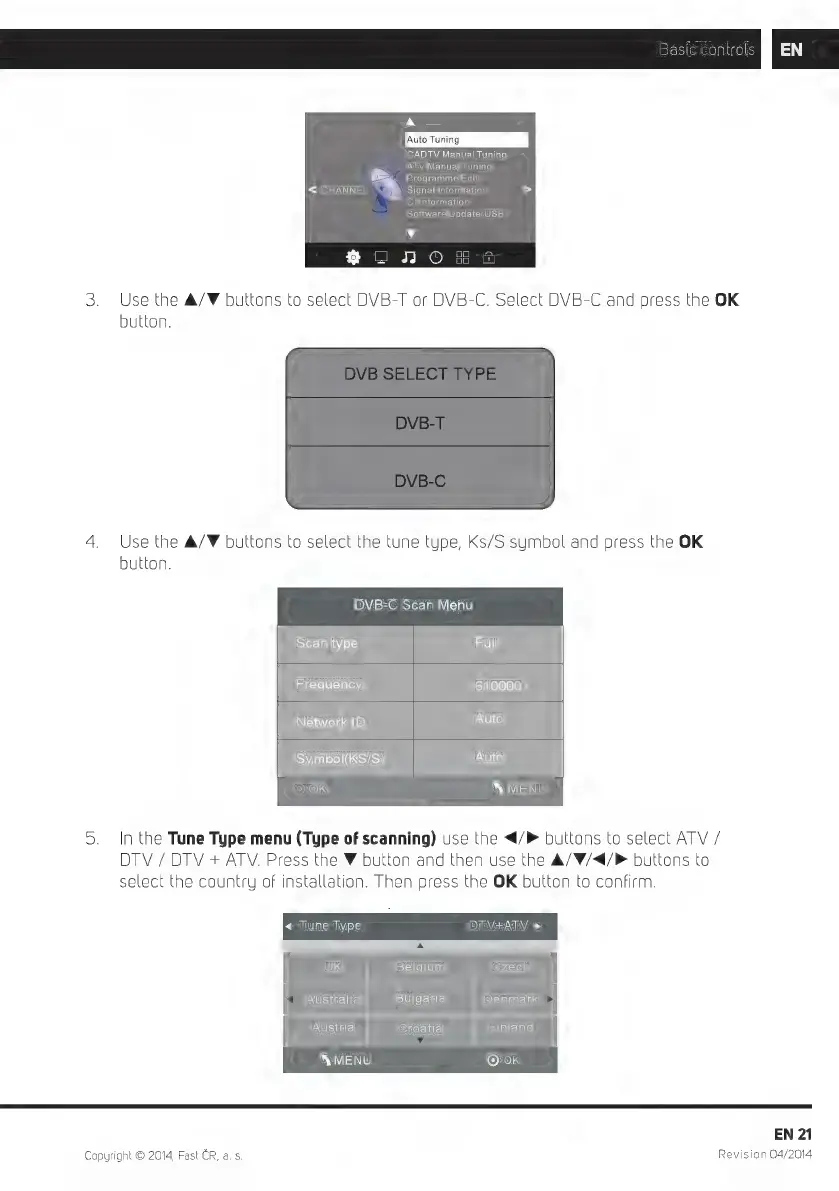
3.
Use
the
A/F
buttons
to
select
DVB-T
or
DVB-C.
Select
DVB-C
and
press
the
OK
button.
4.
Use
the
A/V
buttons
to
select
the
tune
type,
Ks/S
symbol
and
press
the
OK
button.
DVB-C
Scan
Menu
Scan
type
Full
Frequency
610000
Network
ID
Auto
Symbol(KS/S)
Auto
(OKOL
X
MENU
5.
In
the
Tune
Type
menu
(Type
of
scanning)
use
the
</>
buttons
to
select
ATV
/
DTV
/
DTV
+
ATV.
Press
the
V
button
and
then
use
the
A/V/4/P
buttons
to
select
the
country
of
installation.
Then
press
the
OK
button
to
confirm.
«
Tune
Type
DTV+ATV
>
|
UK
Belgium
Czech
Australia
Bulgaria
Denmark
Austria
Croatia
Finland
‘MENU
[Oel
EN
21
Copyright
O
2014,
Fast
CR,
a.
s.
Revision
04/2014

Related product manuals