EasyManua.ls Logo

Sencor SLE 1955M4 - Page 25

Sencor SLE 1955M4
36 pages
Print Icon
To Next Page IconTo Next Page
To Previous Page IconTo Previous Page
Loading...
Basic
controls
EN
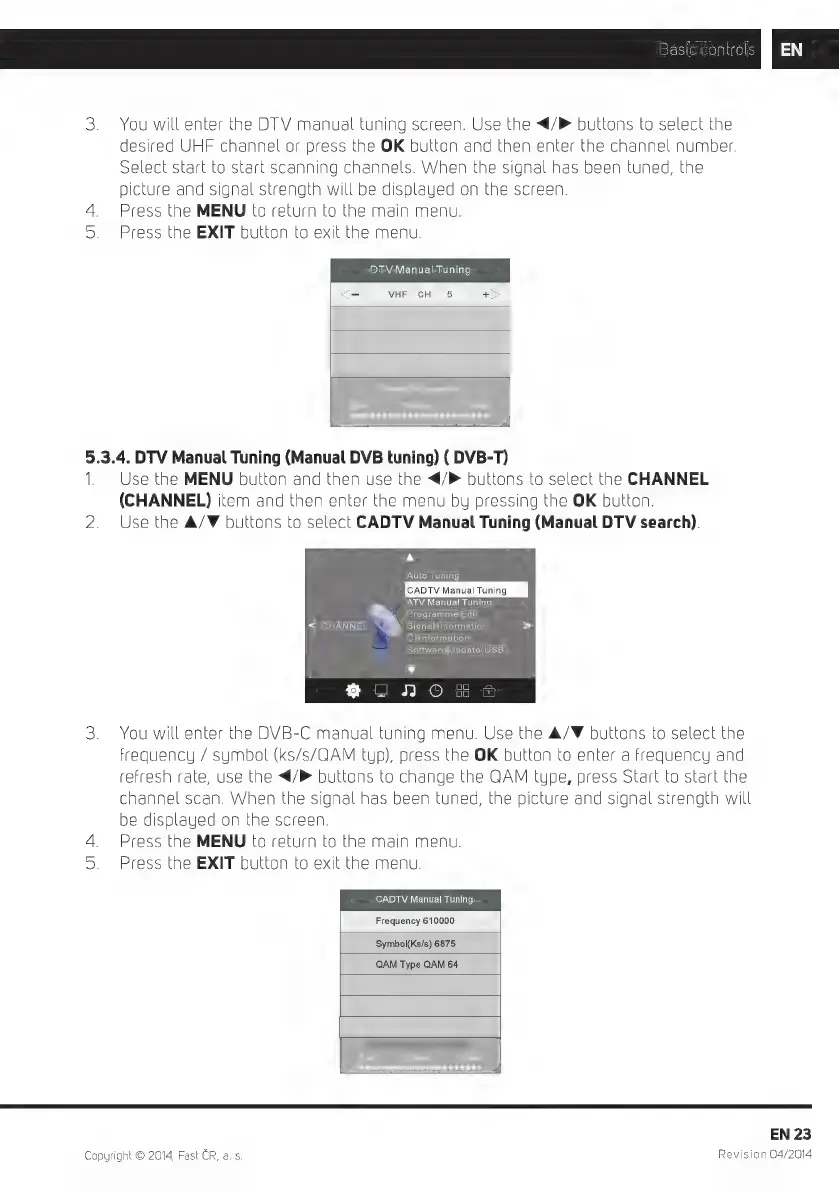
3.
You
will
enter
the
DTV
manual
tuning
screen.
Use
the
</>
buttons
to
select
the
desired
UHF
channel
or
press
the
OK
button
and
then
enter
the
channel number.
Select
start
to
start
scanning
channels.
When
the
signal
has
been
tuned,
the
picture
and
signal
strength
will
be
displayed
on
the
screen.
4.
Press
the
MENU
to
return
to
the
main
menu.
5.
Press
the
EXIT
button
to
exit
the
menu.
DTV
Manual
Tuning
<-
VHF
CH
5
+
5.3.4.
DTV
Manual
Tuning
(Manual
DVB
tuning)
(
DVB-T)
1.
Use
the
MENU
button
and
then
use
the
</>
buttons
to
select
the
CHANNEL
(CHANNEL)
item
and
then
enter
the
menu
by
pressing
the
OK
button.
2.
Use
the
A/F
buttons
to
select
CADTV
Manual
Tuning
(Manual
DTV
search).
A
Auto
Tuning
CADTV
Manual
Tuning
ATV
Manual
Tuning
a
Programme
Edit
<
CHANNEL
Ng
Signal
Information
>
'
Cl
Information
Software
Update(USB)
v
$%
o
J
OEA
3.
You
will
enter
the
DVB-C
manual
tuning
menu.
Use
the
A/W
buttons
to
select
the
frequency
/
symbol
(ks/s/GAM
tup),
press
the
OK
button
to
enter
a
frequency
and
refresh
rate,
use
the
</P
buttons
to
change
the
QAM
type,
press
Start
to
start
the
channel
scan.
When
the
signal
has
been
tuned,
the
picture
and
signal
strength
will
be
displayed
on
the
screen.
4.
Press
the
MENU
to
return
to
the
main
menu.
5.
Press
the
EXIT
button
to
exit
the
menu.
CADTV
Manual
Tuning
Frequency
610000
Symbol(Ks/s)
6875
QAM
Type
QAM
64
EN
23
Copyright
©
2014,
Fast
CR,
a. s.
Revision
04/2014

Related product manuals