EN - 3
REMOTE HANDSET
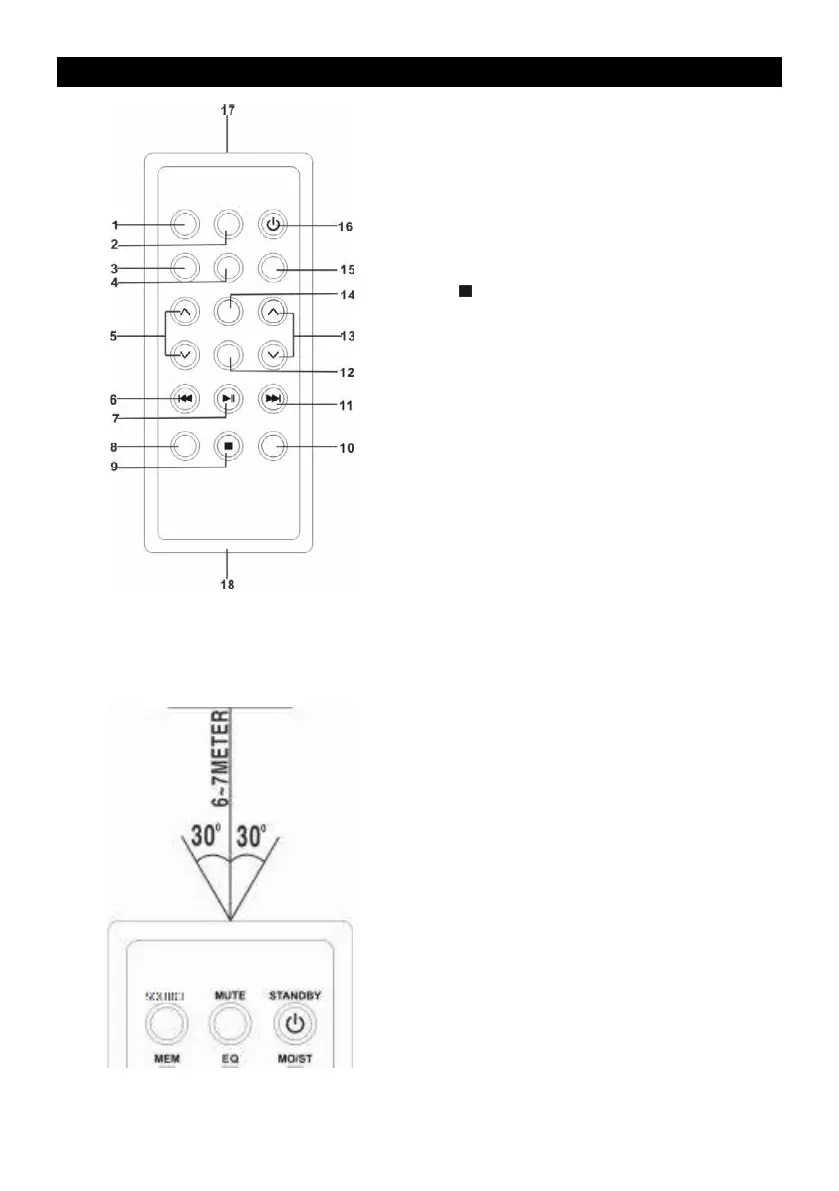
KEY FUNCTIONS:
1. SOURCE KEY
2. MUTE KEY
3. MEMORY KEY
4. EQ KEY
5. FOLD./10/M. UP/DOWN KEY
6. CD B-SKIP DOWN/TUN.- KEY
7. CD PLAY/PAUSE KEY
8. P-MODE KEY
9. KEY
10. PAIR KEY
11. CD F-SKIP UP/TUN.+ KEY
12. ID3 KEY
13. VOLUME UP/DOWN KEY
14. LIGHT KEY
15. MO/ST KEY
16. STANDBY KEY
17. REMOTE SENSER
18. BATTERY COMPARTMENT
NOTE: Please pull battery protector before using.
REMOTE CONTROL OPERATION
To operate the unit with the remote control, point
the remote handset at the remote sensor on the
front panel and press the appropriate button on
the remote handset.
Theremoteworksbestwithinarangeof
6–7 meters from the front panel and on an angle
of 30 degrees. Bright sunlight or room light
conditions can interfere with the remote control.
If the remote operation is unsatisfactory or stops
workingentirely,rsttryreplacingtheremote
batteries, then try reducing the room lighting
conditions.


 To Next Page