EasyManua.ls Logo

Sencor SRD 215 B - Product Overview and Controls; Volume Control; Playback and Station Navigation; Mode Selection

Sencor SRD 215 B
10 pages
Print Icon
To Next Page IconTo Next Page
To Previous Page IconTo Previous Page
Loading...
Description
of
the
product
Please
learn
about
your
radio
before
using
it.
©
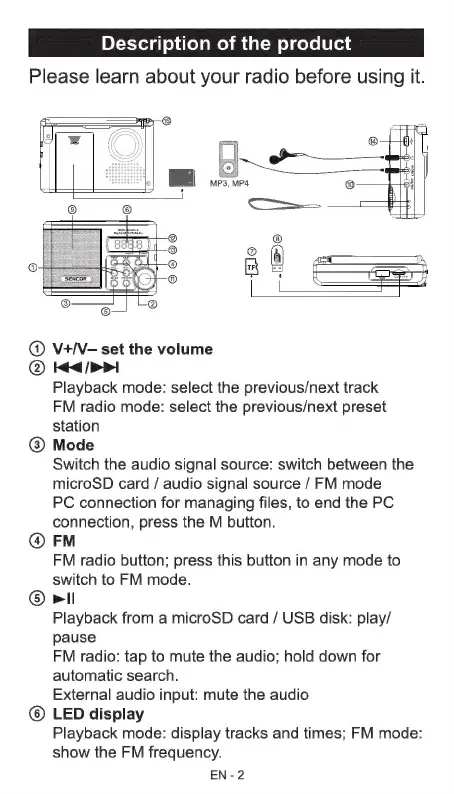
V+/V-
set
the
volume
©
Ke
>>I
Playback
mode:
select
the
previous/next
track
FM
radio
mode:
select
the
previous/next
preset
station
@
Mode
Switch
the
audio
signal
source:
switch
between
the
microSD
card
/
audio
signal
source
/
FM
mode
PC
connection
for
managing
files,
to
end
the
PC
connection,
press
the
M
button.
@
FM
FM
radio
button;
press
this
button
in
any
mode
to
switch
to
FM
mode.
©
Pil
Playback
from
a
microSD
card
/
USB
disk:
play/
pause
FM
radio:
tap
to
mute
the
audio;
hold
down
for
automatic
search.
External
audio
input:
mute
the
audio
©
LED
display
Playback
mode:
display
tracks
and
times;
FM
mode:
show
the
FM
frequency.
EN-2

Related product manuals