EasyManua.ls Logo

Sencor SRD 215 B - Troubleshooting Common Issues; Power and Media Playback Problems

Sencor SRD 215 B
10 pages
Print Icon
To Next Page IconTo Next Page
To Previous Page IconTo Previous Page
Loading...
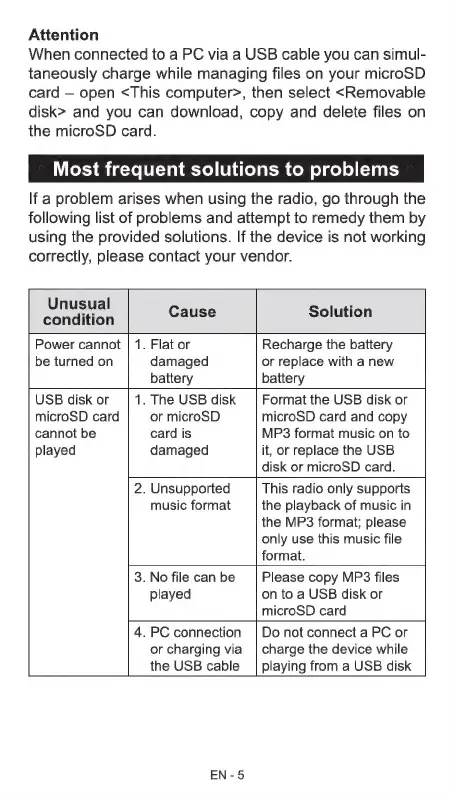
Attention
When
connected
to
a
PC
via
a
USB
cable
you
can
simul-
taneously
charge
while
managing
files
on
your
microSD
card
open
<This
computer>,
then
select
<Removable
disk>
and
you
can
download,
copy
and
delete
files
on
the
microSD
card.
Most
frequent
solutions
to
problems
If
a
problem
arises
when
using
the
radio,
go
through
the
following
list
of
problems
and
attempt
to
remedy
them
by
using
the
provided
solutions.
If
the
device
is
not
working
correctly,
please
contact
your
vendor.
music
format
Unusual
š
Onion
Cause
Solution
Power
cannot
|
1.
Flat
or
Recharge
the
battery
be
turned
on
damaged
or
replace
with
a
new
battery battery
USB
disk
or
.
The
USB
disk
Format
the
USB
disk
or
microSD
card
or
microSD microSD
card
and
copy
cannot
be
card
is
MP3
format
music
on
to
played
damaged
it,
or
replace
the
USB
disk
or
microSD
card.
.
Unsupported
This
radio
only
supports
the
playback
of
music
in
the
MP3
format;
please
only
use
this
music
file
format.
.
No
file
can
be
played
Please
copy
MP3
files
on
to
a
USB
disk
or
microSD
card
.
PC
connection
or
charging
via
the
USB
cable
Do
not
connect
a
PC
or
charge
the
device
while
playing
from
a
USB
disk
EN-5

Related product manuals