EasyManua.ls Logo

Sencor SRD 215 B - Headphone and Audio Issues; Radio Reception Problems

Sencor SRD 215 B
10 pages
Print Icon
To Next Page IconTo Next Page
To Previous Page IconTo Previous Page
Loading...
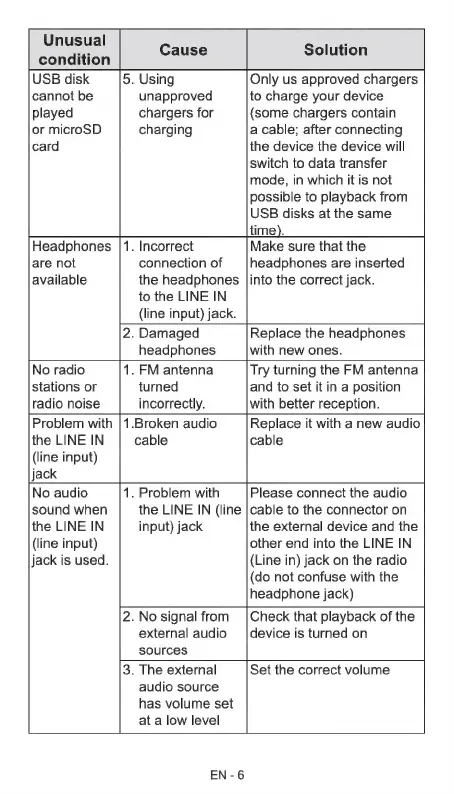
Unusual
on
Cause
Solution
condition
USB
disk
5.
Using
Only
us
approved
chargers
cannot
be
unapproved
to
charge
your
device
played
chargers
for
(some
chargers
contain
or
microSD
charging
a
cable;
after
connecting
card
the
device
the
device
will
switch
to
data
transfer
mode,
in
which
it
is
not
possible
to
playback
from
USB
disks
at
the
same
time).
Headphones
|1.
Incorrect
Make
sure
that
the
are
not
connection
of
headphones
are
inserted
available
the
headphones
|into
the
correct
jack.
to
the
LINE
IN
(line
input)
jack.
2.
Damaged
Replace
the
headphones
headphones
with
new
ones.
No
radio
1.
FM
antenna
Try
turning
the
FM
antenna
stations
or
turned
and
to
set
it
in
a
position
radio
noise
incorrectly.
with
better
reception.
Problem
with
|1.Broken
audio
Replace
it
with
a
new
audio
the
LINE
IN
cable cable
(line
input)
jack
No
audio
1.
Problem
with
Please
connect
the
audio
sound
when
the
LINE
IN
(line
|cable
to
the
connector
on
the
LINE
IN
input)
jack
the
external
device
and
the
(line
input)
other
end
into
the
LINE
IN
jack
is
used.
(Line
in)
jack
on
the
radio
(do
not
confuse
with
the
headphone
jack)
2.
No
signal
from
|Check
that
playback
of
the
external
audio
device
is
turned
on
sources
3.
The
external
Set
the
correct
volume
audio
source
has
volume
set
at
a
low
level
EN
-6