EasyManua.ls Logo

Sencor SWM 181 - Keys and Display; Basic Operations

Sencor SWM 181
8 pages
Print Icon
To Next Page IconTo Next Page
To Previous Page IconTo Previous Page
Loading...
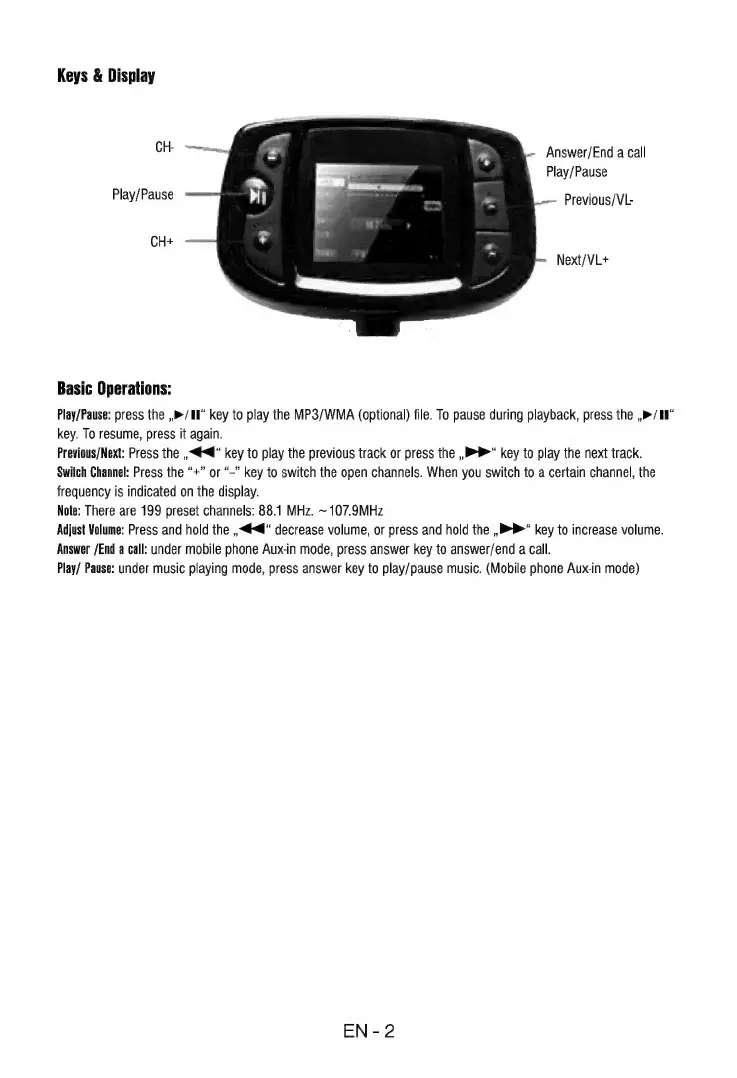
Keys
&
Display
CH
Answer/End
a
call
Play/Pause
Play/Pause
Previous/VL-
CH*
Next/VL+
Basic
Operations:
Play/Pause:
press
the
,»/W"
key
to
play
the
MP3/WMA
(optional)
file.
To
pause
during
playback,
press
the
,»/H
key.
To
resume,
press
it
again.
Previous/Next:
Press
the
„<€<“
key
to
play
the
previous
track
or
press
the
„BP“
key
to
play
the
next
track.
Switch
Channel:
Press
the
"*"
or
"-"
key
to
switch
the
open
channels.
When
you
switch
to
a
certain
channel,
the
frequency
is
indicated
on
the
display.
Note:
There
are
199
preset
channels:
88.1
MHz.
~
107.9MHz
Adjust
Volume:
Press
and
hold
the
„«@“
decrease
volume,
or
press
and
hold
the
„BP“
key
to
increase
volume.
Answer
/End
a
call:
under
mobile
phone
Aux-in
mode,
press
answer
key
to
answer/end
a
call.
Play/
Pause:
under
music
playing
mode,
press
answer
key
to
play/pause
music.
(Mobile
phone
Aux-in
mode)
EN-2

Related product manuals