EasyManua.ls Logo

Sencor SWM 181 - Remote Control Functions

Sencor SWM 181
8 pages
Print Icon
To Next Page IconTo Next Page
To Previous Page IconTo Previous Page
Loading...
Operations
on
the
Remote
Control
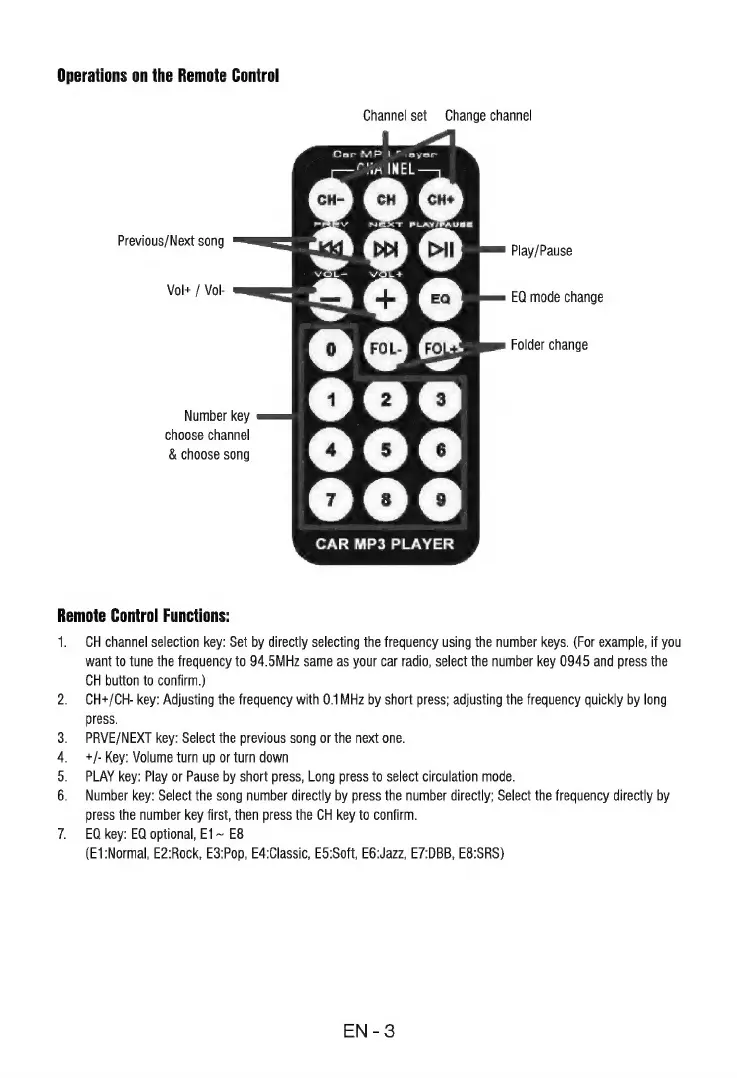
Channel
set
Change
channel
k
Car
MP
L^
ayer
CHA
INEL
0009000
Previous/Next
song
Play/Pause
Vol+
/
Vol-
EQ
mode
change
Folder
change
Number
key
choose
channel
&
choose
song
0000090
Remote
Control
Functions:
1;
Oar
ow
CH
channel
selection
key:
Set
by
directly
selecting
the
frequency
using
the
number
keys.
(For
example,
if
you
want
to
tune
the
frequency
to
94.5MHz
same
as
your
car
radio,
select
the
number
key
0945
and
press
the
CH
button
to
confirm.)
CH+/CH-
key:
Adjusting
the
frequency
with
0.1MHz
by
short
press;
adjusting
the
frequency
quickly
by
long
press.
PRVE/NEXT
key:
Select
the
previous
song
or
the
next
one.
+/-
Key:
Volume
turn
up
or
turn
down
PLAY
key:
Play
or
Pause
by
short
press,
Long
press
to
select
circulation
mode.
Number
key:
Select
the
song
number
directly
by
press
the
number
directly;
Select
the
frequency
directly
by
press
the
number
key
first,
then
press
the
CH
key
to
confirm.
EQ
key:
EQ
optional,
E1~
E8
(E1:Normal,
E2:Rock,
E3:Pop,
E4:Classic,
E5:Soft,
E6:Jazz,
E7:DBB,
E8:SRS)
EN-3

Related product manuals