EasyManua.ls Logo

Sencore TF151 - Regular Transistor Troubleshooting Chart

Default Icon
24 pages
Print Icon
To Next Page IconTo Next Page
To Previous Page IconTo Previous Page
Loading...
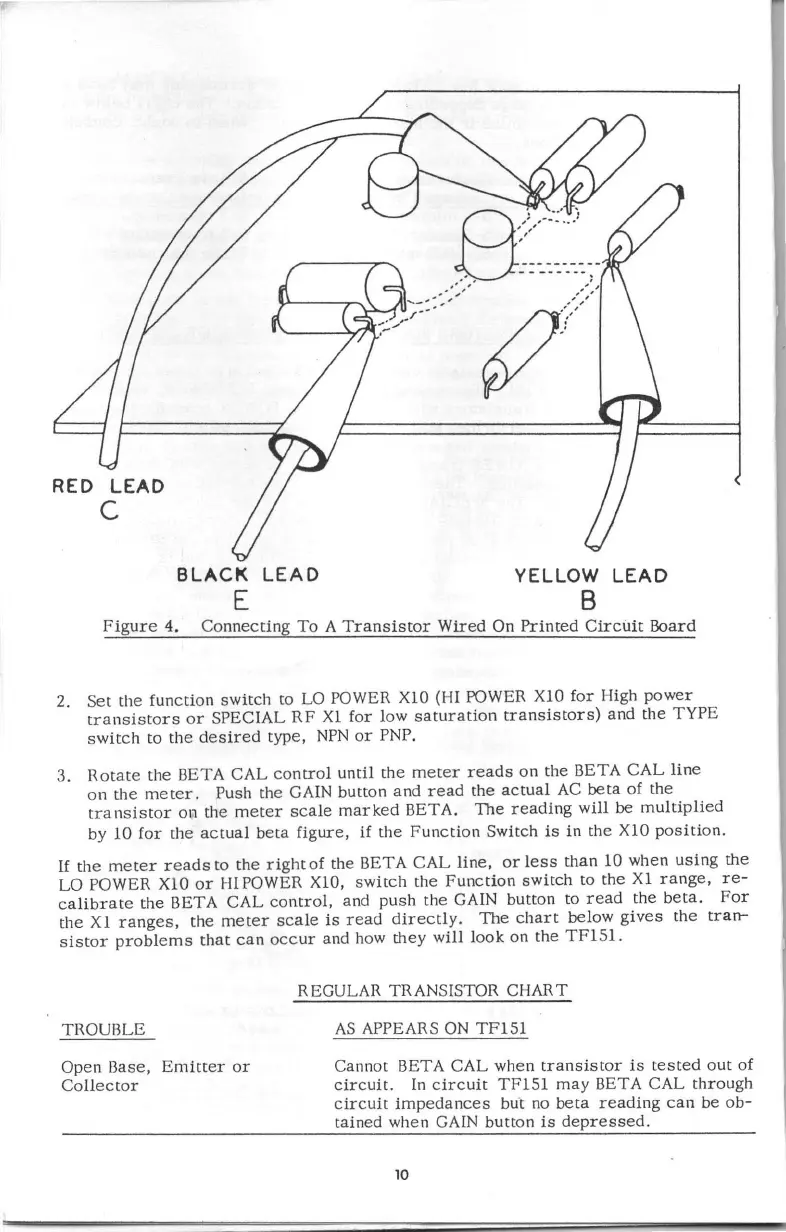
RED
LEAD
C
BLACK
LEAD
E
YELLOW
LEAD
B
Figure
4.
Connecting
To
A
Transistor
Wired
On
Printed
Circuit
&>ard
2.
Set
the function
switch
to
LO
POWER X10 (HI POWER X10
for
High
power
transistors
or
SPECIAL
RF
Xl
for
low
saturation
transistors)
and
the
TYPE
switch
to
the
desired
type,
NPN
or
PNP.
3.
Rotate
the BETA CAL
control
until
the
meter
reads
on
the BETA
CAL
line
on
the
meter.
Push the
GAIN
button
and
read
the
actual
AC
beta
of the
transistor
OIa
the
meter
scale
marked
BETA.
The
reading
will
be
multiplied
by 10
for
the
actual
beta
figure,
if the
Function
Switch
is
in the X10
position.
If
the
meter
reads
to the
right
of
the BETA
CAL
line,
or
less
than
10 when
using
the
LO POWER X10
or
HIPOWER X10,
switch
the
Function
switch
to the
Xl
range,
re-
calibrate
the
BETA
CAL
control,
and
push
the GAIN button to
read
the
beta.
For
the
Xl
ranges,
the
meter
scale
is
read
directly.
The
chart
below
gives
the
tran-
sistor
problems
that
can
occur
and how
they
will
look
on the
TF15l.
TROUBLE
Open
Base,
Emitter
or
Collector
REGULAR TRANSISTOR CHART
AS
APPEARS
ON
TF15l
Cannot BETA CAL
when
transistor
is
tested
out
of
circuit.
In
circuit
TF15l
may
BETA CAL
through
circuit
impedances
but
no
beta
reading
can
be
ob-
tained when GAIN
button
is
depressed.
10

Related product manuals