Doc. # DPB00006 2
Device Operating Manual
PT300D with SP300
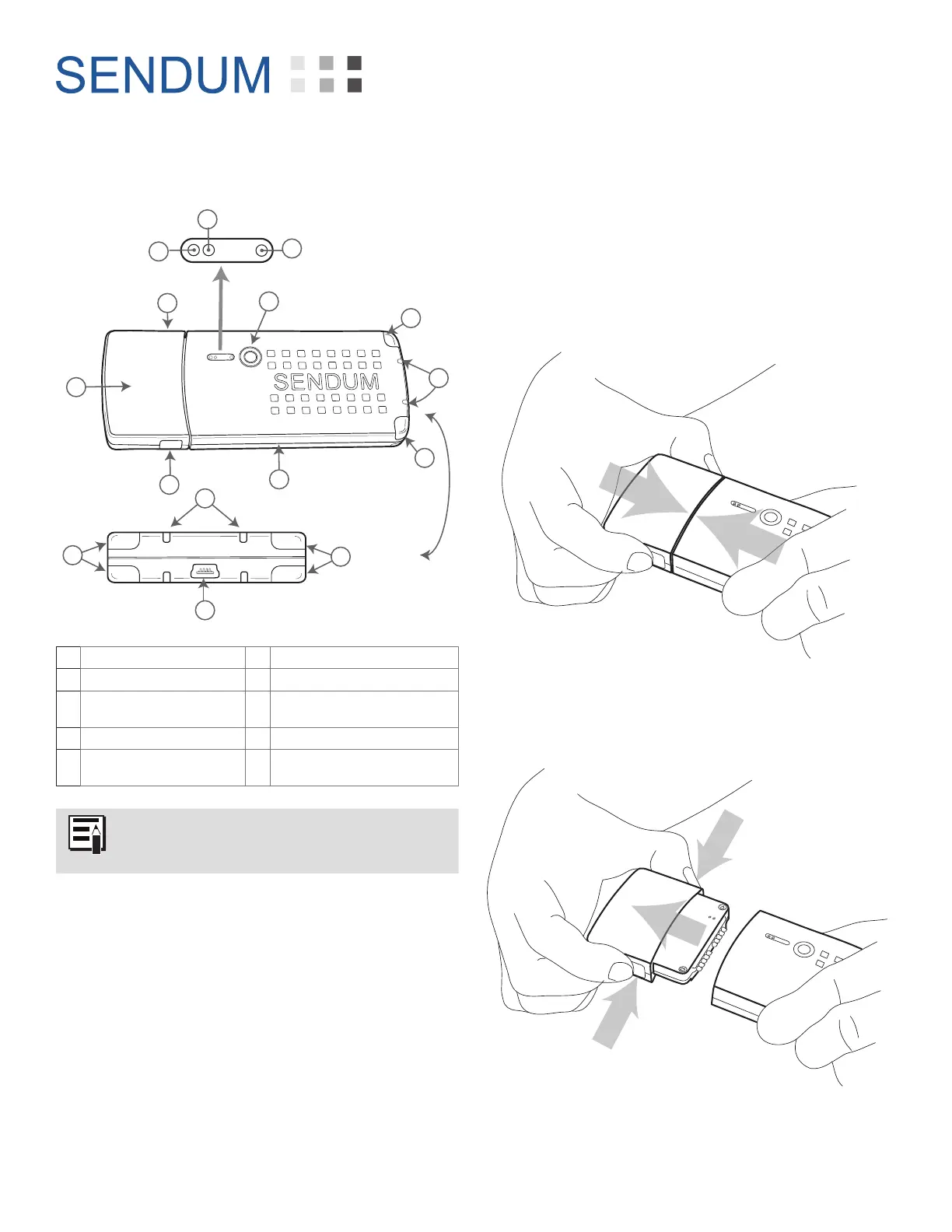
Diagram
B
C
B
C
D
J
C
C
E
G
H
I
F
A
End View
F
A PT300D Command Module F Atmospheric Vents for Sensors
B Module Release Buttons (2) G Network LED
C Light Detectors
(Ambient, Infrared)
H Battery LED
D SP300 Sensor Pack I Charger LED
E Status Button
(Touch-Sensitive)
J Mini-USB Connector
The SP300 Sensor Pack contains the
battery used to power the PT300D.
Connecting the Modules
The PT300D Command Module and SP300
Sensor Pack are designed to work together.
To connect them, simply slide the Sensor Pack
into the PT300D Command Module using the
guiding tabs until you hear a confirming “Click”
sound.
To remove the Command Module, squeeze the
two tabs on the side of the device, then pull the
module out of the Sensor Pack.


 To Next Page