EasyManua.ls Logo

Sengled Alexa - User Manual

Sengled Alexa
9 pages
Print Icon
To Next Page IconTo Next Page
Loading...
User Manual of Product 1:
Sengled Alexa Light Bulb, S1 Auto Pairing with Alexa Devices,
Color Changing Light Bulbs, Smart Light Bulbs that Work with
Alexa, Bluetooth Mesh Smart Home Lighting, E26 60W
Equivalent, 800LM, 4-Pack
User Manual of Product 2:
Sengled Alexa Light Bulb, BR30, S1 Auto Pairing with Alexa
Devices, Smart Flood Light Bulb that Work with Alexa,
Multicolor Dimmable, E26,RGBW Lights, 65W Equivalent
Recessed, No Hub Required, 2-Pack
Question and Answer IconNeed help?

Do you have a question about the Sengled Alexa and is the answer not in the manual?

Summary

Introduction

Important Safety Information

Wireless Specification

Installation Instructions

Mesh Network Setup

Describes how to set up a mesh network for multiple bulbs.

Reset Instructions

Operation

On; Off

Explains how to control the bulb's power state.

Dimming

Details how to adjust the brightness of the LED bulbs.

Tuning Whites

How to adjust the white color temperature of the bulbs.

Changing Colors

Guide to changing the bulb's color output.

Routine

Instructions for creating automated lighting routines.

Frequently Asked Questions

Limited Warranty

Support

Overview

This document provides user manuals for two products: Product 1, a Sengled Alexa Light Bulb (S1), and Product 2, a Sengled Alexa Light Bulb (BR30). Both products are smart LED bulbs designed to work with Amazon Echo devices using Bluetooth Mesh technology, offering an easy solution for voice and app-controllable smart lighting in your home.

Function Description:

Both Sengled Smart Bluetooth Mesh LED bulbs allow you to control your lights in multiple ways, including turning them on/off, dimming them, setting up routines, and activating an "Away mode." These functions are managed through the Alexa app on your smartphone or via simple voice commands directed at a compatible Amazon Echo device. The bulbs are designed for easy integration into a smart home ecosystem, leveraging Bluetooth Mesh for extended range and reliable connectivity.

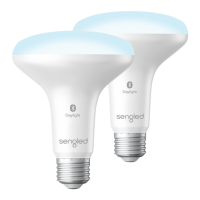
Product 1, the Sengled Alexa Light Bulb (S1), is a color-changing smart bulb with an E26 base, equivalent to a 60W incandescent bulb, providing 800 lumens of brightness. It comes in a 4-pack. Product 2, the Sengled Alexa Light Bulb (BR30), is a smart flood light bulb, also color-changing and dimmable, with an E26 base. It's equivalent to a 65W incandescent bulb and is designed for recessed lighting, offered in a 2-pack. Both products feature S1 Auto Pairing, which simplifies the setup process with Alexa devices. They do not require a separate hub, making them convenient for users looking for a straightforward smart lighting solution.

Usage Features:

Installation and Setup:

The installation process for both bulbs is designed to be user-friendly. Before adding a smart bulb, ensure your Amazon Alexa device is set up and has the latest software update. You can prompt an update by asking "Alexa, is my software up to date?"

  • Frustration-Free Setup: If you purchased the bulb from Amazon using the same account linked to your Alexa App and selected "Link to my Amazon account to simplify setup" during purchase, the bulb can be installed close to your compatible Alexa device and powered on. It should automatically join the Bluetooth network.
  • Traditional Setup: Alternatively, you can set up the bulb by asking "Alexa, discover devices." Once discovered and connected, you'll receive a notification from the Alexa app, and potentially a voice prompt from your Echo device if you have only one.

Mesh Network Setup:

For larger homes or multiple rooms, the Bluetooth Mesh Network setup extends the range of your smart lighting.

  1. Initially, set up the smart bulbs close to your Alexa device.
  2. After setup, switch off the bulb and move it further away from the Alexa device. Ensure it remains within Bluetooth range of another active Bluetooth bulb that is already connected to the network as a node. This creates a Bluetooth Mesh network, where each connected bulb communicates with other bulbs within its range, effectively extending the control area.

Operation Modes:

Once set up, the bulbs offer various operational modes:

  • On / Off: Control the bulbs manually via a wall switch, through the Alexa app, or using voice commands like "Alexa, turn on bulb 1" or "Alexa, turn off all lights."
  • Dimming: Adjust the brightness via the Alexa app or voice commands such as "Alexa, dim bulb 1 to 10%" or "Alexa, brighten bulb 1."
  • Tuning Whites: For bulbs with white light capabilities, adjust the white tones using the white palette in the Alexa app or through voice control.
  • Changing Colors: For color-changing bulbs, select from 16 million colors using the color palette in the Alexa app or voice control.
  • Routines: Create customized routines using the Alexa app to automate lighting behaviors based on time, events, or other smart home triggers.

Maintenance Features:

Reset Instructions:

If you need to reset a smart LED bulb, ensure it is on, then quickly turn it off and on at least 5 times. Using a light switch or power bar is recommended for this process. A successful reset is indicated by the bulb flashing three times. If it doesn't flash, you'll need to try again. After a successful reset, attempt to pair it with your Alexa app once more.

Important Safety Information:

To ensure safe operation and longevity of your Sengled Smart LED bulbs, follow these precautions:

  • Always turn off power before installing or removing the bulb.
  • Discontinue use if the bulb is damaged.
  • Do not attempt to disassemble the bulb, as there is a risk of electric shock.
  • These bulbs are not suitable for use with wall dimmers.
  • They are designed for operation in environments between -4°F and 104°F (-20°C and 40°C).
  • The bulbs are not intended for emergency lighting.
  • They are for indoor use only.

Support and Warranty:

Sengled provides a 3-year limited warranty from the original purchase date. Warranty service is restricted to the country where the device was originally sold by Sengled or an authorized retailer. For support, users can visit the Sengled website, send emails to dedicated support addresses for USA and Canada, or call the customer support line during specified hours.

Frequently Asked Questions:

  • Sengled Home App Compatibility: At this point, Sengled Smart Bluetooth bulbs only work with the Alexa app, not the Sengled Home app.
  • Direct Smartphone Connection: The Smart LED bulb must be connected to a compatible Alexa device, not directly to a smartphone via Bluetooth, to be controlled by the Alexa app.

Sengled Alexa Specifications

General IconGeneral
ConnectivityWi-Fi
ControlVoice, App
Voice AssistantAmazon Alexa
Brightness800 lumens
Energy Usage9W
Life Span25, 000 hours
DimmableYes
Requires HubNo
CompatibilityAmazon Alexa
TypeSmart Light Bulb
Color Temperature2000-6500K
App ControlSengled Home App
ColorMulticolor

Videos

How To Connect Sengled To Alexa

How to Link Your Sengled Products to Alexa

How To Fix Sengled Bulbs Not Connecting To Alexa

Related product manuals