13WWW.SENIXTOOLS.COM
MAINTENANCE
CHANGING THE OIL
Change the oil while the engine is still warm. The oil will
ow freely and carry away more impurities.
1. Clean the area around the oil ll plug (Fig. 9) to prevent
debris from entering the oil ll hole.
2. Unscrew the oil ll plug.
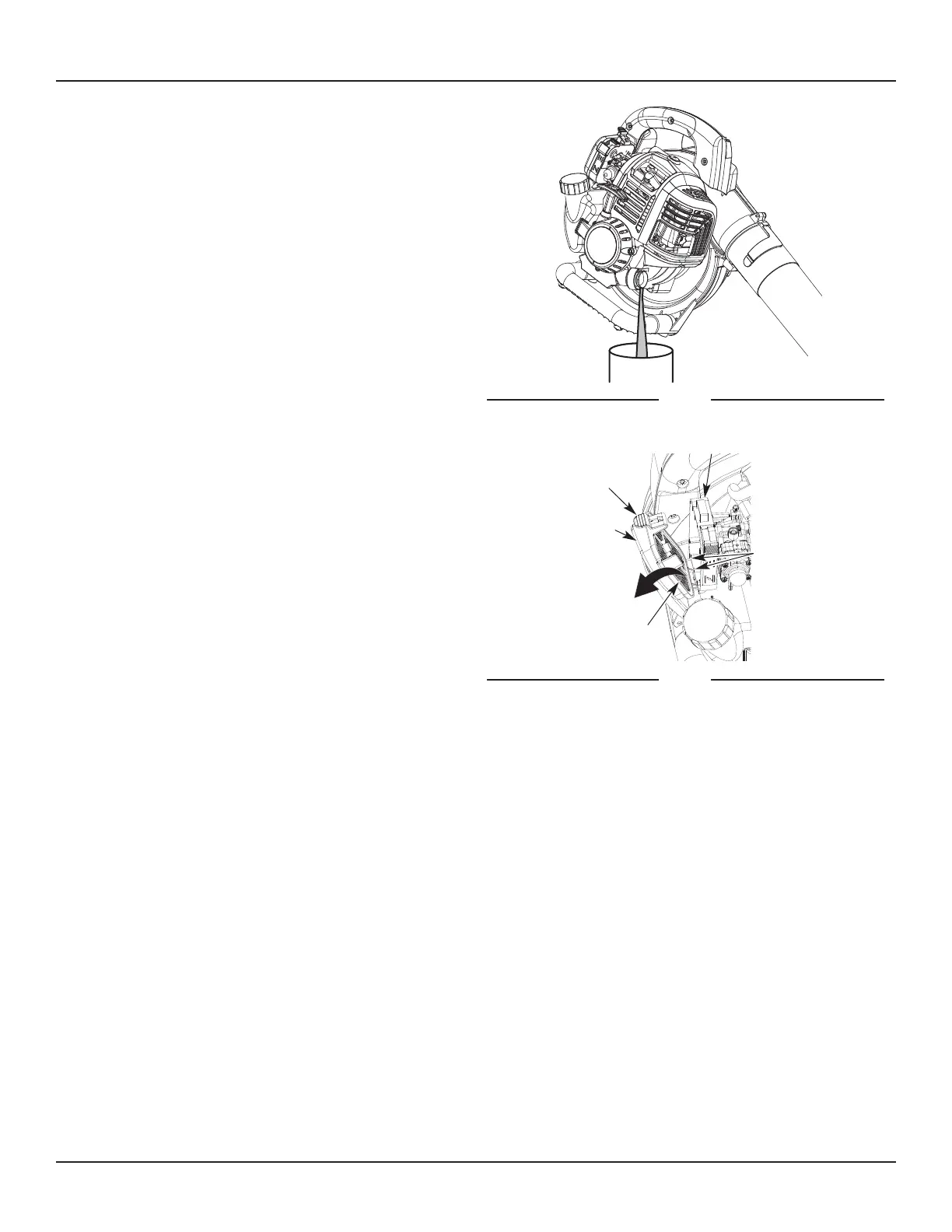
3. Tip the unit vertically to pour the oil out of the oil ll
hole and into a container (Fig. 11). Allow ample time for
complete drainage.
Note: Dispose of the old oil according to federal, state and
local regulations.
4. Wipe up any oil that may have spilled.
5. Pour 2.03 .oz. (60 ml) of SAE 30 oil into the oil ll hole.
Note: DO NOT overll. Refer to Checking the Oil Level.
6. Wipe up any oil that may have spilled.
7. Reinstall the oil ll plug.
Note: Make sure the O-ring is in place on the oil ll plug
(Fig. 9).
MAINTAINING THE AIR FILTER
Failure to maintain the air lter can result in poor
performance or can cause permanent damage to
the engine. Engine failure due to improper air lter
maintenance is not covered by the product warranty.
Cleaning the Air Filter
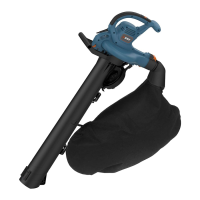
1. Open the air lter cover: press in the lock tab and swing
the air lter cover to the right (Fig. 12).
2. Remove the air lter (Fig. 12).
3. Wash the air lter in detergent and water. Rinse the air
lter thoroughly and allow it to dry.
4. Lightly coat the air lter with clean SAE 30 oil.
5. Squeeze the air lter to spread and remove excess oil.
6. Reinstall the air lter (Fig. 12).
Note: Operating the unit without the air lter and air lter
cover will VOID the warranty.
7. Close the air lter cover: insert the tabs on the air lter
cover into the slots on the backplate. Swing the air lter
cover to the left and press it closed until the lock tab
snaps into place
(Fig. 12).
Fig. 11
Air Filter
Air Filter Cover
Lock Tab
Tabs/Slots
Backplate
Fig. 12


 To Next Page