22 | All-Day Clear Slim All-Day Clear Slim | 23
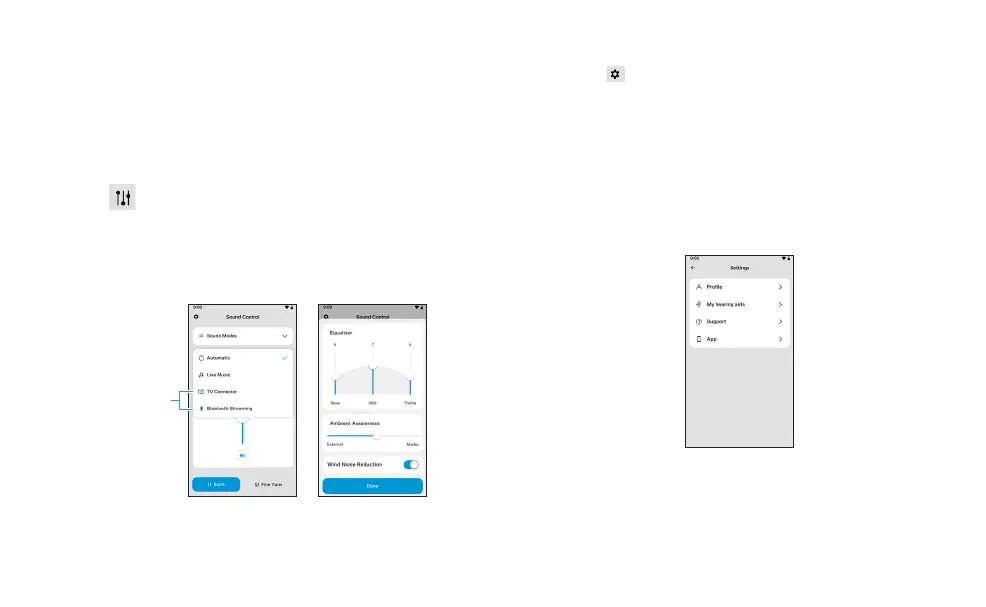
Sound mode selection
Tap the arrow beside the current sound mode
to see all available sound modes designed for
different environments. Select the desired
sound mode.
Advanced fine tuning
Tap the icon on the bottom right corner to
access equalizer and wind noise reduction.
When streaming audio or connected to a
TV Connector, balance adjustments can be
made.
Will appear when
connected to a
TV Connector or
streaming audio
Settings menu
Tap the icon on the top left side of the main
screen to access the settings menu.
You will find:
• General account information
• Hearing aid settings including sound profile
information and hearing aid usage data
• Links to support materials and the ability to
provide feedback online














 To Next Page