EN Putting the Flex 5000 into operation
8|Flex 5000
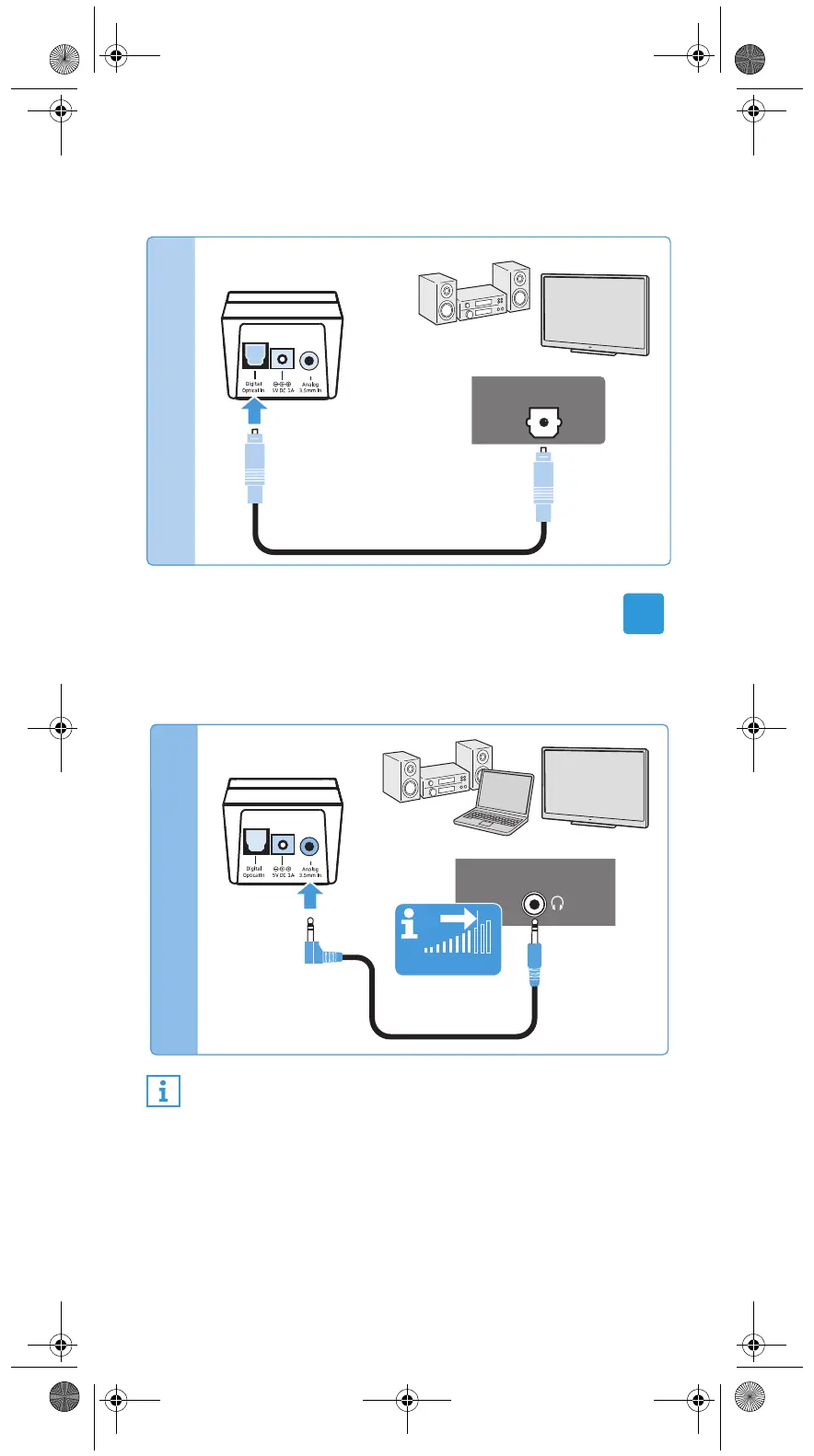
왘 Connect the optical digital cable to the pink Digital Optical
In digital audio input of the transmitter and to the optical
output of your audio source.
Connection possibility B: 3.5 mm jack socket (analog)
왘 Connect the stereo audio cable to the blue Analog
3.5 mm In audio input (3.5 mm jack socket) of the trans-
mitter and to the 3.5 mm headphone socket of your audio
source.
If the headphones socket on your audio source is a 6.3 mm/
¼“ jack socket, you require an adapter (3.5 mm jack plug to
6.3 mm/¼“ jack plug, optional accessory) for the supplied 3.5
mm stereo audio cable.
Adjust the volume of the headphone socket on your TV/
audio source to at least a medium level.
This improves the quality of wireless audio transmis-
sion. For detailed information, please refer to the
instruction manual of your TV/audio source.
OPTICAL OUT
Digital Audio
B
PHONES
TV VOLUME
Analog Audio
Flex_5000_570735_0117_PRT.book Seite 8 Montag, 10. Oktober 2016 3:58 15









 To Next Page