SL Ceiling Mic Connection Guide | 3/5
Connecting the SL Ceiling Mic to the TeamConnect system
Connecting the SL Ceiling Mic to the
TeamConnect system
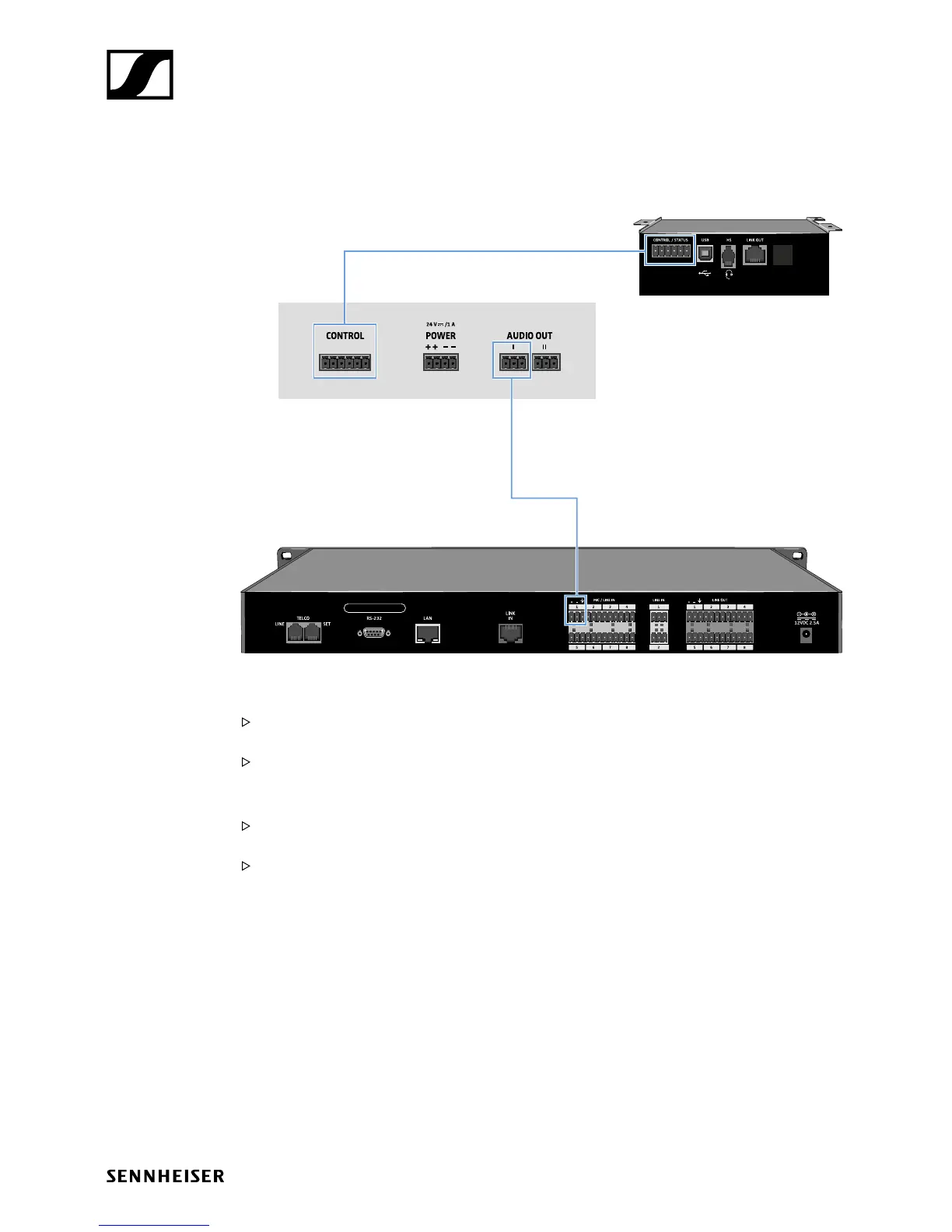
SL TeamConnect CU1
SL TeamConnect CB1
SL Ceiling Mic
To connect the SL Ceiling Mic to the TeamConnect system:
Audio signal:
Connect the angled 3-pin connector of the audio cable to the AUDIO I or the AUDIO II terminal of
the SL Ceiling Mic.
Connect the second 3-pin connector of the audio cable to one of the eight microphone inputs
MIC / LINE IN of the SL TeamConnect CU1.
Control signal:
Connect the angled 6-pin connector of the control cable to the CONTROL terminal of the
SL Ceiling Mic.
Connect the second 6-pin connector of the control cable to the CONTROL / STATUS terminal of
the SL TeamConnect CB1.








 To Next Page