92
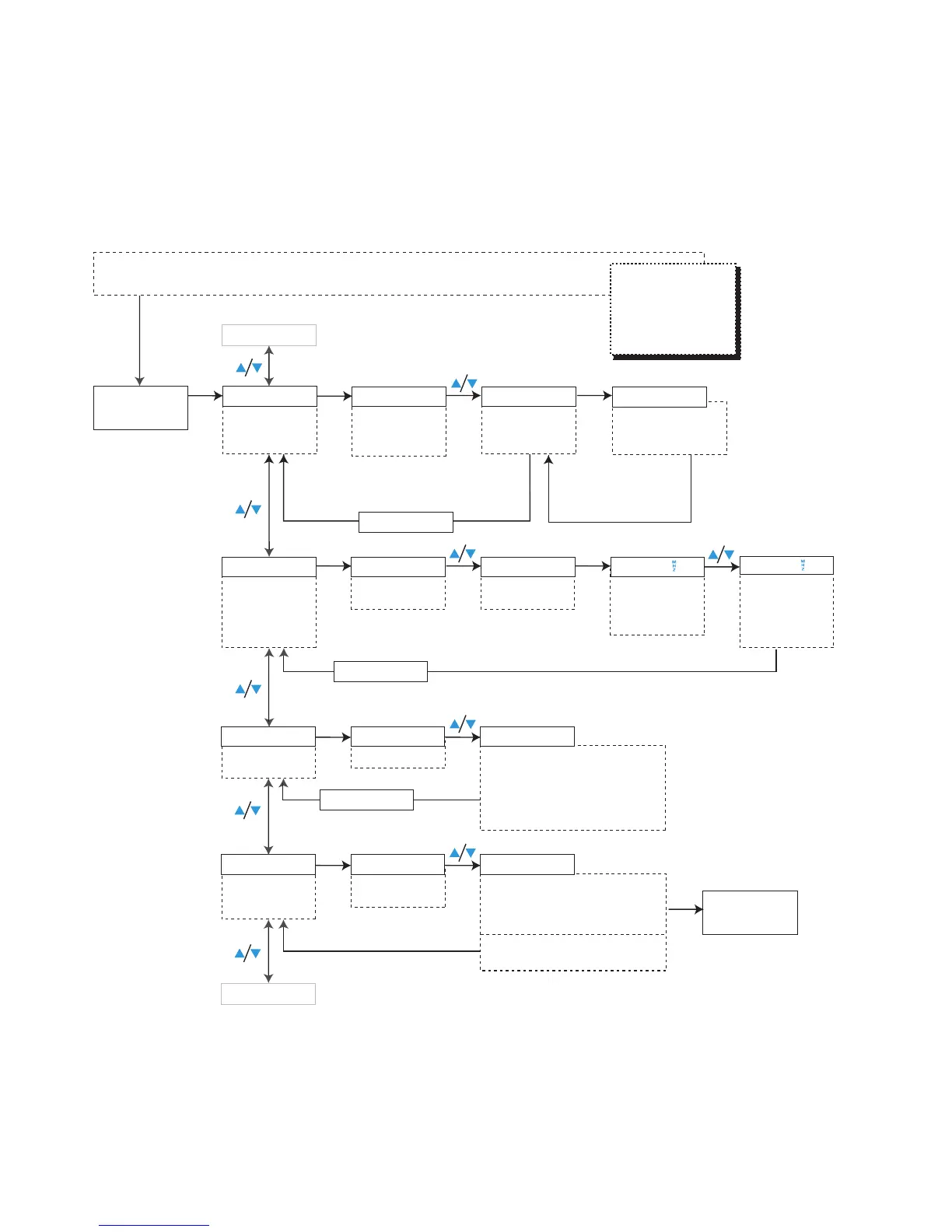
Structure of the configuration menu of the SK 2015 transmitter
Setting a
frequency for a
selected channel
in the channel
bank "U"
Current channel
/
:
U.01...20 Current
frequency of the
selected
channel
ACCESS
TUNE U.01 U.04
SETUP
Releasing
channels for the
user
744.500
SET
SET SET
SET
Transmitter must be switched off.
Simultaneously press SET+ON/OFF and keep both buttons pressed for 5 seconds
744.650
STORED
/
:
Transmittion
frequency tunable
in steps of 25 kHz
SET: Stores the
setting
RESET
ON/OFF
Cancels your entry
on all levels of the
operating menu
Displays
channels that
can be released
1.01 5.20
SET
/
:
U.01...20,
1.01...8.20,
ERASE
SET
Channel released:
"ACCESS" is
displayed briefly
Press SET
for 1
STORED
The selected channels are released
ACCESS
The next channel that
can be released is
displayed
Current name
/
:
Enter a name (6 characters)
Letters w/o pronounciation marks,
numbers from 0...9, special
characters, spaces
SET: 5 x next character, then store
the setting
Assigning a
name
Loading the
factory-preset
default settings
NAME
RESET
SK 2015 PETE15
/
:
OK
SET: Unit loads factory-preset
default settings, unit is restarted,
"SETUP" display appears
/
:
NO
SET: Reset is cancelled
RST. OK
SET
Confirmation
RST. NO
SET
SET
STORED
SET
ACCESS
SETUP
SET


 To Next Page