B. Digital music player with remote controller
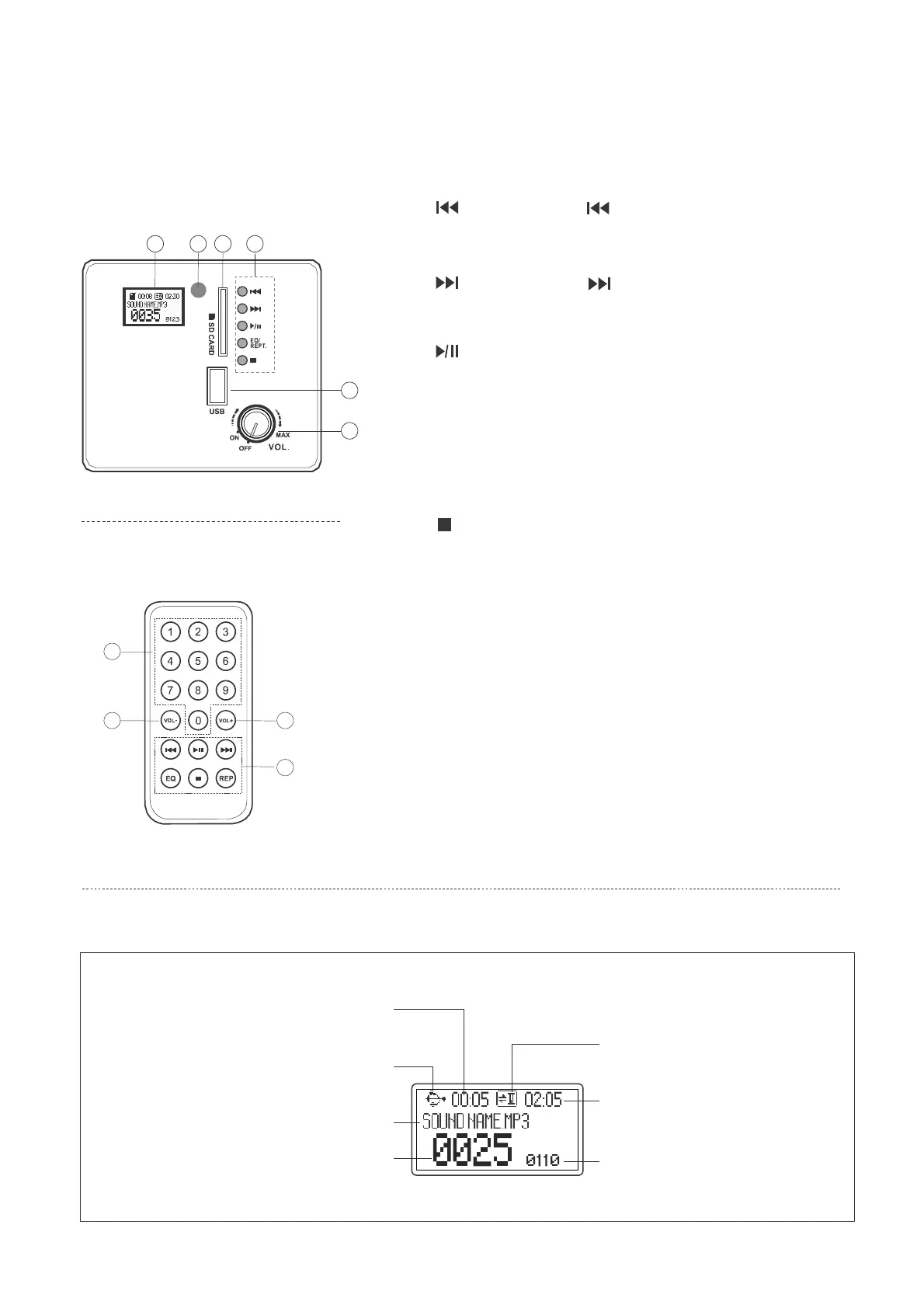
Digital music player
1. Displayer: Indicating with "play" information.
2.
Backward: Press to go back to previous
music; with long press over two seconds to
adjust a volume for line out jack of earphone.
1 3 4 2
Forward: Press to go to next music; with
long press over two seconds to adjust a volume
for line out jack of earphone.
Play/Pause: with play/pause function.
EQ/REPT. : Press to select:
normal→pop→rock
→jazz→classic→country
equalizer mode.
5
6
REP: Press to repeat :
off→ single→ one→ folder→ all→
random
Stop: Press stop key to terminate the current
function.
Remote controller (optional)
3. Infrared receiver.
4. SD card port.
5. USB port.
6. Volume control: Main knob: turn it from right to
volume, to reduce volume by turn it reverse
Remote control: press key [ VOL - ]/[ Vol +], LCD
display "VOLxx", the "xx" indicating volume size.
7
6 6
7. Numbers: selecting music, press number 2, the
LCD shows "0002", press it one more time then
playing begin with "0002". If it is enter with a
number out of selection then it will remain to play
with the same music of current track number.
2
The explanations of display
play status
numbe
6
total played time for
the current track
current device
track length
current track
sequence track
total track number


 To Next Page