www.sensirion.com Version 2 – March 2019 – D1 1/3
Handling Guideline
For the SCD30 CO
2
, humidity and temperature sensor
Mechanical Handling
Never touch or apply force on the optical cell. Only handle the sensor by touching the PCB. The sensor should always be
handled with clean gloves in a clean environment to keep the sensor away from contaminant like dust, dirt or grease.
ESD Precautions
The SCD30 is an ESD sensitive product and must be prevented from electrostatic discharge events at all times. Thus,
operators must always use proper ESD equipment when handling the sensor. Furthermore, the SCD30 sensor module
must only be touched on the long side of the PCB to avoid contact with the metallized parts of the optical cavity.
Introduction
The SCD30 CO
2
, humidity and temperature sensor
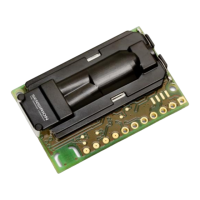
consists of a PCB with discrete electric components and
an optical cell: The RH/T sensor is soldered on the PCB,
CO
2
concentration is measured in an optical cell in a
dual-channel configuration.
Force applied on the optical cell and ESD events might
impact the sensor accuracy and functionality. This
application note explains how to handle the SCD30
properly to guarantee optimal sensing performance and
to avoid sensor damage.


 To Next Page