© Sensortech Systems, Inc. 2016 Page 14 of 16 Rev.7-2016
ST-2200 System Power-up:
Please verify the following before applying power to the ST-2200 Processor:
1. Securely tighten the black Amphenol connector located on the side of the Sensor.
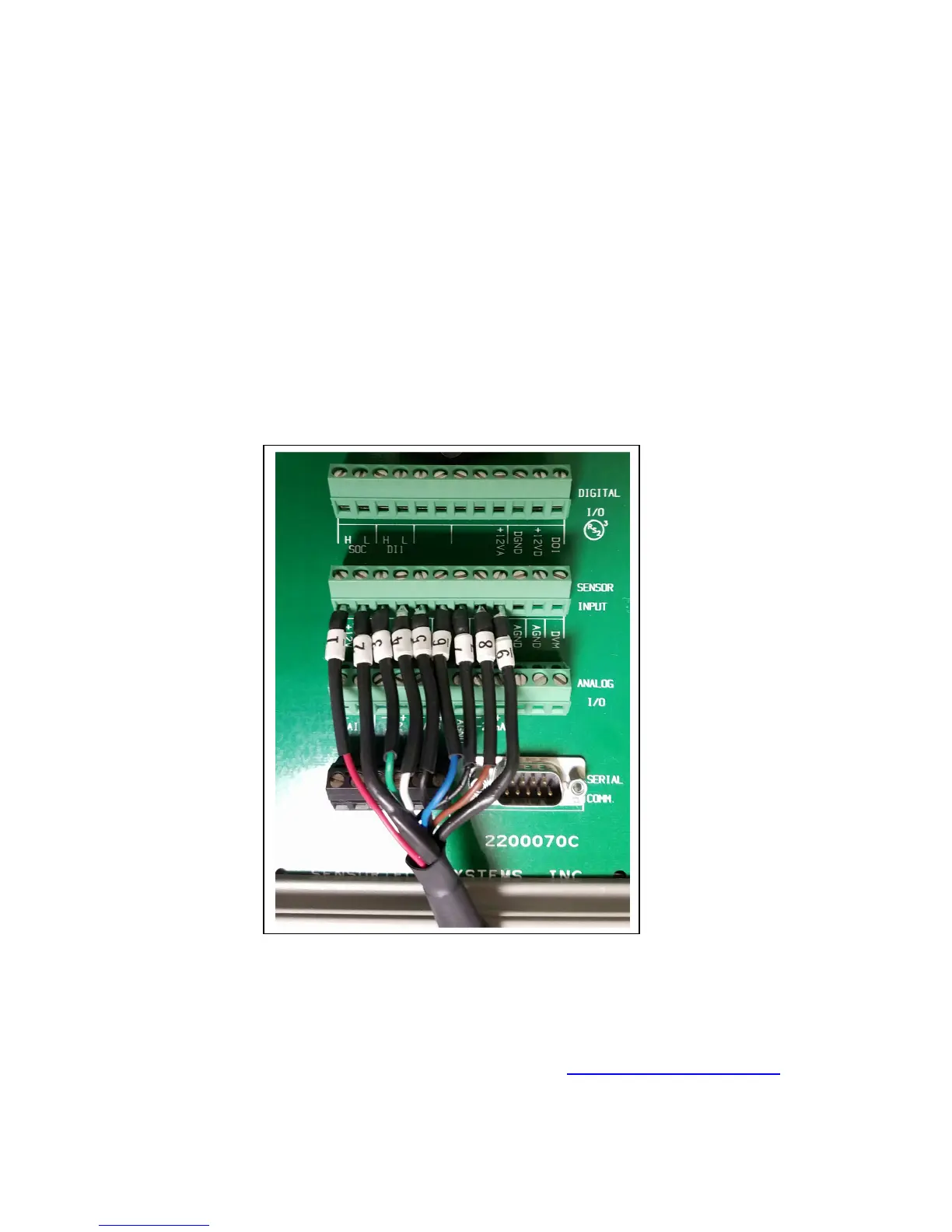
2. Ensure the nine wires on the Processor Cable from the Sensor Electronics Unit are
wired into the terminal block labeled SENSOR INPUT on the rear of the Processor. The
wires are labeled 1 thru 9, and should be installed in sequential order, starting with wire
labeled #1 on the left side terminal block connector labeled +12V. Continue installing
each wire in number sequence ending with wire labeled #9 on the right terminal block
connector labeled AIO- (see Figure 9).
3. Ensure the Processor and Sensor are moisture free and the ambient temperature
environment is between 0°C to +50°C.
Note: Do not over tighten the terminal block screws.
For additional technical support, email us at
support@sensortech.com
or call 805-981-3735 M-F between 8AM-4:30PM Pacific Standard Time
. Processor Unit Rear Panel Connections


 To Next Page
 Loading...