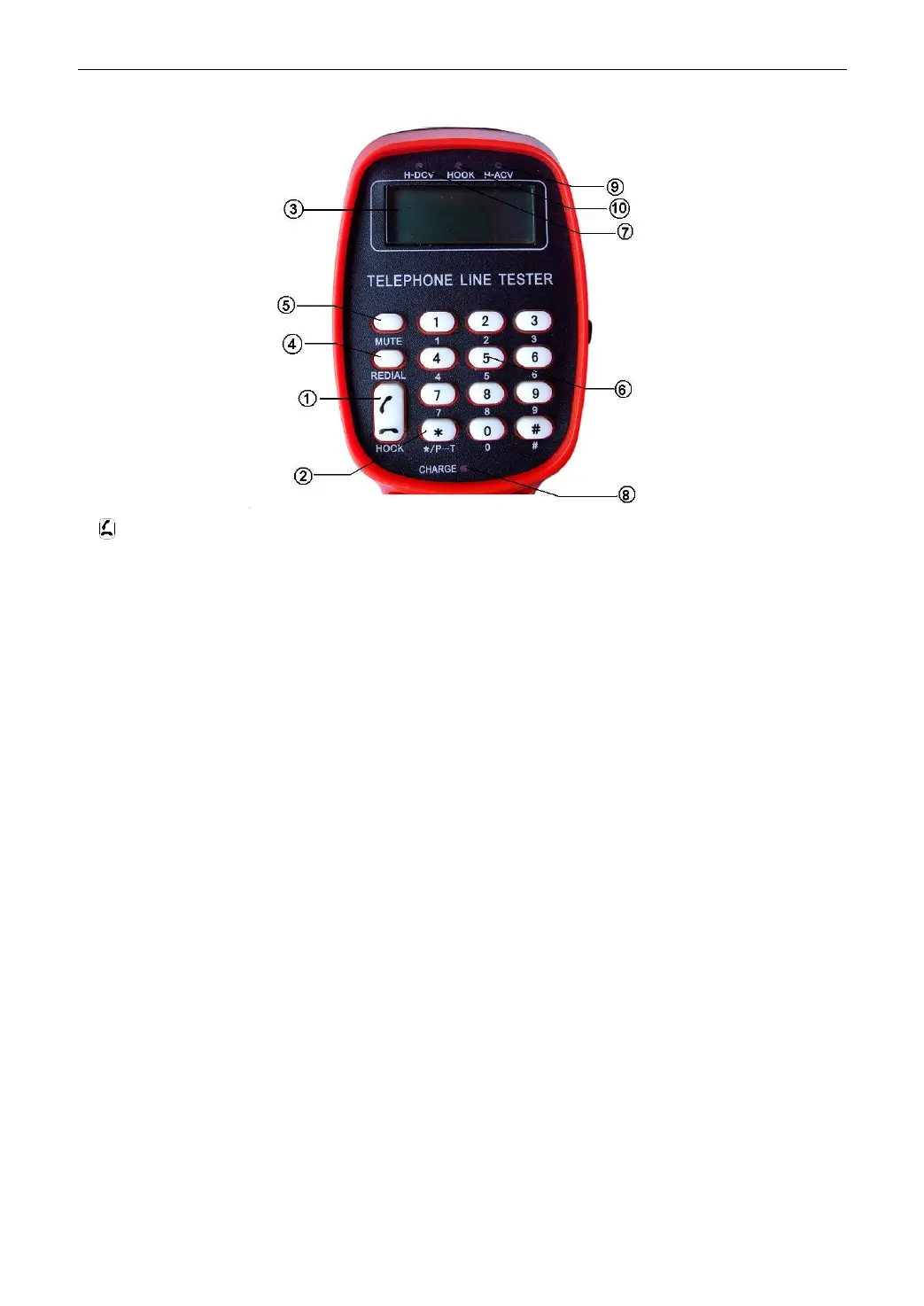
2.2 Front faceplate
① ---HOOK
②*/P…T—“*” and P/T
③LCD—Display telephone number and test result
④REDIAL
⑤MUTE
⑥Dial key—1……9,*, #
⑦on line H-DCV LED indicator— If there is high DC voltage(70V<voltage<250V)on the line,
the indicator will be lighted.
⑧Charger LED—this light will be on when the tester is charging
⑨H-ACV LED indicator— If there is high AV voltage on the line, the H-ACV indicator will be
lighted.
⑩Talk indicator light—this light will be bright when talking.
2.3 Tester faceplate
① Phone/Tester
Press it to enter test status; loose it to enter telephone status.
② Talk
Press it and cooperate with key ① to talk; then cooperate with the key ③ to call user.
③Call MΩ
Press it after press ① key to test line insulation; press it after press ① and ② to call user.
④Mon
Press it in telephone status and it will be in monitor status; press it after press key ① and it
will be in AC voltage test status.


 To Next Page