Rev B Doc. 6001072 Page 15 of 28
2. LINE INTERFACE BOARD (LIB) HOUSINGS
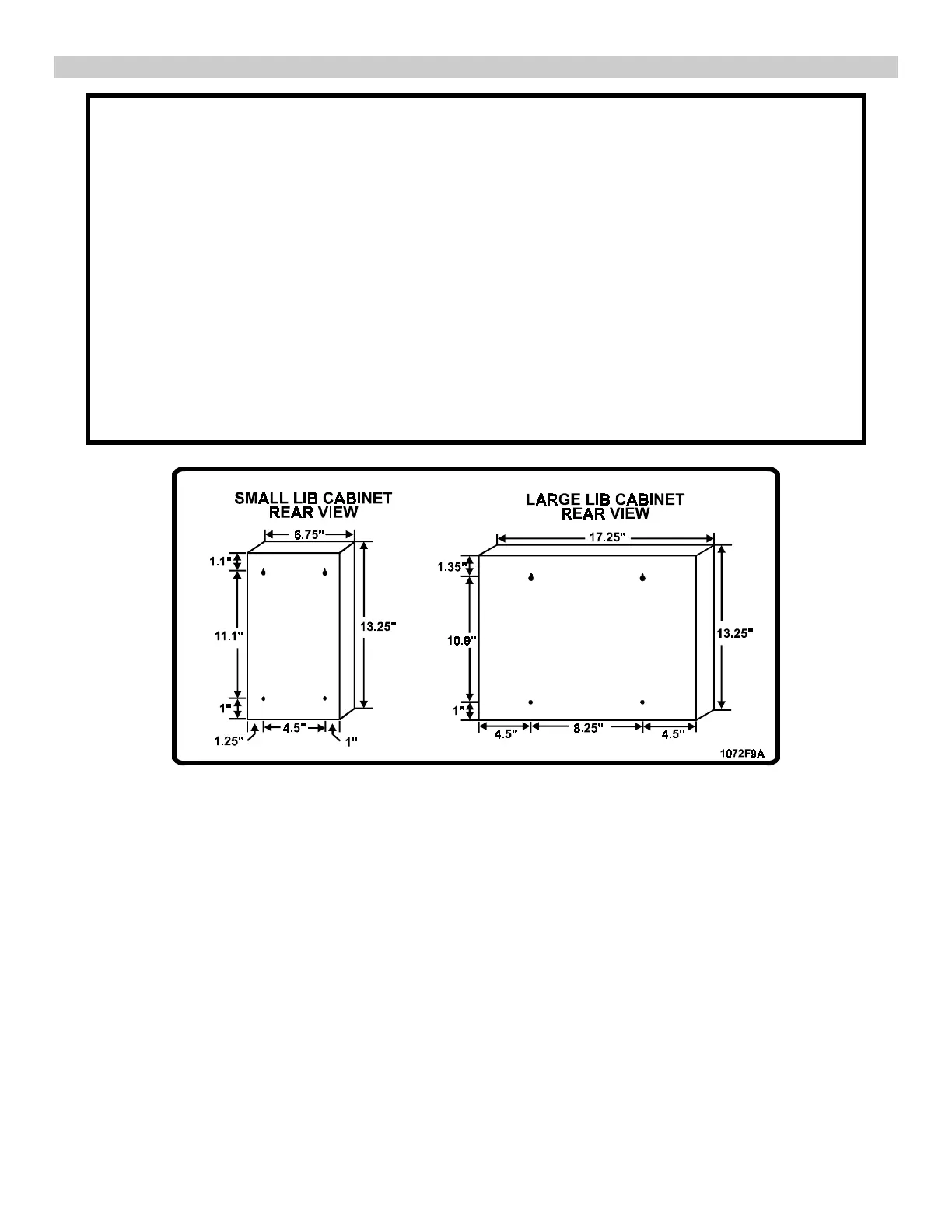
• Mount the LIB housings as close as possible to the RJ71C jacks to simplify installation.
• Fifteen foot connector-end cables are available from Sentex.
• Longer connector-end cables may be special-ordered from Sentex.
1. Remove the LIB circuit boards from their housing(s).
Note: Each LIB is held in place by its own grounding screw at the top of the housing.
2. Mount the LIB housing(s) on the wall:
a) Install the two top screws/bolts in the wall, leaving them loose.
b) Hang the cabinet on the installed screws-bolts.
c) Install the bottom screws/bolts in the bottom openings.
d) Tighten all four screws/bolts.
3. Ground the housing to a suitable earth ground using the ground connection located on the
upper right side of the LIB housing.
4. Set the LIB addresses as described in Part 7.
5. Reinstall the LIBs and secure with grounding screws.
Figure 10. Mounting LIB Cabinets.



 To Next Page